2.Disassembly
Upgrading the Optical Device
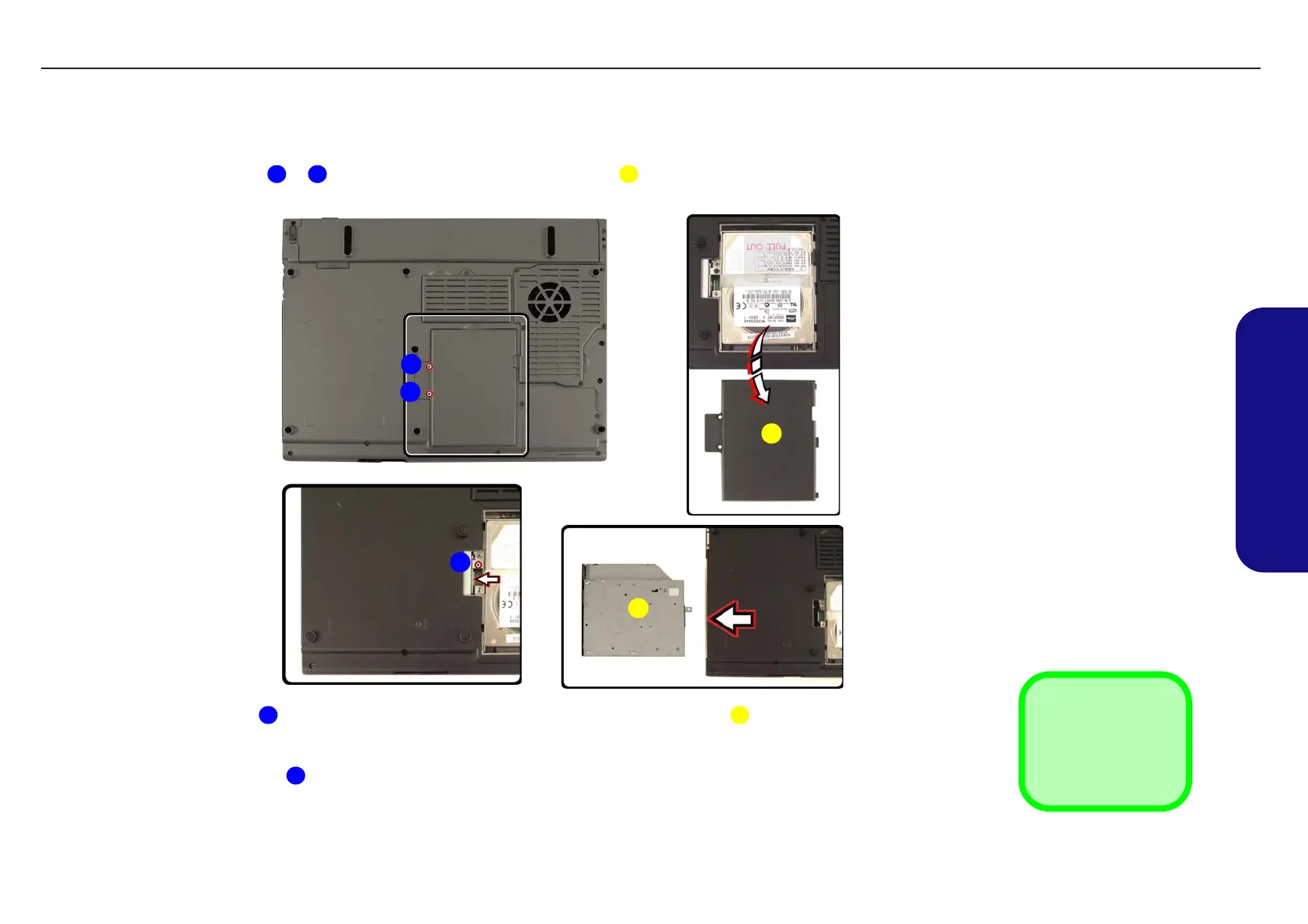
1. Turn off the computer, turn it over and remove the battery (page 2 - 7).
2. Remove screws
& , and then remove the hard disk cover .
3. Remove screw , then use a screwdriver to carefully push the optical device assembly out of the computer.
4. Insert the new device and carefully slide it into the computer (the device only fits one way). DO NOT FORCE IT; the
screw holes should line up.
5. Replace the screw , hard disk cover and the 2 cover screws.
6. Restart the computer to allow it to automatically detect the new device.
Figure 2 - 5
Optical Device
Removal
a. Remove the 2 screws.
b. Carefully lift the cover off
the computer.
c. Remove the screw.
d. Push the optical device
out of the computer.
3. Socket Cover
5. Optical Device
•3 Screws
1 2 3
1
2
3
4
a. b.
c. d.
5
4 5
4
TECHNICAL SERVICE MANUALPrestigio Visconte 125W
11


 To Next Page