2.Disassembly
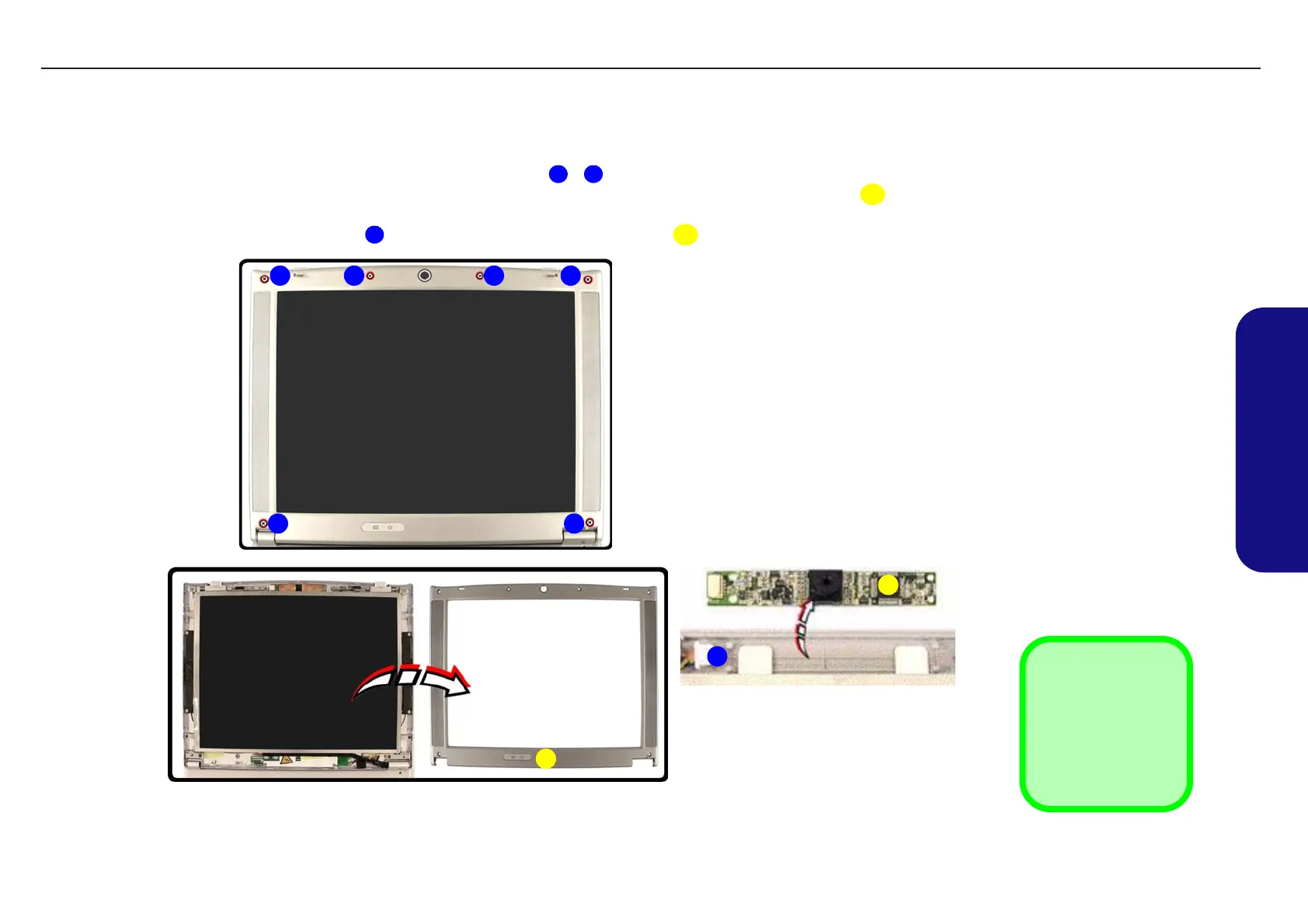
Removing the PC Camera Module
1. Turn off the computer and remove the battery (page 2 - 7).
2. Remove all the rubber covers and screws from points - .
3. Run your finger around the middle of the frame to carefully unsnap the LCD front panel module from the LCD
assembly.
4. Disconnect the cable at point
then remove the PC Camera module .
1 6
7
8
9
Figure 2 - 9
Removing the PC
Camera Module
a. Remove the rubber cov-
ers and screws.
b. Separate the LCD front
panel module from the
LCD assembly.
c. Remove the camera
module.
7. LCD Front Panel
9. PC Camera
•6 Screws &
Rubber Covers
3
a.
9
1 4
56
8
7
b. c.
2
TECHNICAL SERVICE MANUALPrestigio Visconte 125W
15


 To Next Page