2.Disassembly
Removing the System Memory (RAM)
The computer has one memory socket for 200 pin Small Outline Dual In-line (SO-DIMM) type memory modules sup-
porting DDR SDRAM SODIMM (2.5V) - DDR 266/ DDR 333. The main memory can be expanded up to 1024MB. The
SO-DIMMs supported are 128MB, 256MB, 512MB and 1024MB in size, and the total memory size is automatically de-
tected by the POST routine once you turn on your computer.
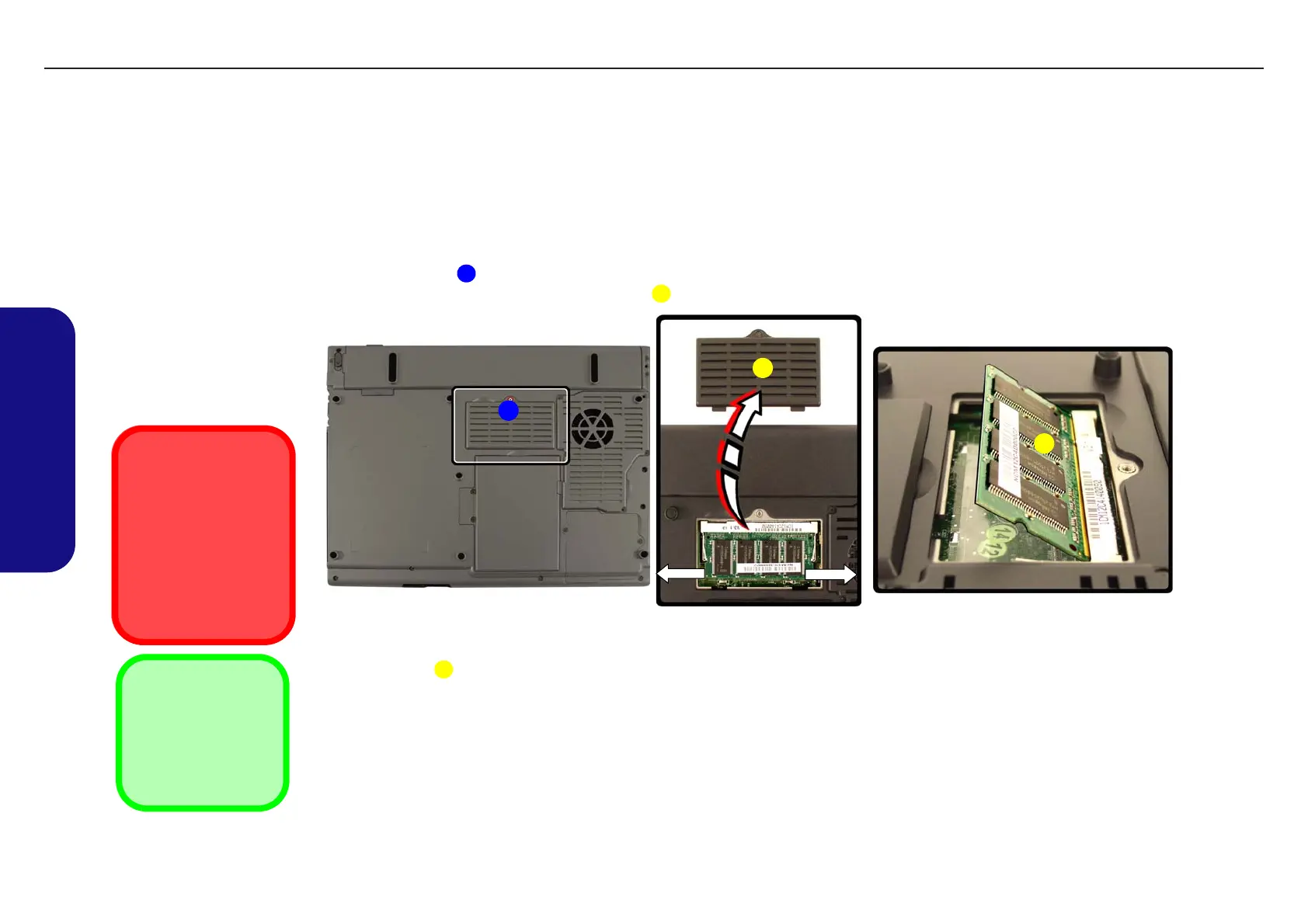
1. Turn off the computer, turn it over and remove the battery (page 2 - 7).
2. Remove screw from the memory socket cover
.
3. Carefully lift off the memory socket cover .
4. Remove any currently installed module which needs to be upgraded or replaced, by gently pulling the two release
latches on the sides of the memory socket toward the sides of the computer.
5. The module will pop-up, and you can remove it.
6. Insert a new module holding it at about a 30° angle and fit the connectors firmly into the memory slot.
7. The module’s pin alignment will allow it to only fit one way. Make sure the module is seated as far into the slot as it
will go. DO NOT FORCE the module; it should fit without much pressure.
8. Press the module in and down towards the mainboard until the slot levers click into place to secure the module.
9. Replace the memory socket cover and the screw.
10. Restart the computer, and the BIOS will register the new memory configuration as it starts up.
Figure 2 - 4
Removing/
Installing a RAM
Module
a. Remove the screw.
b. Remove the cover.
c. Pull the release latches
to remove the mod-
ule(s).
Contact Warning
Be careful not to touch the
metal pins on the mod-
ule’s connecting edge.
Even the cleanest hands
have oils which can attract
particles, and degrade the
module’s performance.
1
2
1
a. b. c.
2
3
3
2. Socket Cover
3. RAM Module
•1 Screw
TECHNICAL SERVICE MANUAL Prestigio Visconte 125W
10


 To Next Page