2.Disassembly
Removing the Processor
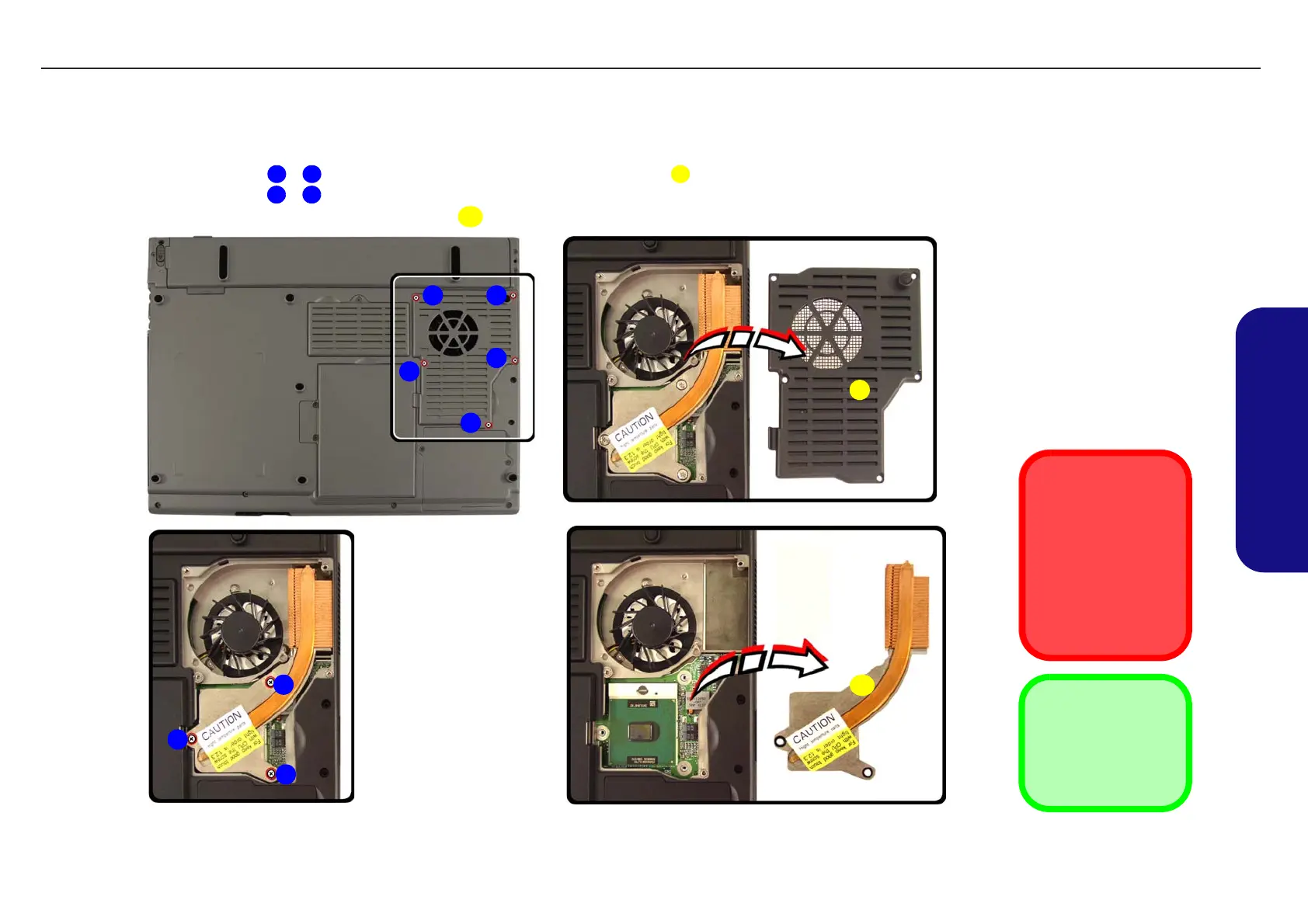
1. Turn off the computer, remove the battery (page 2 - 7) and turn it over.
2. Remove screws - from the CPU cover, and lift off the cpu cover .
3. Remove screws
- from the heat sink, in the order indicated on the label (note the order when replacing
the heat sink)
, and remove the heat sink .
Figure 2 - 7
Processor Removal
a. Remove the screws.
b. Carefully lift the cover off
the computer.
c. Remove the screws in
the order indicated.
d. Remove the heat sink.
Reassembly Screw
Order
When replacing the
heat sink, make sure
you insert the screws
in the same order indi-
cated on the label.
1 5 6
7 9
10
7
9
1
4
32
5
a.
6
b.
c.
d.
8
10
6. Socket Cover
10. Heat Sink
•8 Screws
TECHNICAL SERVICE MANUALPrestigio Visconte 125W
13


 To Next Page