2.Disassembly
Removing the Keyboard & Shielding Plate
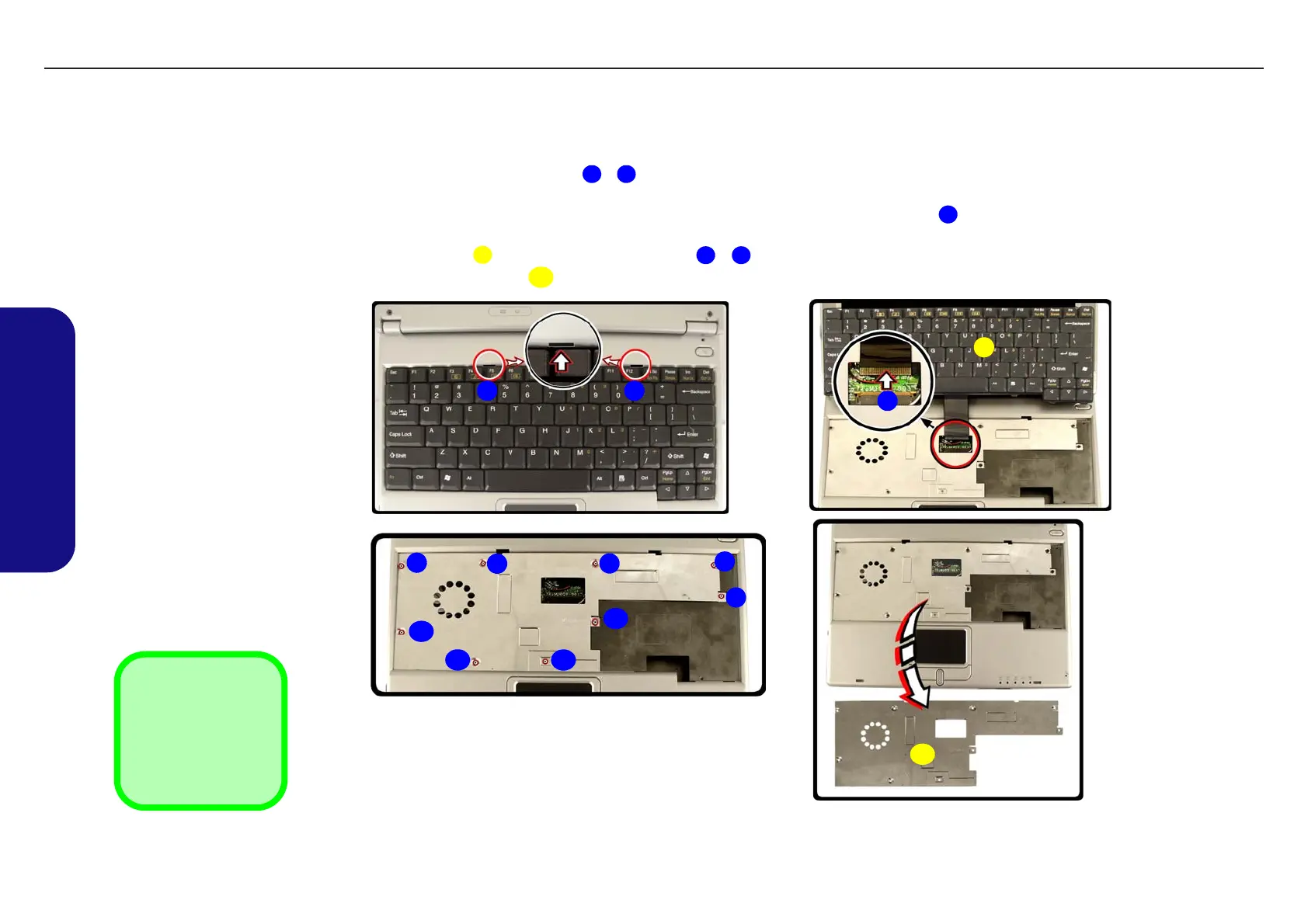
1. Turn off the computer and remove the battery (page 2 - 7).
2. Press the two keyboard latches - at the top of the keyboard to elevate the keyboard from its normal position
(you may need to use a small screwdriver to do this).
3. Carefully lift the keyboard up and disconnect the keyboard ribbon cable at point (be careful not to bend the key-
board ribbon cable).
4. Set the keyboard aside and remove screws - from the keyboard shielding plate.
5. Lift off the shielding plate .
1 2
3
4
5 13
14
Figure 2 - 10
Keyboard &
Shielding Plate
Removal
a. Press in the keyboard
latches and elevate the
keyboard.
b. Disconnect the keyboard
cable.
c. Remove the screws from
shielding plate.
d. Remove the shielding
plate and center cover.
4. Keyboard
14 Shielding Plate
•9 Screws
a.
3
4
b.
c.
8
9
11
12
13
14
d.
1 2
6
7
10
5
TECHNICAL SERVICE MANUAL Prestigio Visconte 125W
16


 To Next Page