2.Disassembly
Removing the Modem/Bluetooth Modem
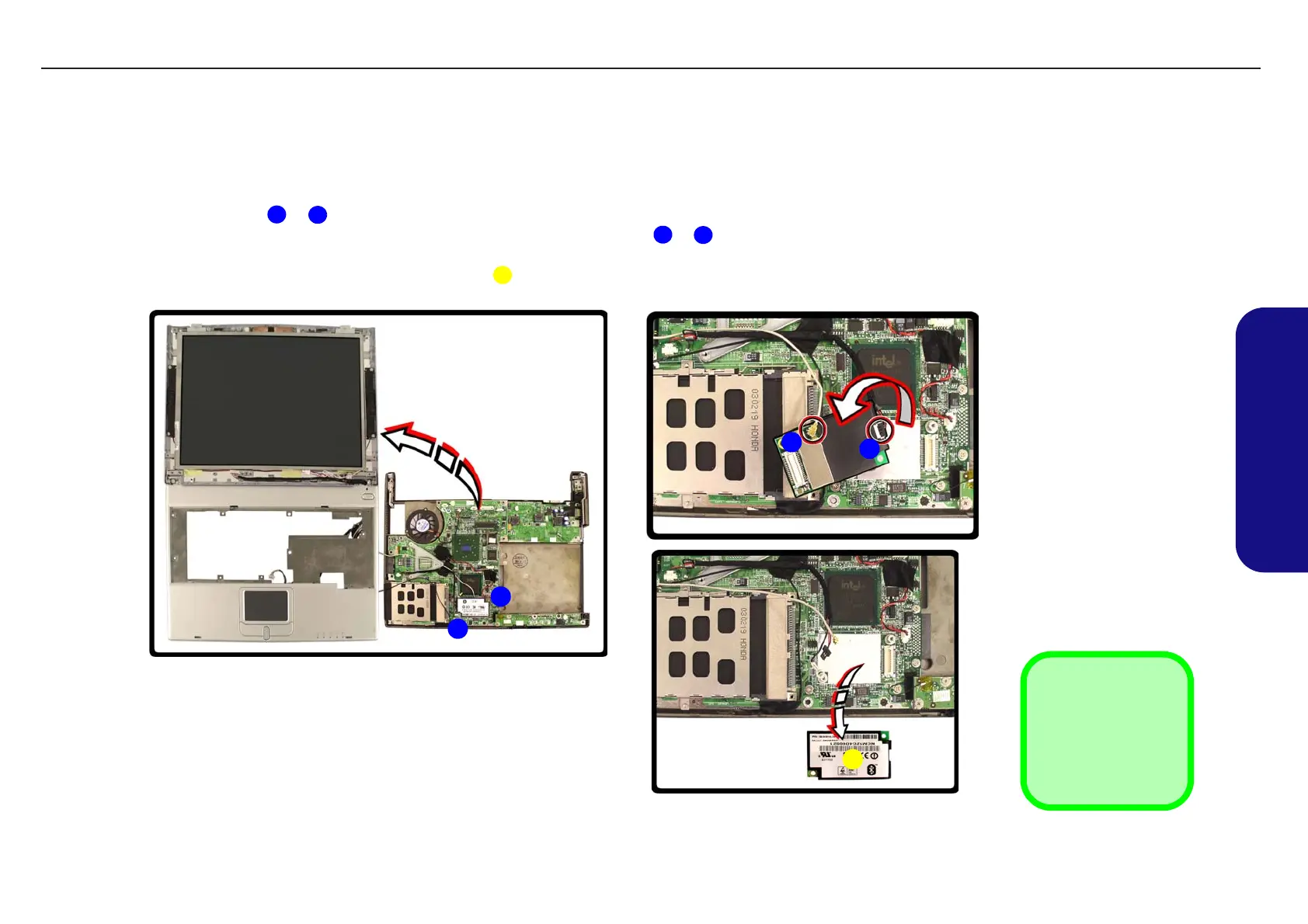
1. Turn off the computer and remove the battery (page 2 - 7), HDD (page 2 - 8), RAM (page 2 - 10), optical device
(page 2 - 11), WLAN module (page 2 - 12), processor (page 2 - 13), keyboard & shielding plate (page 2 - 15) and
separate the top & bottom cases (page 2 - 17).
2. Remove screws
& from the modem/Bluetooth combo modem module.
3. Carefully turn the module over and disconnect the cable(s) at points
& (a Bluetooth combo module will have
two cables attached).
4. Remove the modem/Bluetooth combo module .
1
2
3
4
5
Figure 2 - 13
Removing the
Modem/Bluetooth
Modem
a. Remove the 2 screws
from the modem mod-
ule.
b. Turn the module over
and disconnect the ca-
ble(s).
c. Remove the module.
5. Modem Module
•2 Screws
1
2
a. b.
c.
3
4
5
TECHNICAL SERVICE MANUALPrestigio Visconte 125W
19


 To Next Page