2.Disassembly
Removing the Inverter
1. Turn off the computer and remove the battery (page 2 - 7), HDD (page 2 - 8), RAM (page 2 - 10), optical device
(page 2 - 11), WLAN module (page 2 - 12), processor (page 2 - 13), keyboard & shielding plate (page 2 - 15), sep-
arate the top & bottom cases (page 2 - 17), disconnect any Bluetooth antenna cable (page 2 - 19) and remove the
LCD front panel module (page 2 - 21).
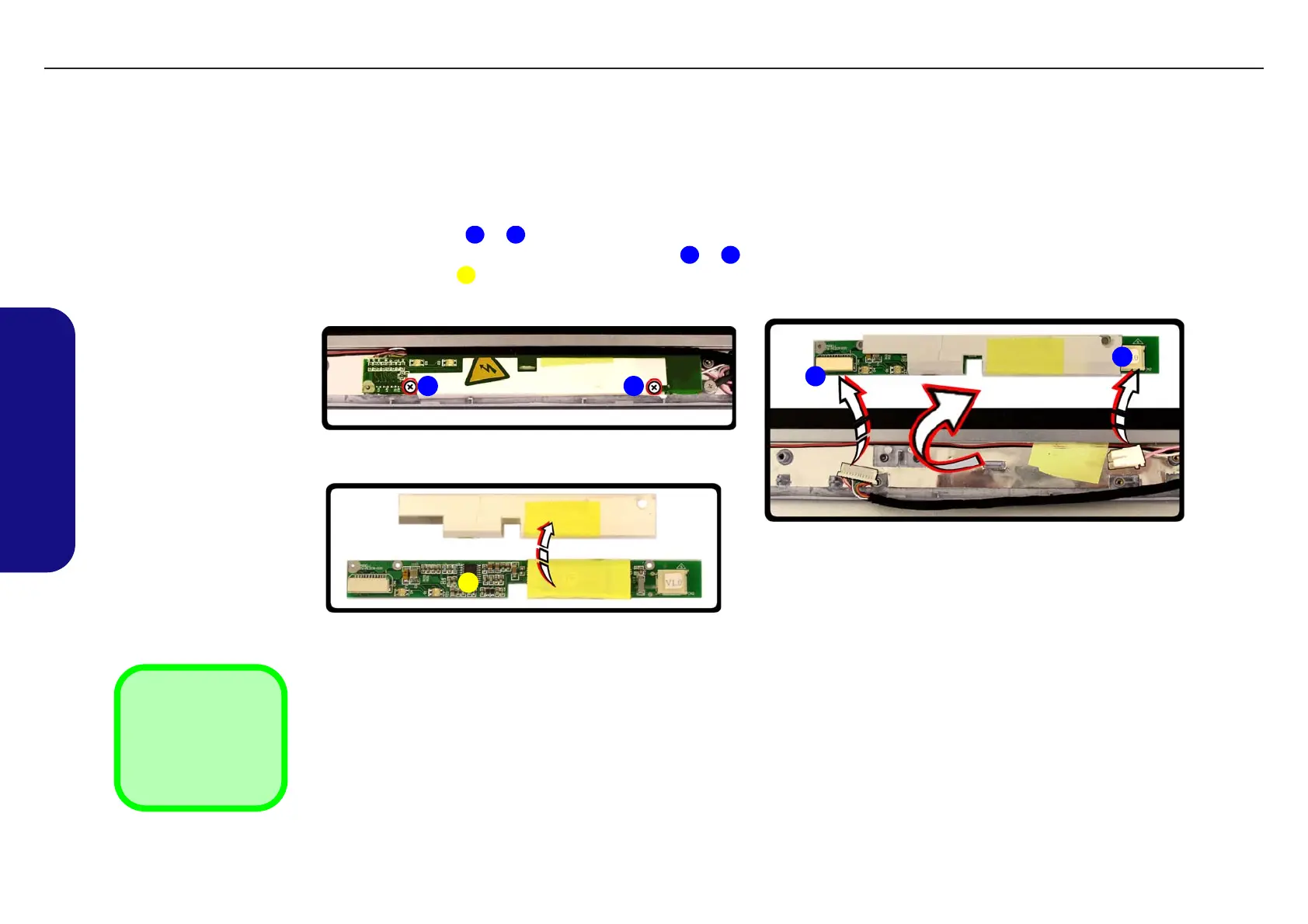
2. Remove screws &
.
3. Turn over the inverter and disconnect cables & .
4. Lift the inverter up off the LCD assembly.
1 2
3 4
5
Figure 2 - 16
Removing the
Inverter
a. Remove the screws.
b. Disconnect the cables.
c. Lift the inverter off the
LCD assembly.
5. Inverter
•2 Screws
a. b.
1
4
5
c.
2
3
TECHNICAL SERVICE MANUAL Prestigio Visconte 125W
22


 To Next Page