24
Proel MS 32 Owner's Manual
WRITE SET MEMORY:
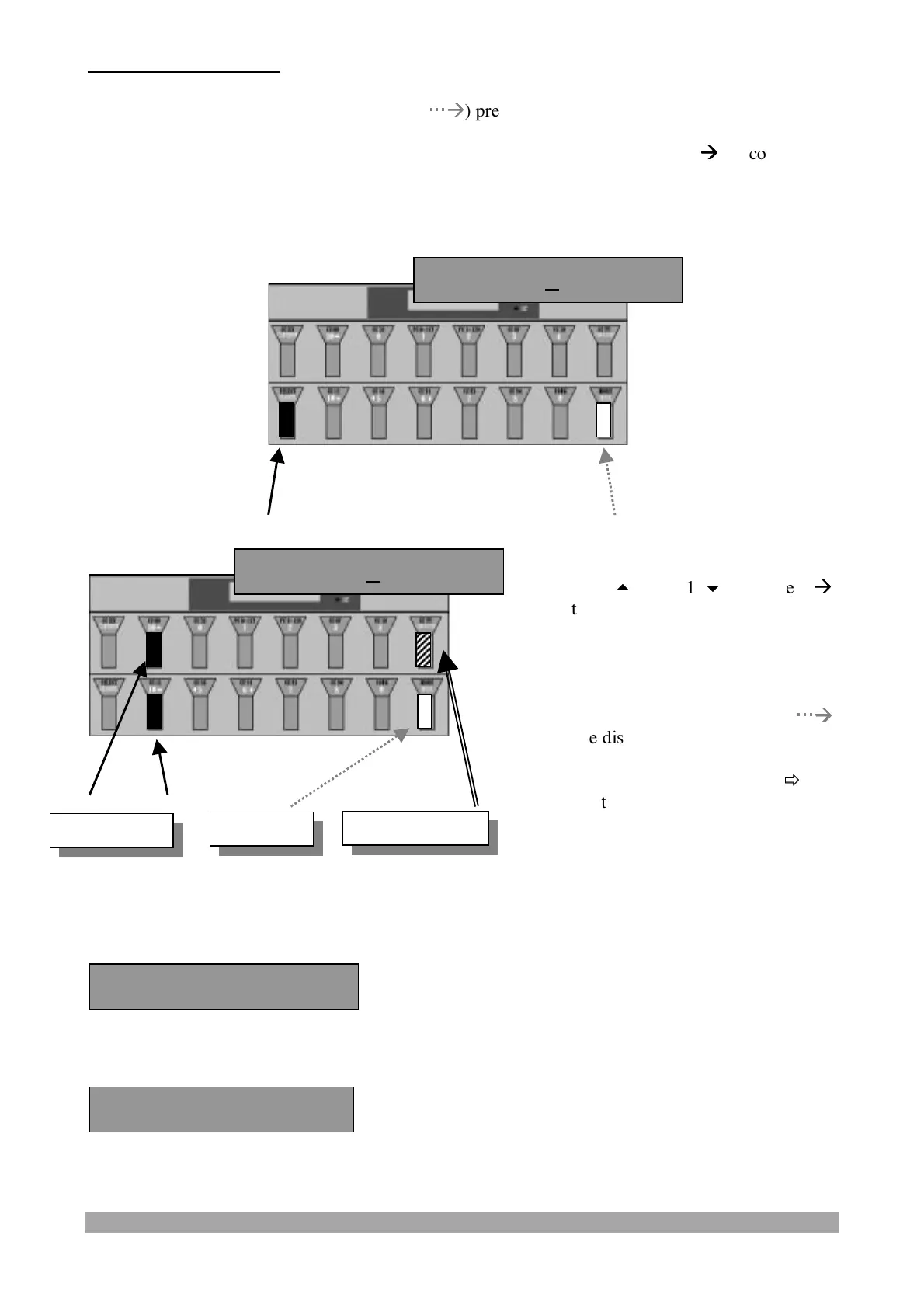
When keeping the "MODE/WRITE" switch (
Æ
Æ
) pressed for some seconds
or
in Edit mode : pressing and releasing the "SELECT/CHANNEL" switch (
Æ
Æ
) to confirm the
data and exit from "SET" parameters programming
the following message will be displayed:
When using the WRITE switch, the display will show the following message:
and will go back to the SET MASTER screen shot after some seconds:
Press the "10
" and "10
" switches (
Æ
Æ
)
to select a SET from 0 to 9 where to store
the inserted parameters. (Keeping the
switch pressed the characters will shift
automatically).
Keeping the WRITE/MODE switch (
Æ
Æ
)
pressed the displayed SET is stored.
Press the START/STOP switch (
Ö
Ö
) to
exit without saving the SET. All the data
of the previously modified parameters are
lost.
rteSet 0 ? W/S
rteSet 0 ? W/S
Exit (no write)
Write
Set Number
rite Complete !


 To Next Page