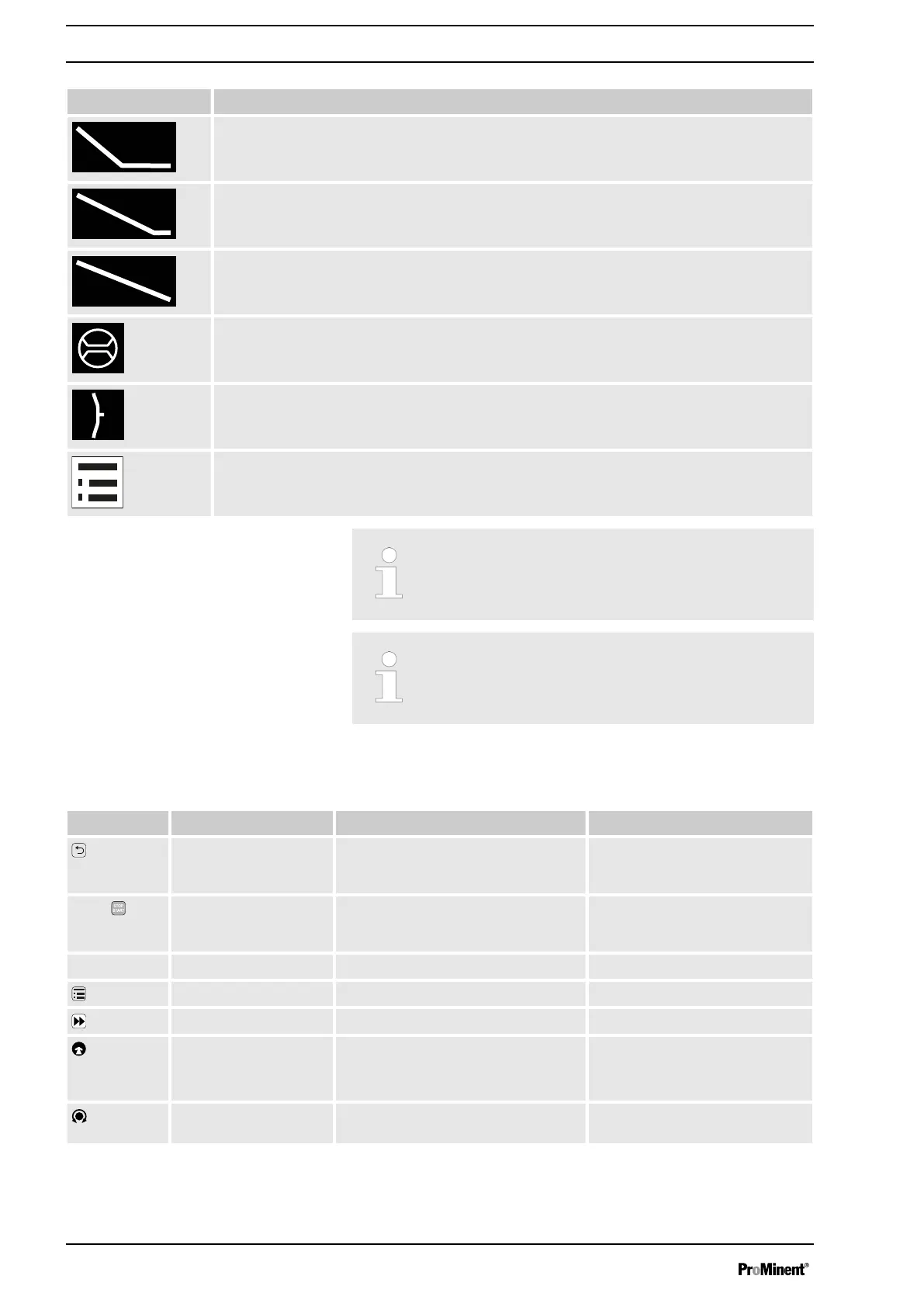
Identifier Meaning
‘Metering
è
Discharge stroke
è
HV1’
metering profile has been set.
‘Metering
è
Discharge stroke
è
HV2’
metering profile has been set.
‘Metering
è
Discharge stroke
è
HV3’
metering profile has been set.
A dosing monitor "Flow Control" is connected.
A diaphragm rupture indicator is connected.
The pump is in the
‘Menu’
(Set up).
Further explanations can be found in the "Troubleshooting"
chapter.
The pump only shows the metering volume and the capacity
in the calibrated state in l or l/h or in gal or gal/h.
5.2.2 Key Functions
Key Application In the continuous displays In the menu
[Back]
press - Move back to the previous menu
point (or a continuous display) -
without saving
Press
[STOP/
START]
press Stop pump, Stop pump,
Start pump Start pump
[Menu]
press Move to the menu Move back to a continuous display
[Priming]
press Priming Priming
[Clickwheel]
press Start batch (only in
‘Batch’
operating
mode)
Acknowledge errors
Move to next menu option (or a
continuous display)
Confirm entry and save
[Clickwheel]
turn Switch between the continuous dis‐
plays
Change figure or change selection
Overview of Equipment and Control Elements
18


 To Next Page
 Loading...