21
QBOT ADJUSTMENTS
QBOT ADJUSTMENTS
INSPIRA owners:
If you have the INSPIRA frame you must make
a change to the ‘X Axis Direction’ parameter
through the ‘Options’ and ‘Setup’ menus. To do
this, insert the SD card and turn on the QBOT. If
you get an error message, ‘No SD card detected,
Please insert card’, re-insert the SD card making
sure you here a ‘click’. You will now see the
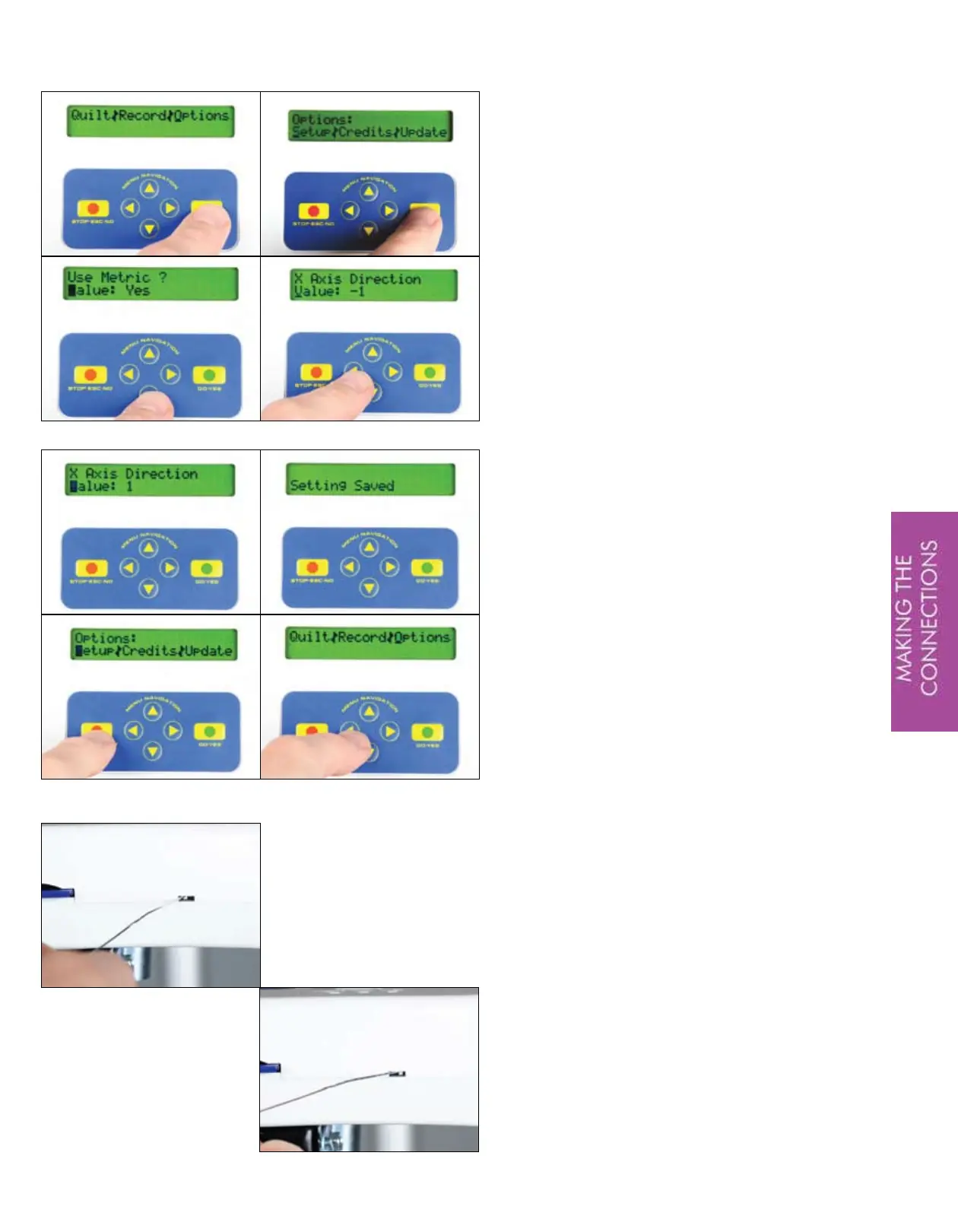
Quilt|Record|Options menu.
Using the navigation arrows, arrow to the
right and highlight the ‘O’ in ‘Options’, then
press ‘GO’. The next menu you will see is the
‘Setup|Credits|Update’ menu. The cursor will
be blinking over the ‘S’ in ‘Setup’. Press ‘GO’
You are now in the parameter setup section of the
QBOT. The parameter name is shown in the top
line of the display and the value is listed in the
second line. The first parameter is ‘Use Metric?’
and the Value is ‘No’. The next parameter is
what you are interested in. Press the DOWN
navigation arrow once. You will now see ‘X Axis
Direction’ as the parameter and the default value
is ‘-1’. Press the LEFT navigation arrow to change
the parameter to ‘1’. Press ‘GO’. Your QBOT
will display ‘Setting Saved’, then will return to
the ‘Setup|Credits|Update’ menu. Press ‘STOP’
to return to the ‘Quilt|Record|Options’ menu.
Highlight the ‘Q’ in ‘Quilt’ by pressing the LEFT
navigation arrow twice.
You may now return to page 19 of this manual.
BROTHER/BABYLOCK owners:
Using a blunt tip of a paper-clip, slide the small
switch on the right side of the QBOT to the right or
up. The default position for this switch is the left
or down position.
You may now return to page 19 of this manual.


 To Next Page