VERIFYING THE INSTALLATION
VERIFYING THE INSTALLATION
19
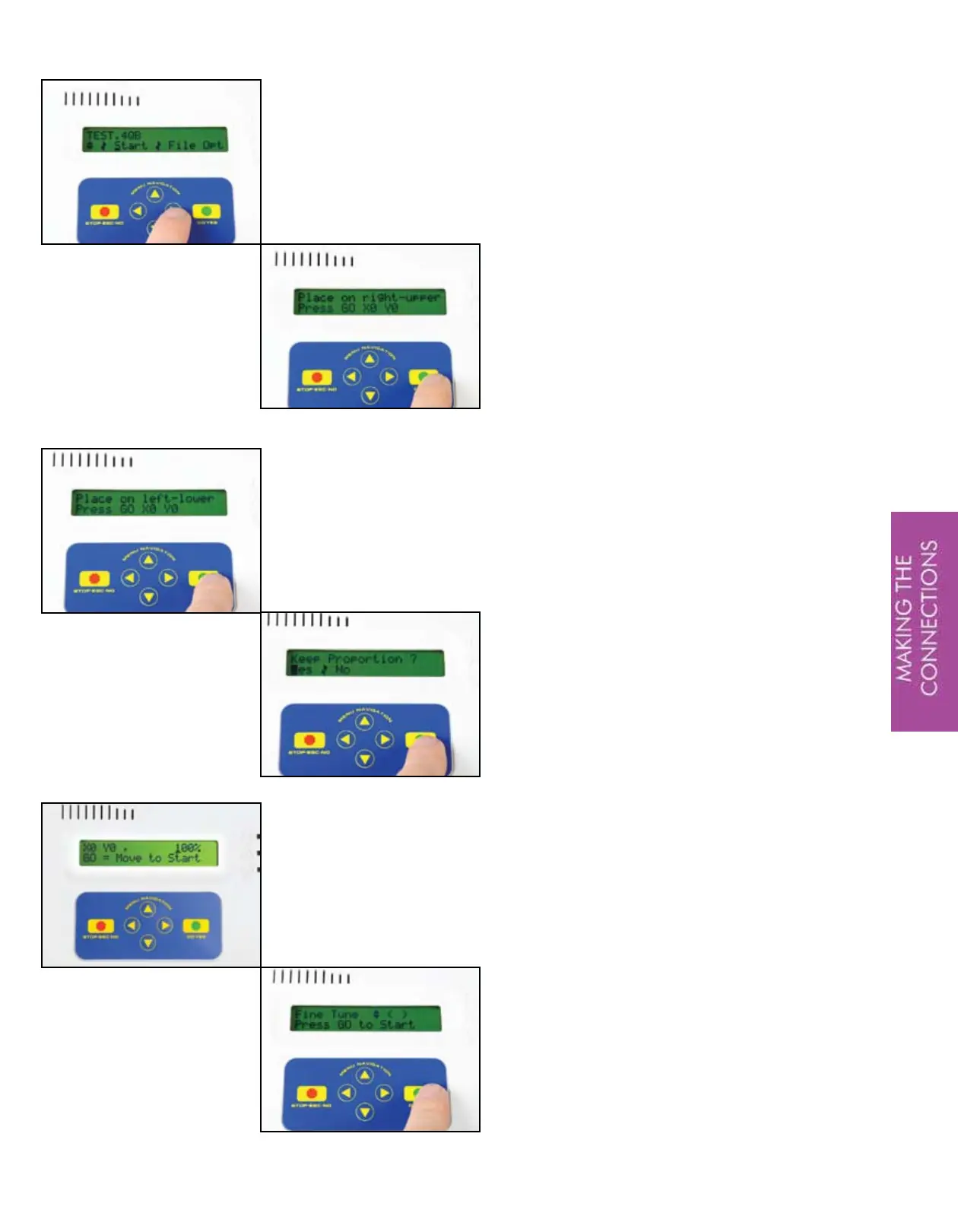
On the menu navigation touch pad,
press the ‘GO’ button. The QBOT will
then display the design selection menu.
Press the down arrow once to select the
design named ‘TEST.4QB’.
Navigate to the right and highlight
‘Start’. Press the ‘GO’ button.
The QBOT displays ‘Place on right
upper’. Place the carriage toward the
take up roller, but not touching.
Press ‘GO’.
Next, the QBOT displays ‘Place on left
lower’. Relative to the first position,
move the carriage to the left and
down.
Press ‘GO’.
The QBOT displays ‘Keep Proportion?’
Select ‘Yes’, then pess ‘GO’.
The QBOT will then scale the design
and report the scale relative to the
stored design.
The QBOT displays ‘Press GO = Move
to Start’. Press ‘GO’ and the carriage
will begin moving to the start point.
The QBOT will wait at the start point.
After the carriages move to the start
position, turn off the sewing machine
and raise the presser foot. The QBOT
will display the fine tune menu. Press
‘GO’ to start the test pattern.


 To Next Page