GEM5000 Gas Analyzer
Page 92 of 102
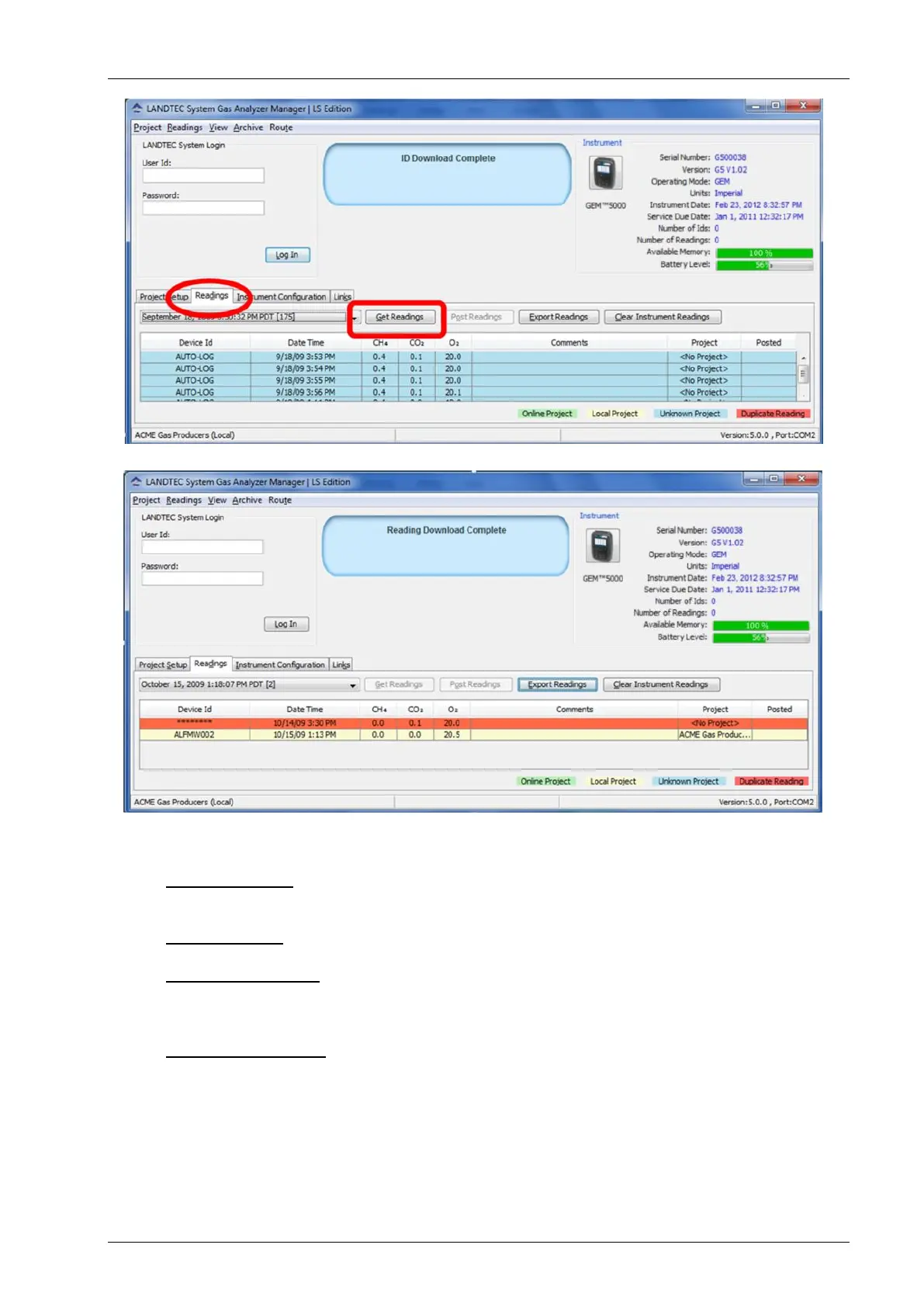
When the instrument is initially detected by the LSGAM software, the Get Readings button
will activate if there are readings in the instrument to be downloaded.
Readings will be highlighted based upon the following:
Online Project: If the readings were taken against an ID belonging to an On-Line
Enterprise System which the download computer is configured for as (REMOTE) the
readings will highlight in a green color.
Local Project: If the readings were taken against a project that is setup on the
computer as a local project then they will highlight in a beige color.
Unknown Project: IDs in the instrument that do not match any of the Local or
Remote projects on the download computer. This is the result of uploading an
instrument with IDs from one computer but downloading on a different computer
without the exact same project configuration(s).
Duplicate Reading: This does not imply that the reading was taken twice. Rather it
is an indication that the reading was previously downloaded and exists on the
computer in a different readings file.
Placing your mouse over a reading will display additional parameters of the reading. As
shown below on the left, clicking on a reading will open a Reading details window and allow
you to click through the readings one-by-one in detail by clicking the Previous and Next
buttons.



 To Next Page