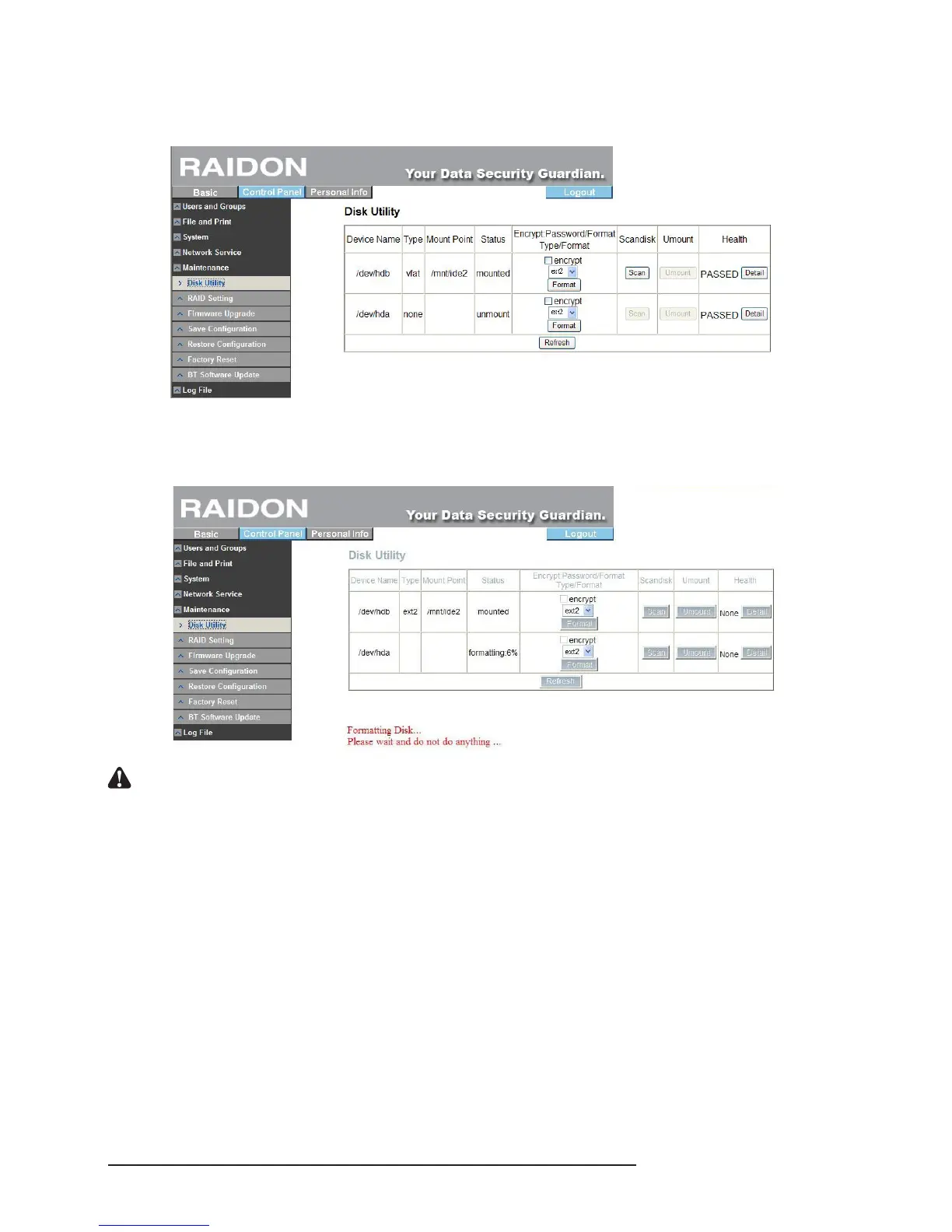
To format the hard disk separately, refer to the following procedures:
1. Enter “Maintenance” and click “Disk Utility”.
2. Choose the hard disk to be formatted and choose le format. SL3610/3620-2S-LB2 provides 3
formats: Fat32, Ext2 and Ext3. After choosing, click “Format”. The system will start to format
automatically and display the progress.
Notice : 1. If you choose to format the hard disks separately, the system information will be recorded on the rst
hard disk that is formatted, which, once damaged, may result in system malfunction. The space of the
second hard drive which is formatted is completely open which means all users can write/read data on
that hard drive.
2. SL3610/3620-2S-LB2 can perform 128bits loop-AES encryption for Ext2 le format only.
3. If you choose to format hard drives separately, you will be unable to set the disk array subsequently.
3. Once formatting is completed, the system will restart automatically. After login, enter “Disk Utility”
and you can see related information that formatting is complete. You can repeat the above
procedures to nish formatting the other hard disk.



 To Next Page