Notice : 1. The password shall not exceed 16 characters and must be English letters in lower case and numeric
numbers.
2. To install more than 2 SL3610/3620-2S-LB2s, it is recommended that you change the password to
prevent other persons from changing your system information via the default password.
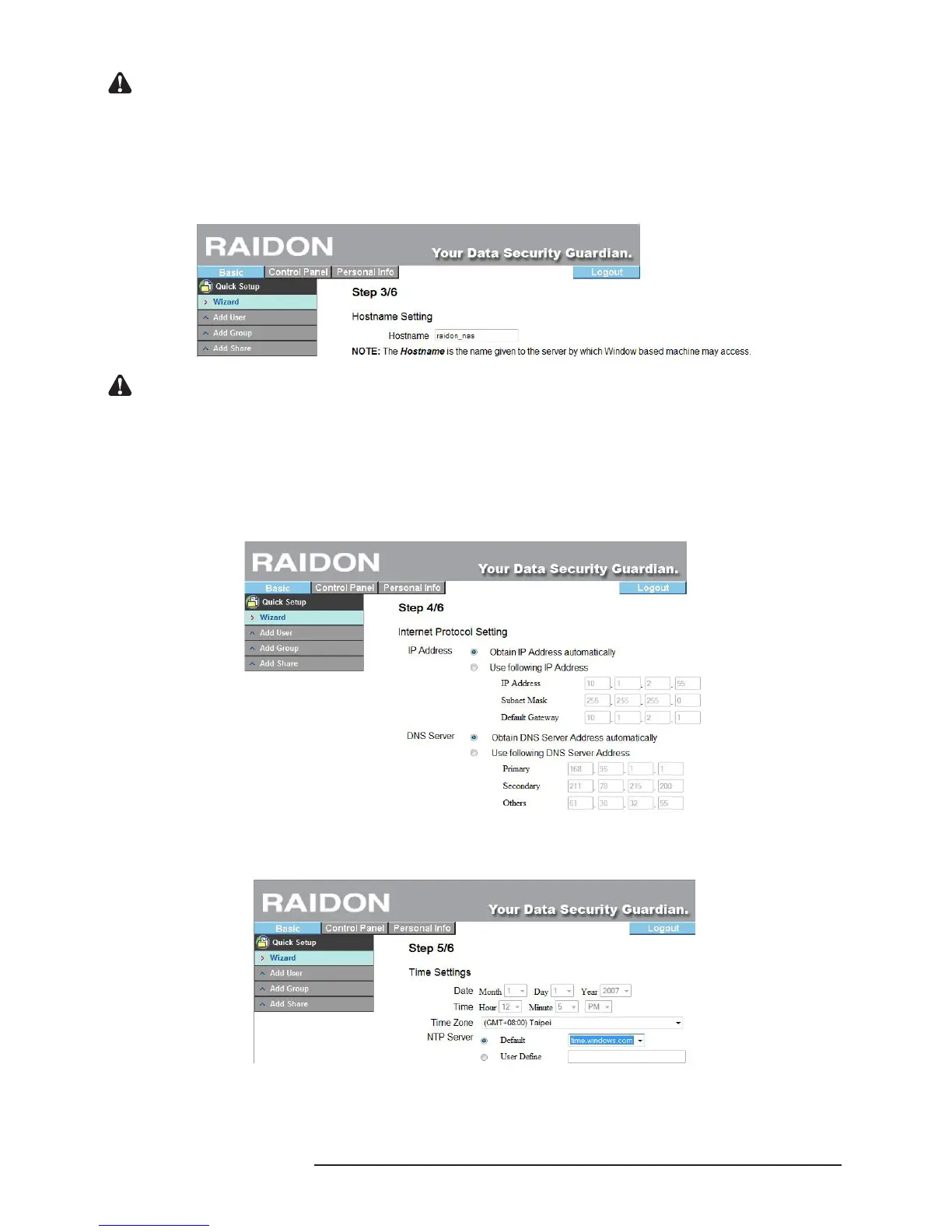
3. Host Name Setting
Please set the host name of SL3610/3620-2S-LB2 over the network in this step.
Notice : 1. The number of characters is limited to 15 characters, which must consist only English letters, numeric
numbers or “-”.
2. Since each SL3610/3620-2S-LB2 has an identical default host name, if you want to install more than 2
SL3610/3620-2S-LB2s, be sure to change the host name of each of them to avoid recognition errors
on the IP setting software.
4. Network Communication Protocol Setting
Through this procedure, you can perform related network IP address settings.
5. Time Setting
Here, you can set system date, time and time zone and designate the NTP server.
The NTP (network time protocol) server is one that is provided over the network primarily for network
time checking of the user’s host. The system is to provide two NTP server addresses: time.windows.
com and time.nist.gov for users to choose.



 To Next Page