27
BASIC OPERATION
2.10 Using the Frequency Meters
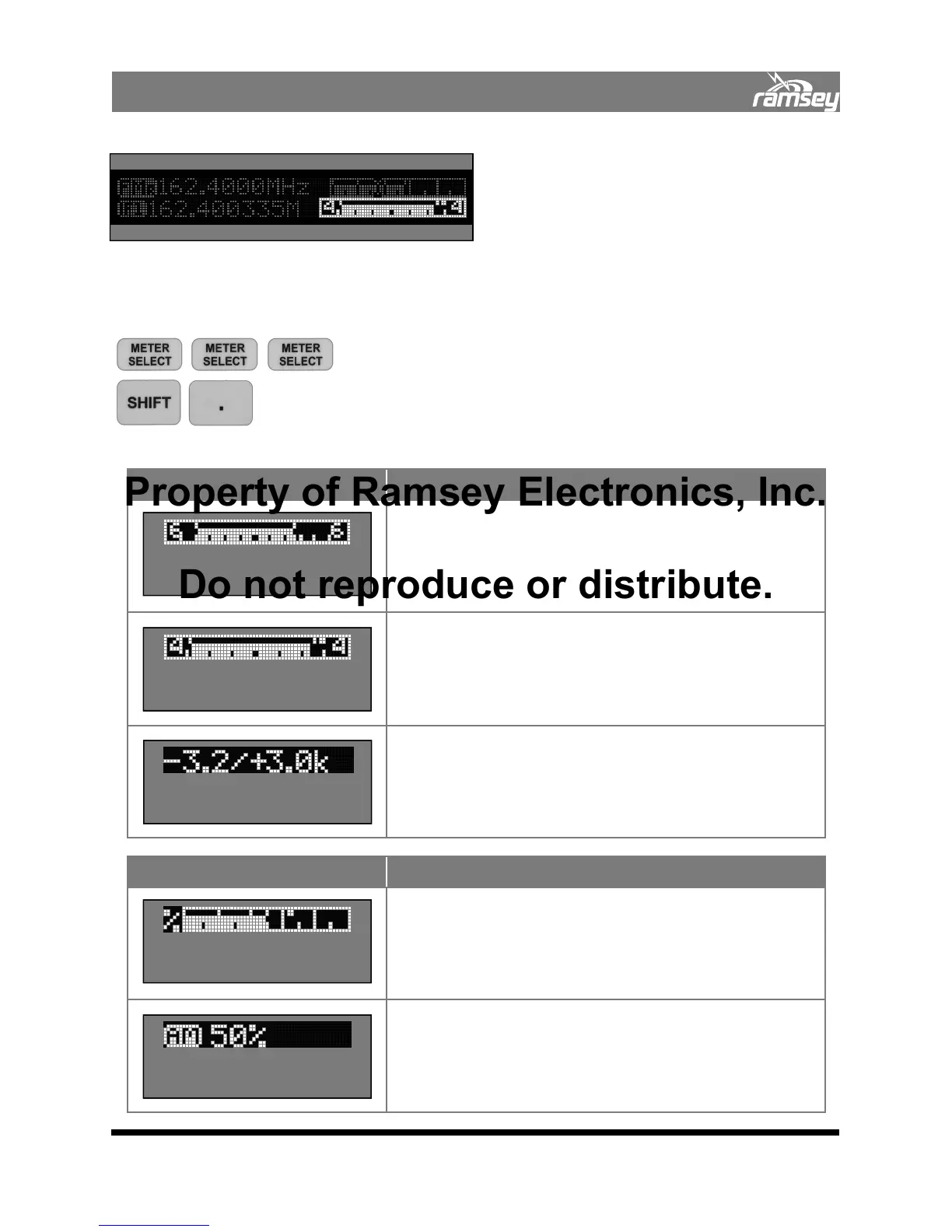
The frequency meters are selected by pressing
METER SELECT multiple times. There are me-
ters unique to both RECEIVE AM and RECEIVE
FM modes.
Any of these meters may be zoomed for a larger display for easy viewing. To zoom a display,
press SHIFT, . Function keys.
Example:
To select meter mode
To zoom a display for easy viewing
RECEIVE Level Meters
Counter Freq Meters
FM Mode: Meter Displayed Description
2.10.01 This meter displays the instantaneous modulation
packet showing the minimum and maximum level. It displays
a maximum of +/- 6 kHz deviation whether or not the
received signal is on frequency. Each division represents
1kHz; this display is showing +3 kHz/-4.2 kHz.
2.10.02 This reduces the scale to +/- 4 kHz. This allows more
resolution for detecting smaller signals without having to
zoom.
2.10.03 This meter is a numeric version of the above meters.
+/- 4 kHz FM Deviation
Bargraph Meter
Digital
FM Deviation Meter
+/- 6 kHz FM Deviation
Bargraph Meter
FM Mode: Meter Displayed Description
2.10.04 Displays a quickly updated percent of AM calibrated
demodulation. Every tick indicates 10%. This meter indicates
50% modulation, and the slow peak-hold point (larger
square) indicates a peak of 65% modulation.
2.10.05 Displays percent of demodulated AM. Accuracy is +/-
5%, but better than +/-1% using 1kHz tones.
Percent of AM
Bargraph Meter
Digital Percent of AM
Meter
COM3010 Meter Displays
Property of Ramsey Electronics, Inc.
Do not reproduce or distribute.


 To Next Page