4.4.8 Important tips and tricks for the test with the RAH Module 10 Page 47
3. Directly Altering the harmonisation time regarding a stored resonance
value
After storing a resonance value, it is always possible to give it an individual
harmonisation time directly.
Therefore you press the key:
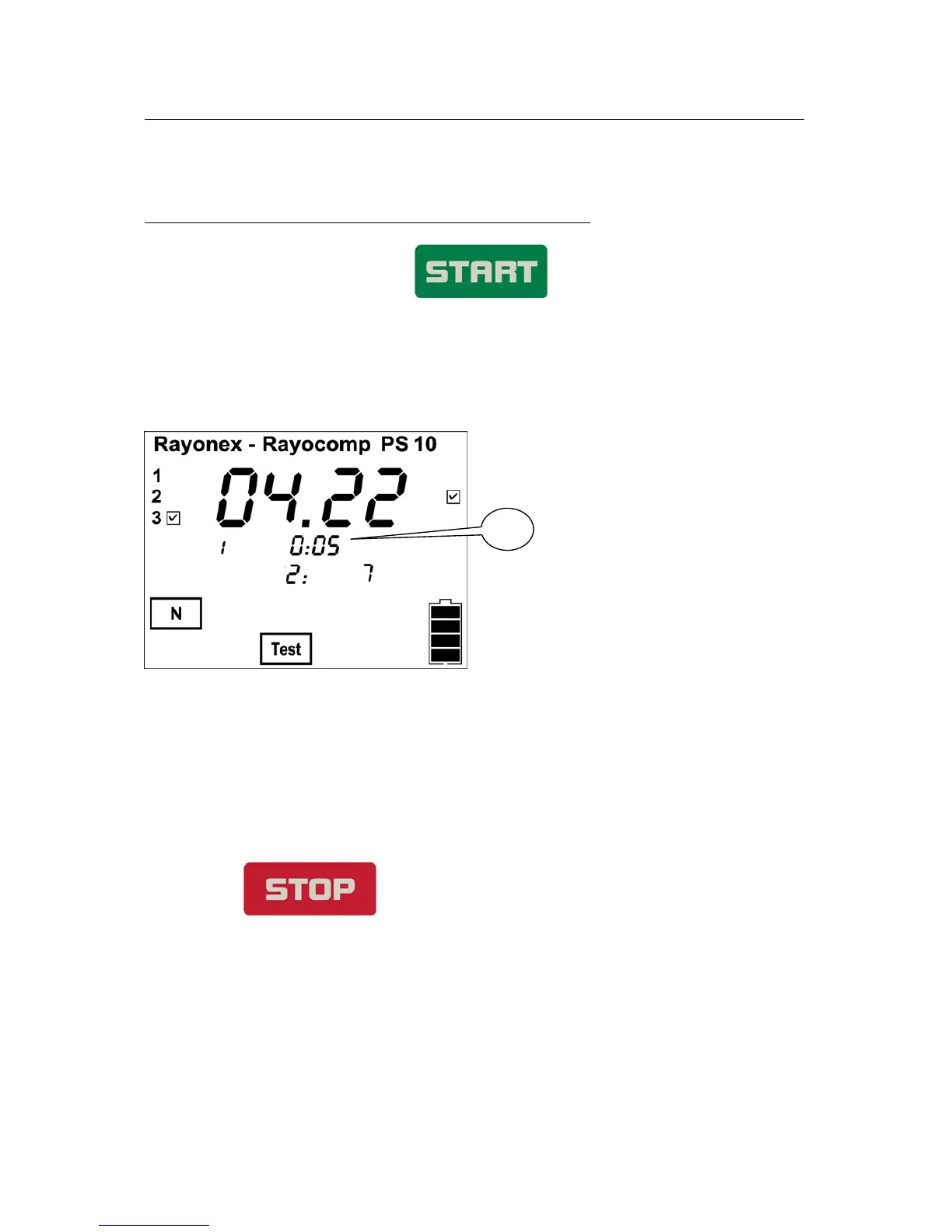
Afterwards, the RAH-programmes can also be related with an individual time
(fig. 1). In front of the double point, the hours are entered, the minutes
behind it. Later on, when you store all found RAH-programmes on a RAH
‘Green Card’, the individual time will be stored under this programme.
1
4. Very important: Deleting the resonance memory
Always, when a new patient is going to be analysed, the resonance memory
has to be deleted. After switching on the device, the memory is empty, and
while testing with RAH-programmes and their harmonisation times, the
memory gets filled.
During the RAH testing, the resonance memory can be deleted by pressing
the key for a longer time. The device confirms this
with a long beep-signal.
When an RAH ‘Green Card’ is read in for testing, the total resonance memory
will be deleted automatically beforehand, as the user would get confused
otherwise. The same is valid for the test with test protocols.


 To Next Page