EasyManua.ls Logo

Raytech TR–Mark III 250V - Defining Transformer Taps; Specifying Tap Steps and Voltages

Raytech TR–Mark III 250V
57 pages
Print Icon
To Next Page IconTo Next Page
To Previous Page IconTo Previous Page
Loading...
Instruction Manual TR-Mark III 250V Version 1.10 Preliminary Page 31 of 57
8.2.1.2 Taps
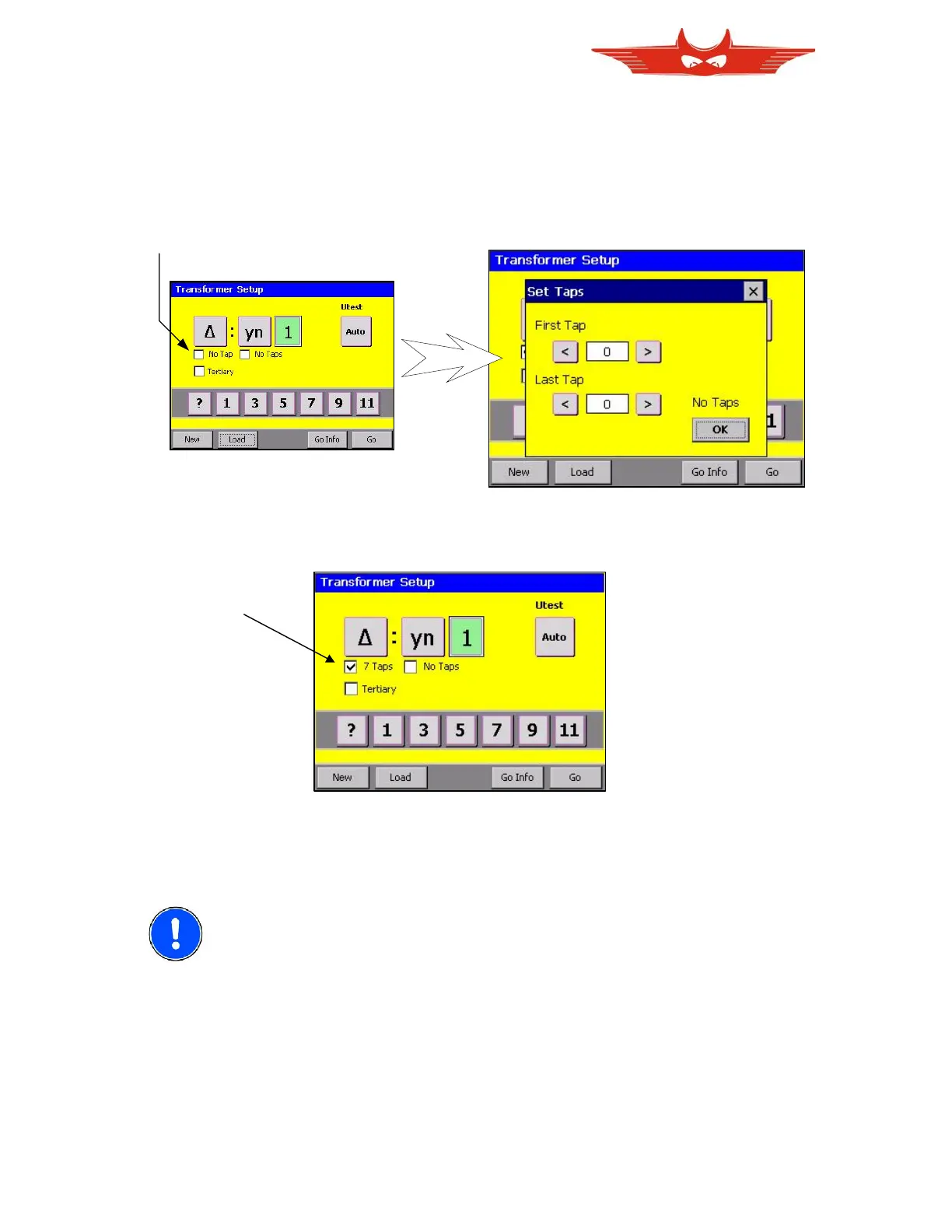
For every winding system taps can be defined. Just touch on the check box by sides the text
‘No Tap’ below to the transformer coil where you want to enter taps. Then a screen to define
tap steps appears.
Use ‘<’ or ‘>’ to increase or decrease first and last tap step.
tip here
Press ‘OK’, and chosen tap will be displayed.
Your Transformer may have taps on the primary and on the secondary winding system. Use
the same procedure to define the secondary taps.
8.3 NOTE Please Check chapter8.4’ for detailed information
about how to assign voltages to tap steps

Table of Contents

Related product manuals