Instruction Manual TR-Mark III 250V Version 1.10 Preliminary Page 34 of 57
8.3.3 Copy Actual Transformer
Let’s say you are a manufacturer of transformers or you are doing service and support. In
both cases, you will often check identical objects. In this case we recommend you to use the
“Copy Actual Transformer” option.
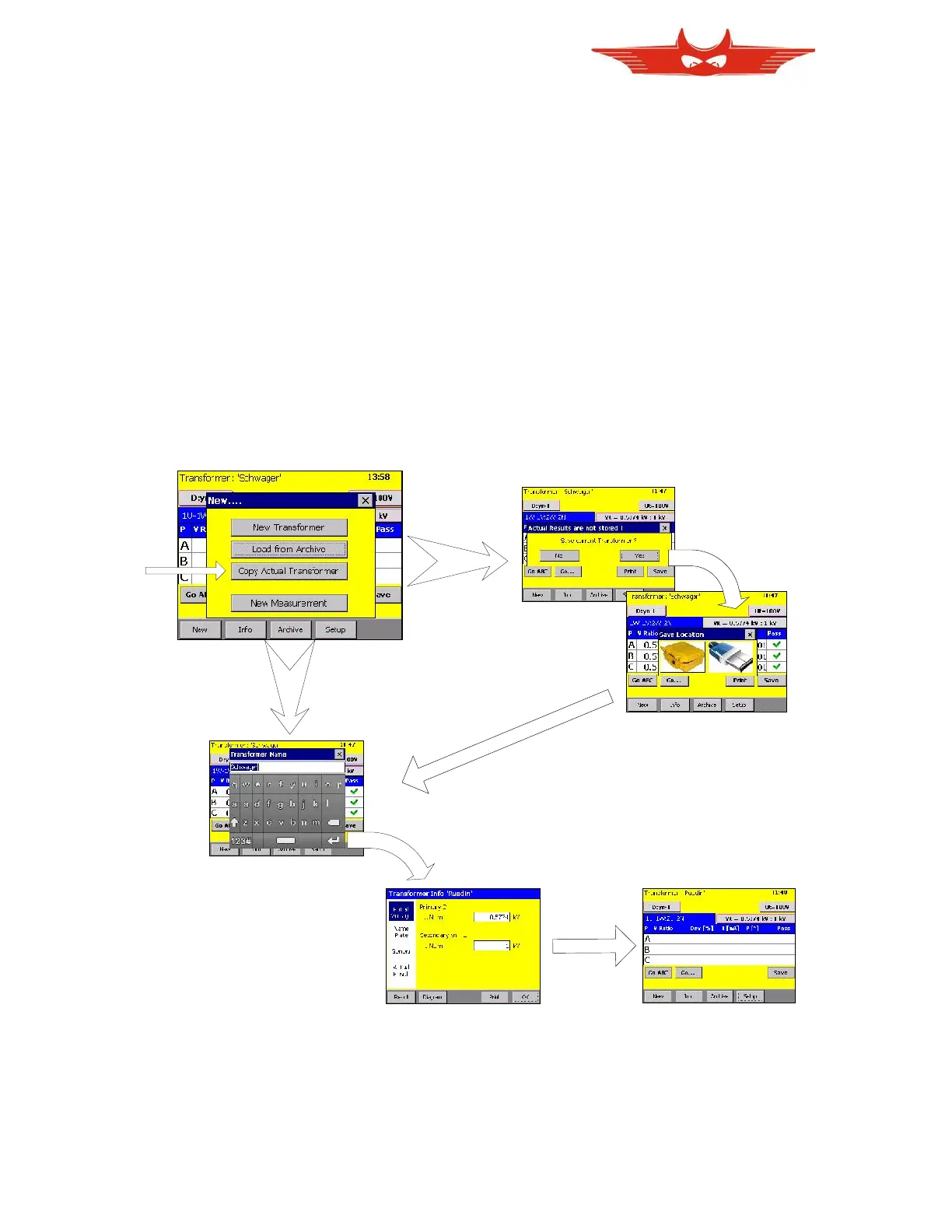
After touching this button, TR-Mark III 250V will copy the actual transformer basics, or let’s
say those things which do not change on transformers of the same type. In other words, a
new transformer is created with the same number of winding systems, taps, winding types,
and so on.
You will automatically be asked, if you would like to save the actual measurement if you did
not yet do so. Afterwards you have to enter a new transformer name, serial number and if
necessary new primary and secondary voltage. Or let us say those things that change if you
produce a further transformer of the same type.
If you are still a bit confused about it, have a look to the following screens and graphics
including MK III screens.
If not safed yet...
Would you like to safe?
Where would you like to safe it?
If safed..
Enter Transformer Name...
... and Serial Number
Change Voltages if necessary Get your new Transformer



 To Next Page