Instruction Manual TR-Mark III 250V Version 1.10 Preliminary Page 20 of 57
8.1.2 Further Options of the Main Screen
8.1.2.1 Change Test Voltage
The following is further measurement settings that are provided by the main test screen.
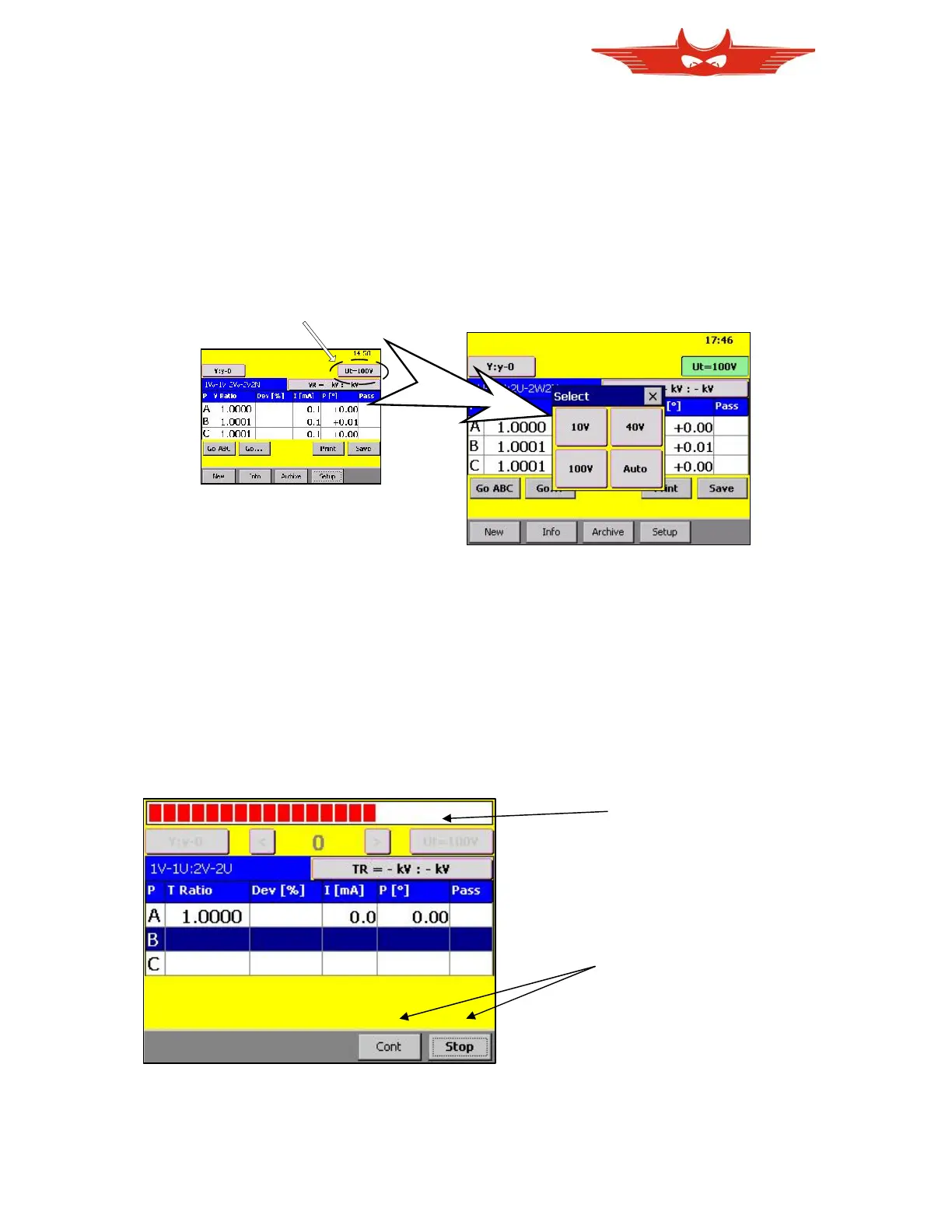
The TR-Mark III 250V offers three Test Voltage settings. To change the Test Voltage, just
touch on the button with the ‘Ut=…’ on the upper right side of the touch-screen. A selection
window appears.
It is now possible to select a new Test Voltage by Selecting the button ‘Ut=…’.
8.1.2.2 Stop Measurement and Continuous Measurement
On the TR-Mark III 250V, a scrolling progress bar indicates that a measurement is being
made. In this condition the buttons on the lower part of the display disappear, and the two
buttons “Cont” and “Stop” appear. Touch “Cont” (continuous) will lead to a continuous
measurement of the marked phase.
In the continuous mode, the ‘Cont’ button will convert to a ‘Next’ button. This ‘Next’ button is
used to switch to the next phase and stay in continuous mode.
Stop will immediately stop measurement in standard and continuous mode.



 To Next Page