Instruction Manual TR-Mark III 250V Version 1.10 Preliminary Page 9 of 57
4 Quick Start Guide
4.1 Instrument operation
Wait until the green light shows “Safe” before handling the cables
If you are new to transformer turns ratio testing, please review the
entire manual carefully before operating this equipment.
Examples for connections to the transformer see next pages
“Overcurrent” error may be displayed with some configurations.
It is OK to run through all the transformer selections with the leads tied
together.
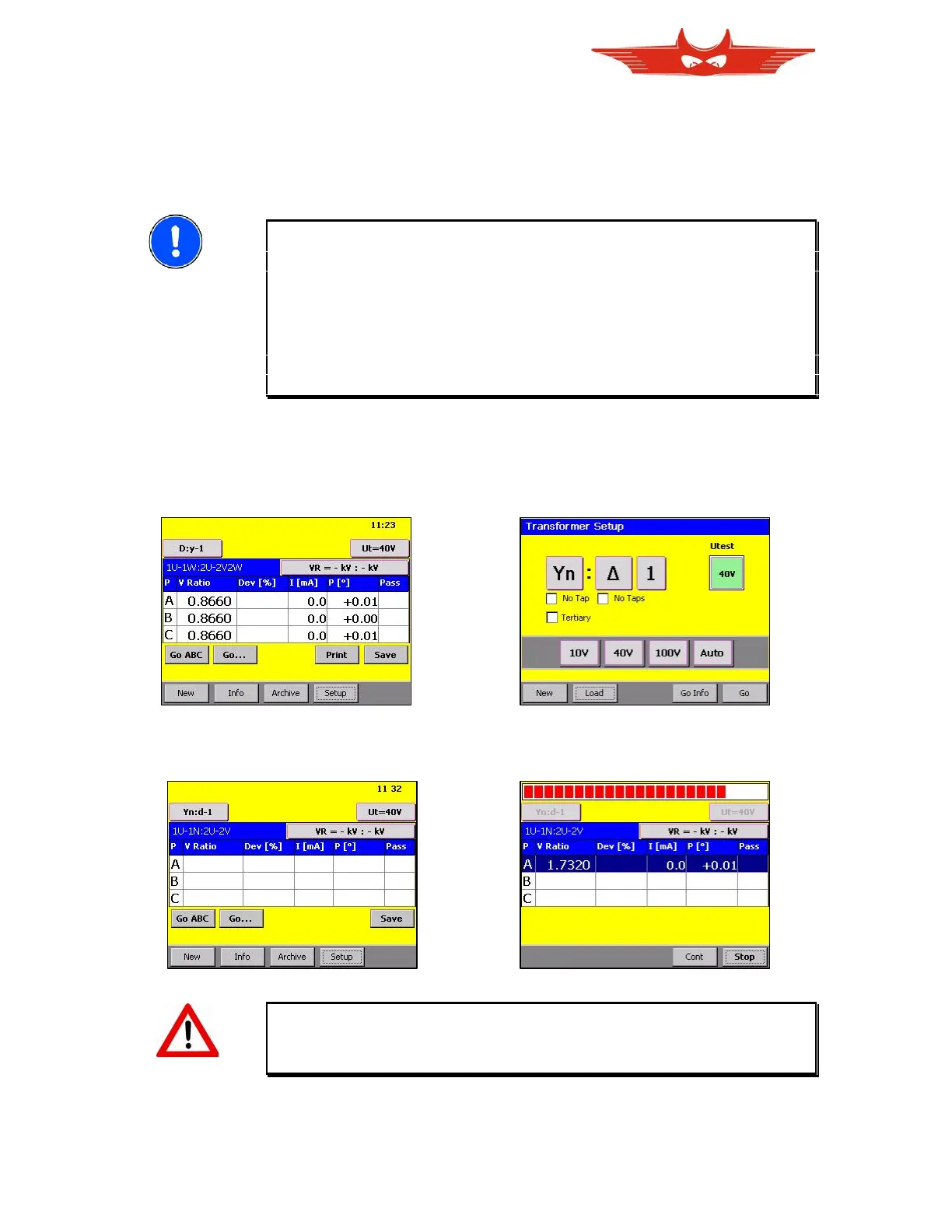
1. Switch on the instrument. 2. When ‘New’ is selected:
To repeat last Measurement, touch Select transformer type and Test
‘GO ABC’. Touch ‘New’ to create a Voltage, then touch ‘GO’.
new transformer configuration.
3. Press ‘Go ABC’ or ‘Go…’ to 4. Get the results
start measurement.
WARNING!
Do not touch the test clips while the safety indication is red.
Test voltage will be present.



 To Next Page