Installation
MarathonSeriesFA/FR 19
5.4InstallingtheElectronicsHousing
Thedistancebetweentheelectronicshousingandacomputer(viaRS485cable)canbeupto1200m
(4000 feet). This allows ample distance from the harsh environment where the sensing head is
mountedtoacontrolroomorpulpitwherethecomputerislocated.
For reliable performance it is recommended that the power supply be no more than
60m(200feet)away!
Following you can see installation examples shown with two representative cable types. A 4‐wire
cableisusedtowirethe24VDCpowersupply andoneoutputoftheelectronics
housing.Acoated
12‐wirecableisusedtowireallinputsandoutputsoftheelectronicshousing.
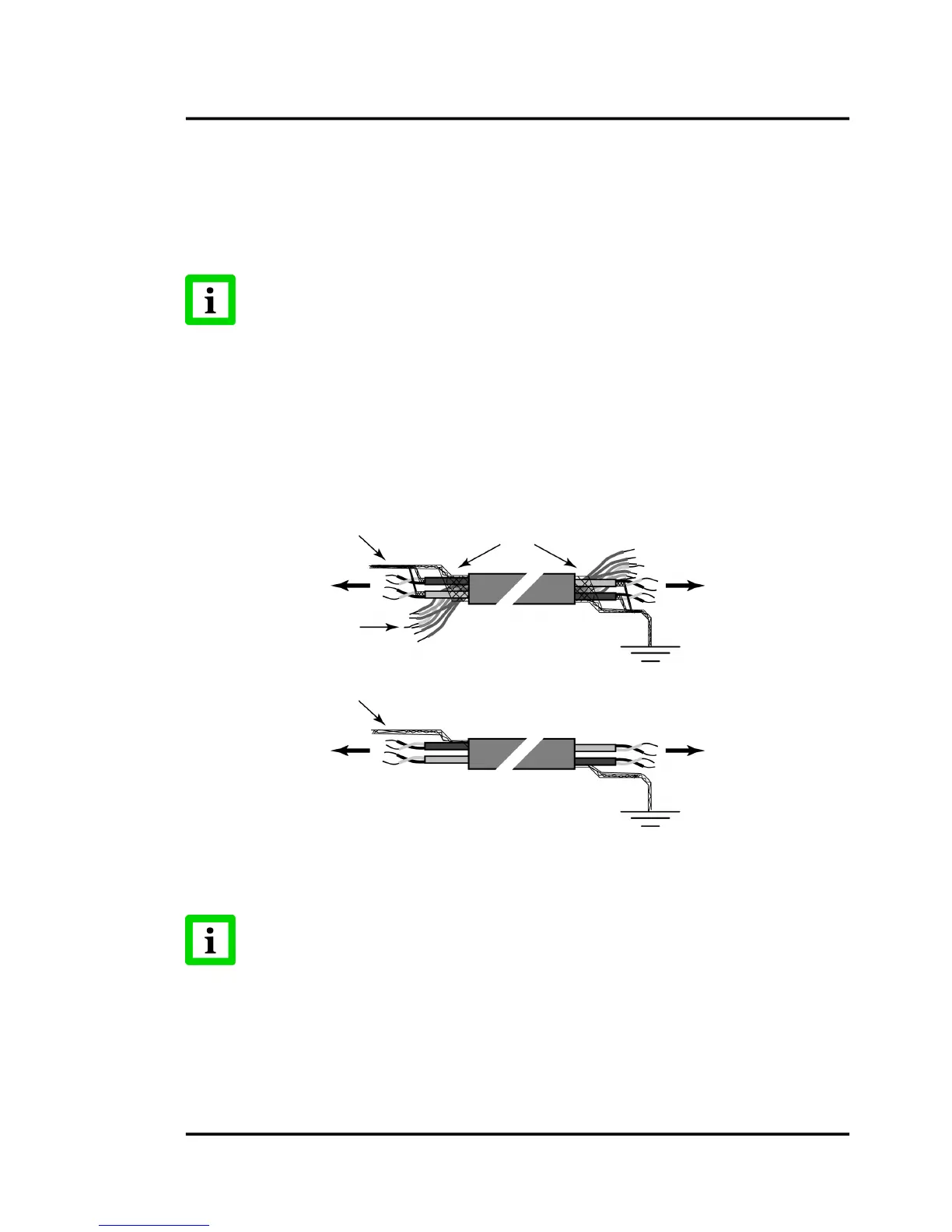
Sometimes in cable both sets of twisted‐pair wires have drain wires inside their insulation. These
drainwiresmustbeassembledandconnectedtotheterminallabeledSHIELD(bare).Alsoconnectthe
earth
groundtotheSHIELD(bare)terminal.Thefollowingfigureshowshowtoconfigurethedrain
wiresofboth4‐and12‐wirecablesbeforeconnectingtothesensorandRS485/RS232converter.
Figure14:ConfiguringtheSensorCable
Thecompletewiringmusthaveonlyonecommonearthgroundpoint!
Cablescan be runtothe electronicsenclosurethroughconduitorfastenedusingtheacompression
fitting.Onceyourunthecableintotheenclosure,attachthecolor‐codedbarewirestotheterminals.
Usethefollowingfigure(or
diagramonundersideoflid)asa wiringguide.Notethattheterminal
blocksintheelectronicsenclosurecanbe“popped”outforeasywireconnections.
Twist braided shield and two drain wires from
the two twisted pairs together




 To Next Page