Installation
MarathonSeriesFA/FR 21
5.5PowerSupply
Connectionsfroma24VDC(500mAorhigher)powersupplyattachtotheappropriateterminalson
theelectronicenclosure’sterminalstrip.
Isolated power is required, and this is provided by the appropriate manufacturer
supplied power supply accessory. Beware of use of other power supplies which may
notprovidethenecessaryisolationandcouldcauseinstrumentmalfunctionordamage!
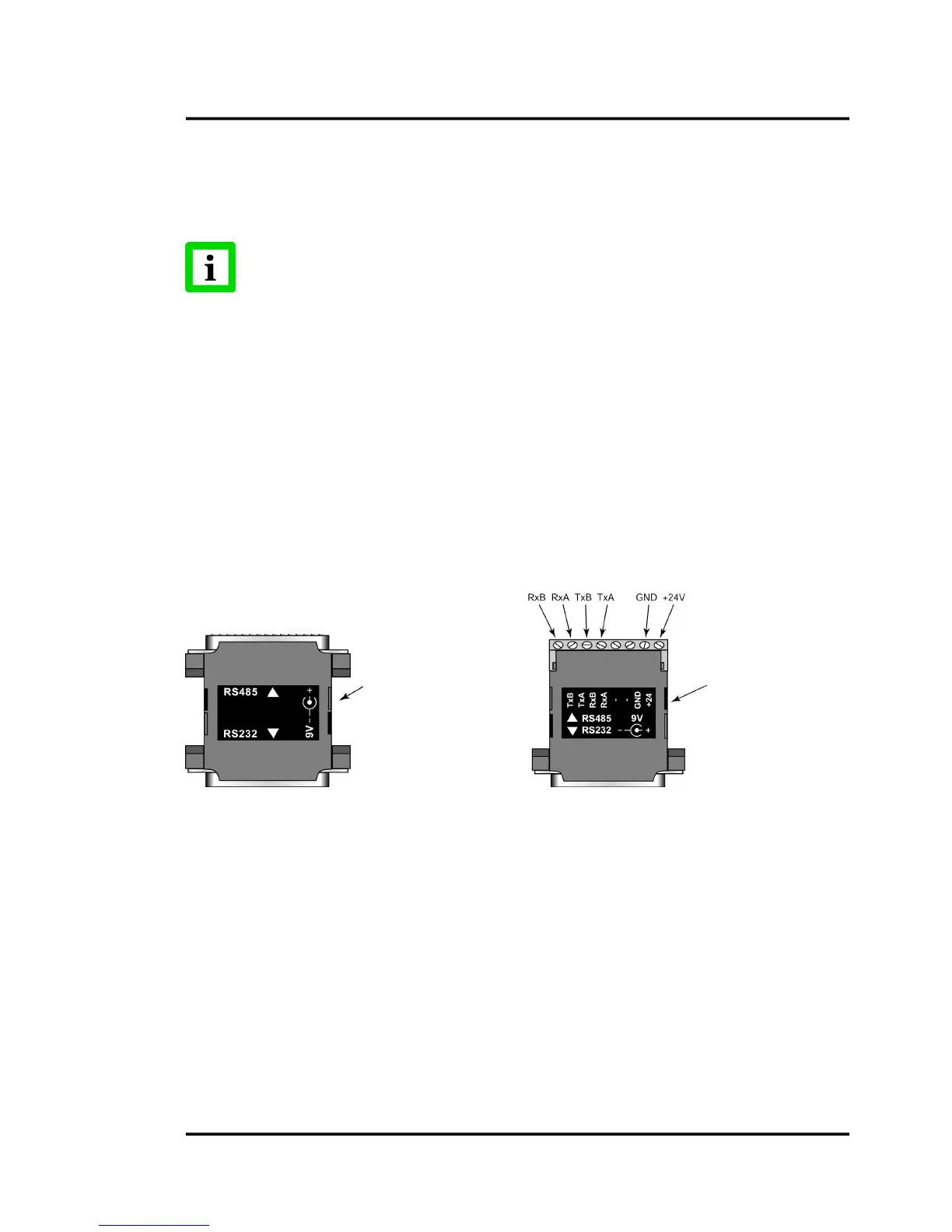
5.6RS232/485InterfaceConverter
Toconnecttoacomputer’sRS232port,youneedoneoftheInterfaceConverteraccessories(similarto
thefollowingfigure)andtheproperRS232cable.IfyourcomputerhasanRS485interfacecard,you
canconnectthesensordirectlytoitsport(usingtheproperconnector)withwiringfromtheelectronic
enclosure’sterminalblock.
ConnecttheinterfaceconvertertoanavailableCOMportonyourcomputer,eitherdirectlyorwithan
appropriateserialcable(availablefromcomputersupplystores).Ifyourcomputerhasa9‐pinserial
connector, use the supplied 25‐pin to 9‐pin cable between the interface converter
or cable and the
computer.
Forappropriateinterfaceconverters,seesection
8.5RS232/485InterfaceConverteronpage37.
Figure17:RS232/485InterfaceConverter,withpins(left,XXX485CV…)
orterminal(right,XXX485CVT…)
TheRS485outputisasfollows:
Baudrate:300,1200,2400,9600,19200,38400(default)
Note:Adjustablebaudrateonlyavailablethrough2‐wayRS485.
Dataformat:8bit,noparity,1stopbit
4‐wire,full
duplex,point‐to‐point
5.7ConnectingtoaPC
Tosetupyourcomputertoinitializethesensors,completethefollowingsteps:
1. RemovepowerfromtheFA/FRsensor!
not










 To Next Page