Operation
26 MarathonSeriesFA/FR
Thesensorhasa remotelockingfeaturethatkeepstheunitfrombeingaccidentallychangedfromthe
control panel (locked by default in multidrop mode). This lockout mode denies access to all the
switchesonthecontrolpanel.ItisavailablethroughtheRS485connectionandcanbeunlockedonly
by
acommandfromtheremotecomputer.
6.2OperationModes
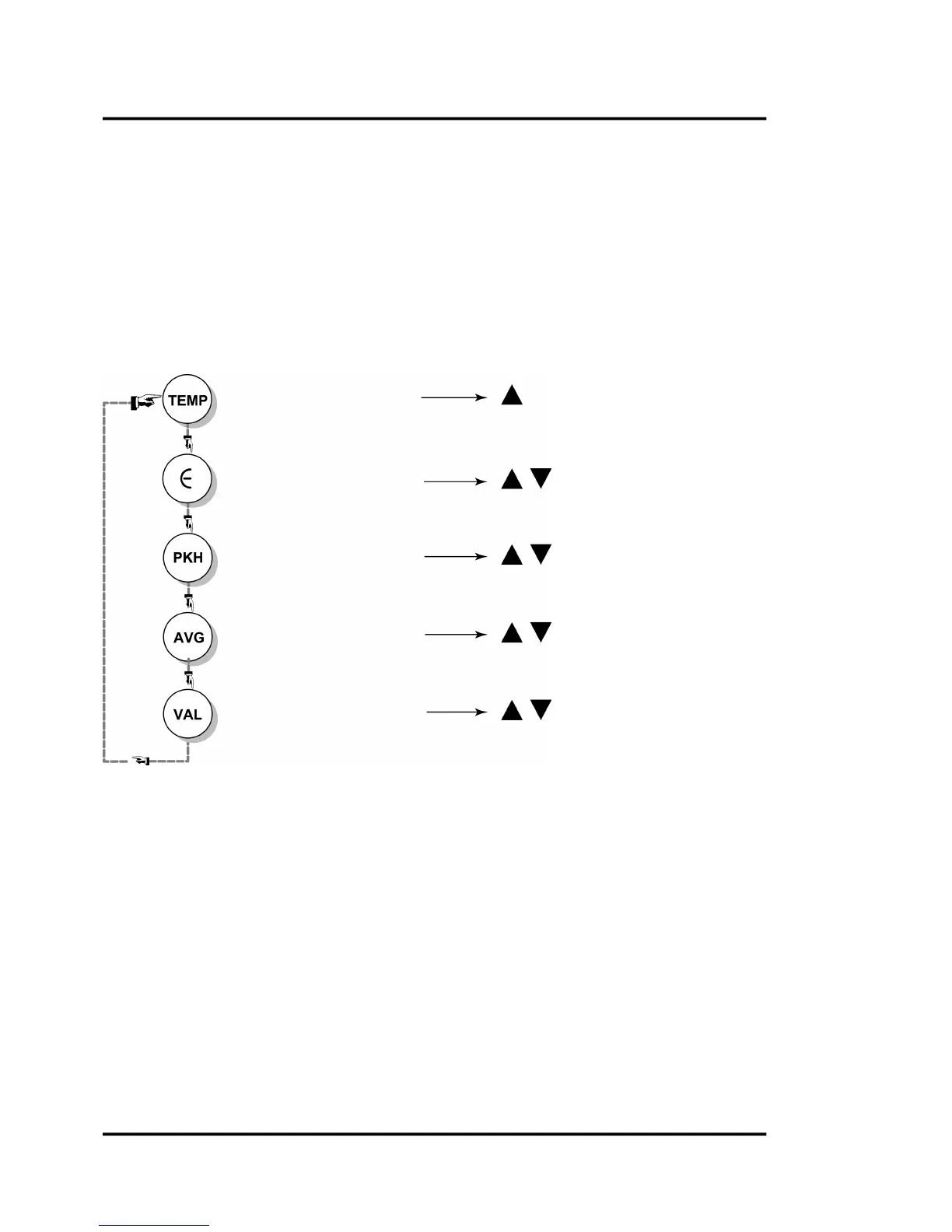
Whenyoufirstturntheuniton,thedisplayshowsthecurrenttemperature.Pushingthemodeselector
button will change the figures on the display to the current setting for each particular mode. The
following figure illustrates the sequence of operationfor the mode selector button when in current
temperaturemode.
Figure24:ModeSelectorButtonSequence(FAModels)
Display current temperature Switches between °C and °F
Display/Change emissivity
default: 1.00
Raises and lowers emissivity
Display/Change peak hold setting
default = 0 sec / off
Raises and lowers







 To Next Page