Maintenance
MarathonSeriesFA/FR 51
10.4.2MountingtheFiberOpticCable
10.4.2.1AttachingtheFiberOpticCabletotheOpticalHead
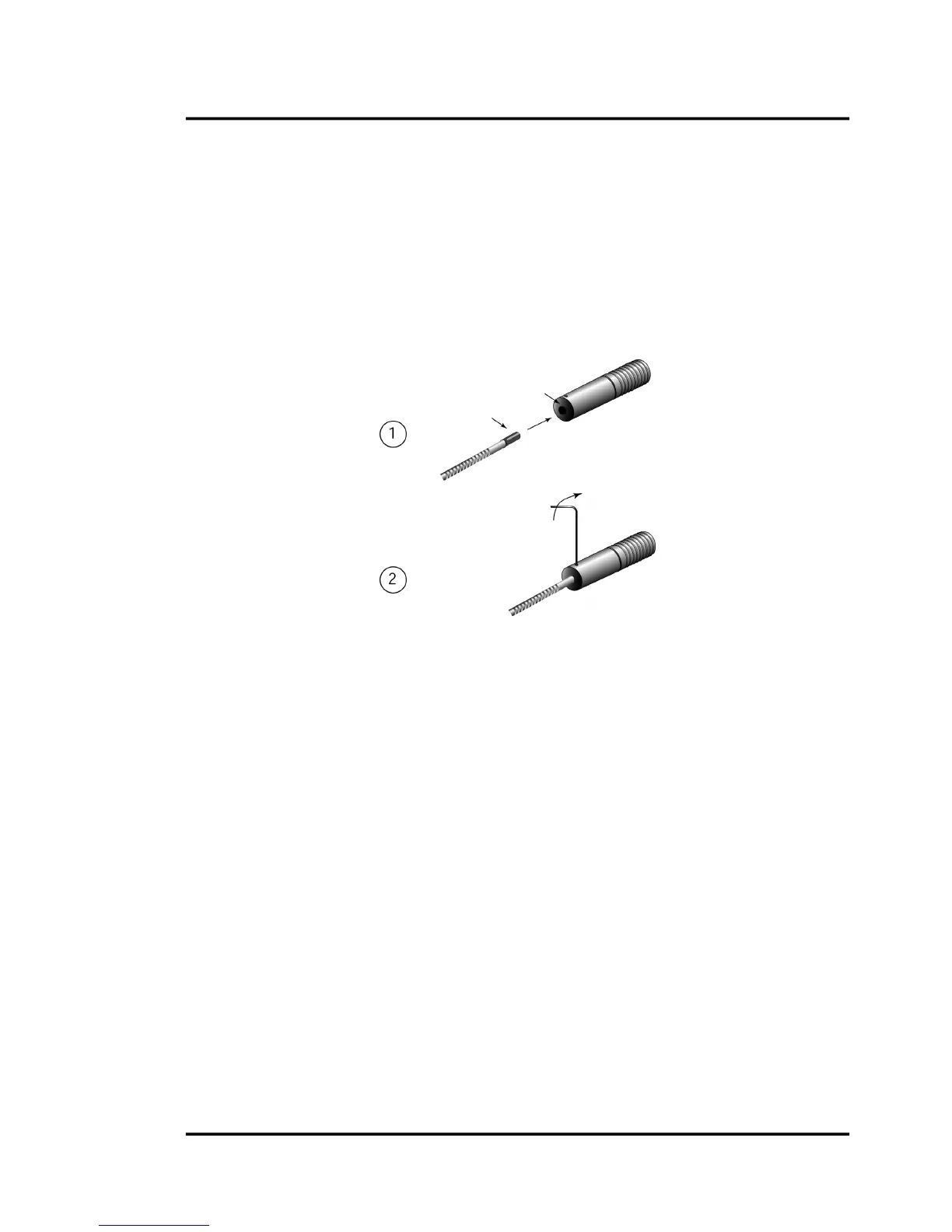
Completethefollowingstepstoattachthefiberopticcabletotheopticalhead:
1. Thefiberopticcableferrulehasakeyslotonitssurface.Inserttheferruleintotherearofthe
opticalhead.Turntheheaduntil
thekeyontheferrule’s keyslotengagesthekeypininside
thehead.
2. Makesurecableispushedinallthewaybeforetighteninghexscrew!Tightenthehexscrew
withthe1.3mm(0.050”)hexwrenchuntilsnug.Donotovertighten!
Figure38:AttachingtheFiberopticCabletotheOpticalHead
10.4.2.2AttachingtheFiberOpticCabletotheElectronicsHousing
Completethefollowingstepstoattachthefiberopticcabletotheelectronicshousing:
1. Insertthetipofthefiberopticcableintothematingreceptacleonthe
electronicsenclosure.
Thecableferruleiskeyedandcangoinonlyoneway.
2. Pushconnectingsleeveinuntilitstops(approx.15mm/0.6in),see
Figure13,p.17.
3. Tightenthescrew(fingertightenonly)onthematingreceptacle.
4. Tightenthecable’scompressionfitting.
Key slo






 To Next Page