Operation
MarathonSeriesFA/FR 27
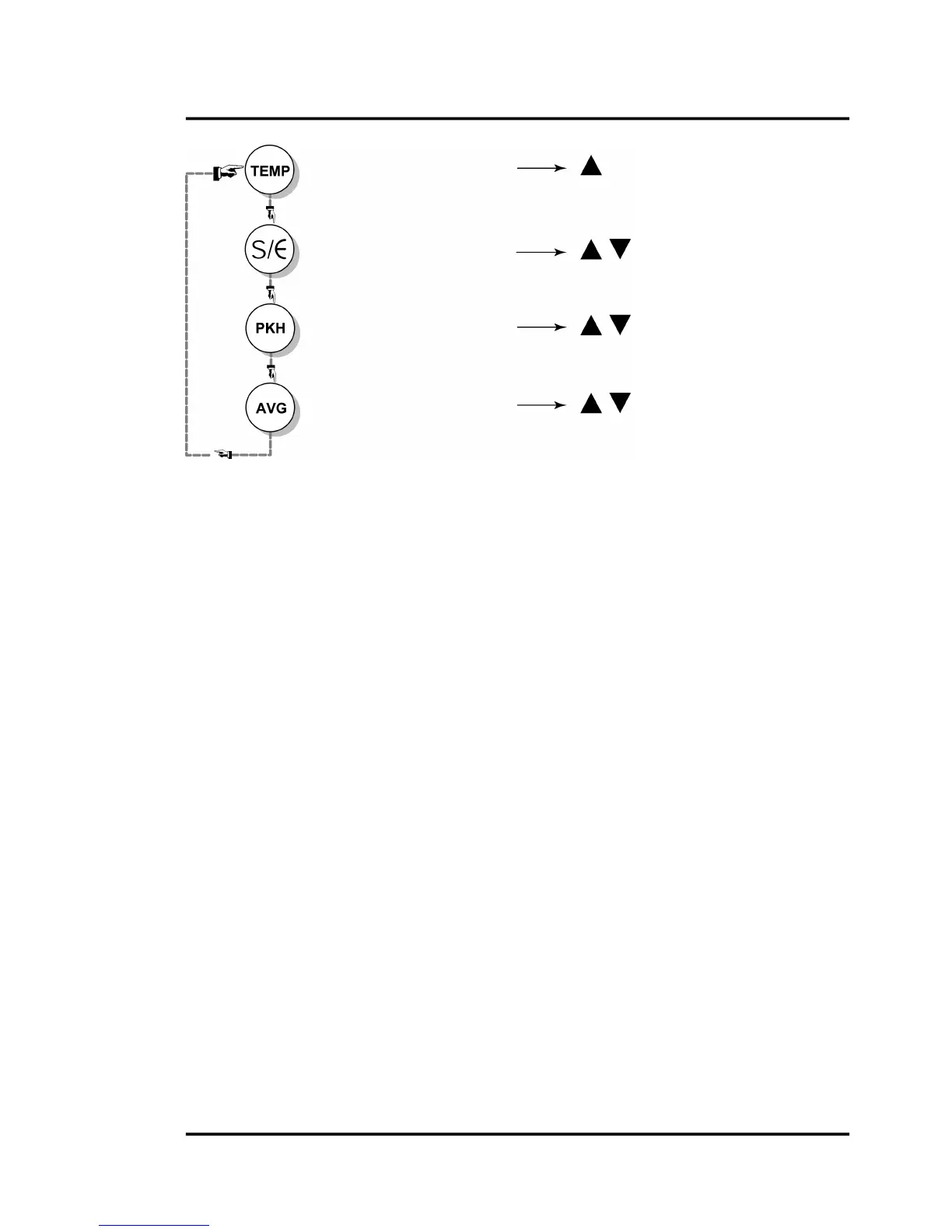
Figure25:ModeSelectorButtonSequence(FRModels)
6.2.1TemperatureDisplay
The temperature displaycanbe setfor either °Cor °F bypressing the C/F selector button (c – up
arrow), which also doubles as the Increase Value button for the other modes. The Decrease Value
(d – down arrow) button is inactive in this mode. A lit LED shows
you whether the measured
temperature is in °C or °F. Note that this setting influences the RS485 output for both target and
internaltemperatures.
6.2.2Emissivity(1‐Color)
Youcansettheunitupforeither1‐coloror2‐colormeasurements.The1C/2Cselectorbuttononthe
controlpanelswitchesbetweenthetwofunctions.OneoftheredLEDs,labeled1Cand2C,willshow
whatfunctionisactive.
Theemissivityisacalculatedratioofinfraredenergy
emittedbyanobjecttotheenergyemittedbya
blackbody at the same temperature (a perfect radiator has an emissivity of 1.00). The emissivity is
presetat1.00.Forinformation on determininganunknownemissivity,andforsampleemissivities,
refertosection
11.1DeterminationofEmissivityand11.2TypicalEmissivityValues,p.54f.
Tochangetheunit’semissivitysetting,completethefollowing:
1. Makesurethe1CLEDislit.
2. Press the Mode button until the Є LED is lit. The current emissivity value shows on the
display.
3. Pressthec ord buttontochangethevalue.
4. Press the
Modebutton several times untilthe C or F LEDislit.The displayedtemperature
willnowbebasedonthenewemissivityvalue.
6.2.3Slope(2‐Color)
Theslopeisthequotientoftheemissivitiesbasedonthenarrowandthewidespectralrange(firstand
secondwavelength).Theslopeispresetatthefactoryat1.000.
Display/Change emissivity (1-color mode)








 To Next Page