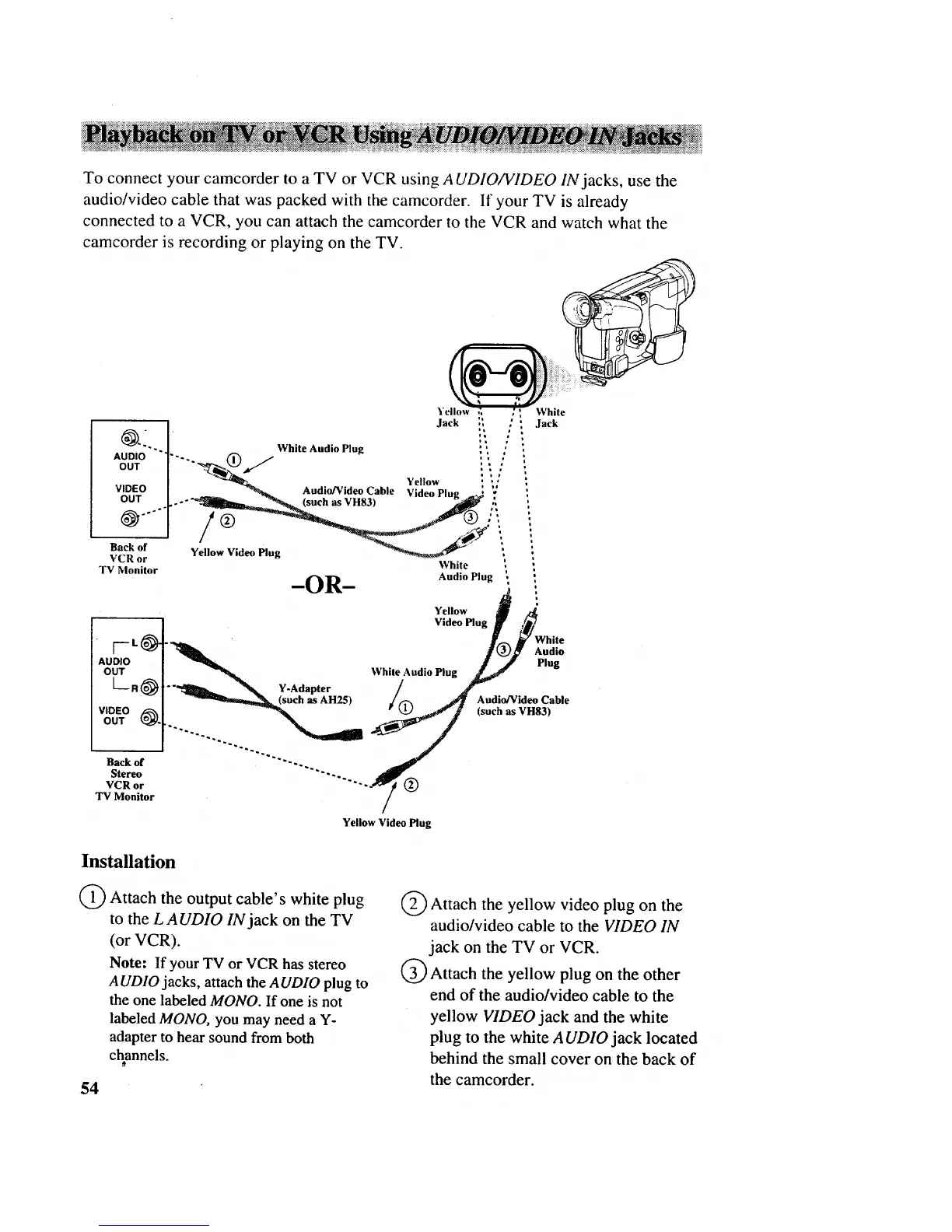
To connect your camcorder to a TV or VCR using AUDIO/VIDEO IN jacks, use the
audio/video cable that was packed with the camcorder. If your TV is already
connected to a VCR, you can attach the camcorder to the VCR and watch what the
camcorder is recording or playing on the TV.
AUDIO
OUT
ellow White
tm
ml
..... _b,-'_"(_) / Y II _ 11i..,iWhiteAudio Plug
__ e o"
VIDEO Audio/Video Cable Video Plug " "
OUT ..... -"_Illm_-.-_ (such as VH83) ..... _ ,',
/@.... ._
i
Yellow Video Plug
VCR or
TV Monitor White ,
Audio Plug '
Jack ., ' .lack
-OR-
Yellow _ ,t_
Video Plug _) ,_11
y INhite
" "
Audio
AUDIO ] _ Plug
OUT ] _ While Audio Plug
L R(_]"__s_d_t_rH25)/@ Audio/VideoCable
V_DETO@1 "_ (such as VH83)
Back of
Stereo
VCR or
TV Monitor
Yellow Video Plug
Installation
O Attach the output cable's white plug
to the LAUDIO IN jack on the TV
(or VCR).
Note: If your TV or VCR has stereo
A UDIO jacks, attach the AUDIO plug to
the one labeled MONO. If one is not
labeled MONO, you may need a Y-
adapter to hear sound from both
channels.
54
Q Attach the yellow video plug on the
audio/video cable to the VIDEO IN
jack on the TV or VCR.
Q Attach the yellow plug on the other
end of the audio/video cable to the
yellow VIDEO jack and the white
plug to the white A UDIO jack located
behind the small cover on the back of
the camcorder.



 To Next Page