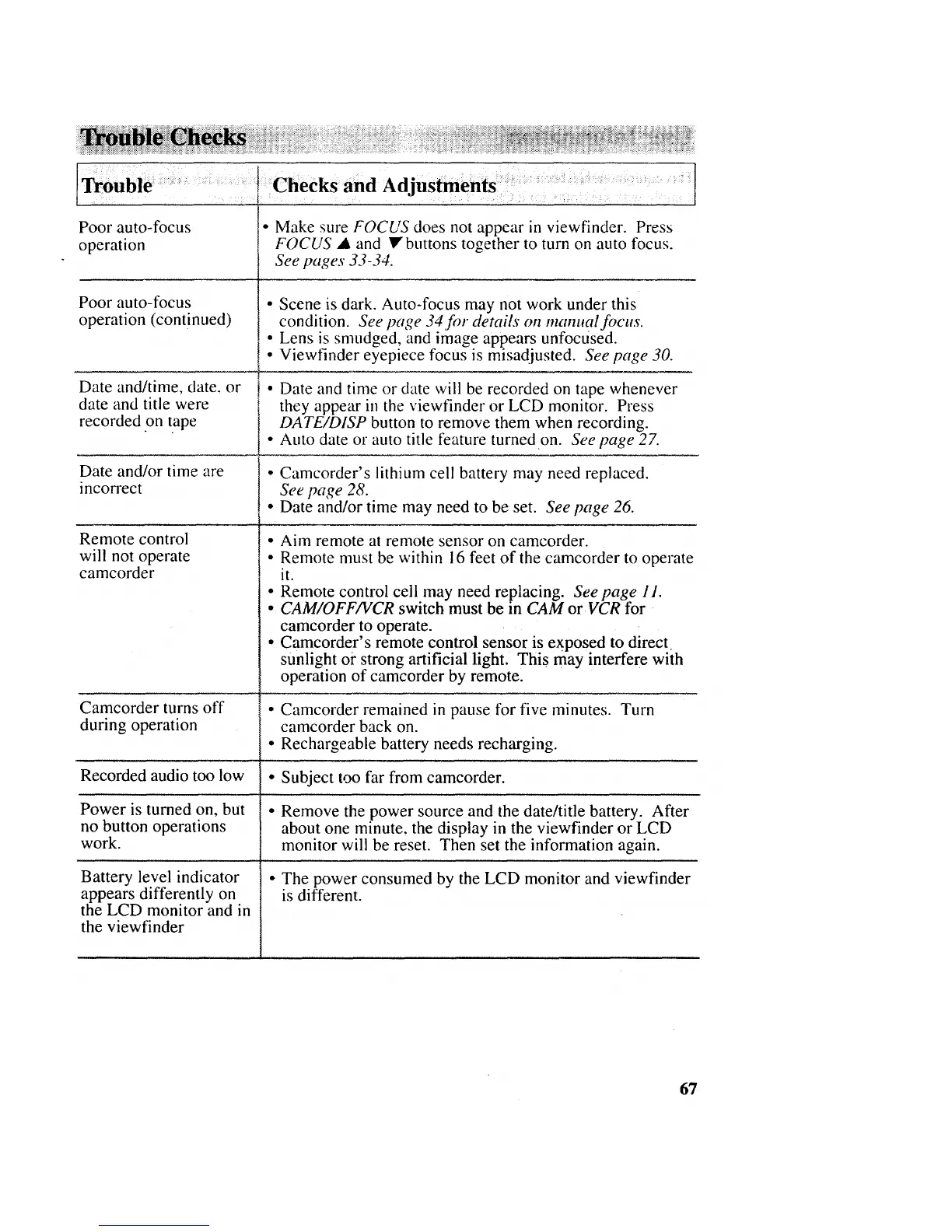
Poor auto-focus
operation
Poor auto-focus
operation (continued)
Date and/time, date. or
date and title were
recorded on tape
Date and/or time are
incon'ect
Remote control
will not operate
camcorder
Camcorder turns off
during operation
• Make sure FOCUS does not appear in viewfinder. Press
FOCUS • and • buttons together to turn on auto focus.
See pages 33-34.
• Scene is dark. Auto-focus may not work under this
condition. See page 34for details on mammal focus.
• Lens is smudged, and image appears unfocused.
• Viewfinder eyepiece focus is misadjusted. See page 30.
• Date and time or date will be recorded on tape whenever
they appear in the viewfinder or LCD monitor. Press
DATE/DISP button to remove them when recording.
• Auto date or auto title feature turned on. See page 2Z
• Camcorder's lithium cell battery may need replaced.
See page 28.
• Date and/or time may need to be set. See page 26.
• Aim remote at remote sensor on camcorder.
• Remote must be within 16 feet of the camcorder to operate
it.
• Remote control cell may need replacing. Seepage 11.
• CAM/OFF/VCR switch must be in CAM or VCR for
camcorder to operate.
• Camcorder's remote control sensor is exposed to direct
sunlight oi" strong artificial light. This may interfere with
operation of camcorder by remote.
• Camcorder remained in pause for five minutes. Turn
camcorder back on.
• Rechargeable battery needs recharging.
Recorded audio too low • Subject too far from camcorder.
Power is turned on, but • Remove the power source and the date/title battery. After
no button operations about one minute, the display in the viewfinder or LCD
work. monitor will be reset. Then set the information again.
Battery level indicator
appears differently on
the LCD monitor and in
the viewfinder
• The power consumed by the LCD monitor and viewfinder
is different.
67



 To Next Page