C OPYRI GHT © 2017 R ED.C O M , I NC 955- 01 38 _V6.3, REV-D | 53
WEAPON/EPIC-W OPERATION GUIDE
4
BASIC MENUS
AND CONTROLS
GUI MENU INTRODUCTION
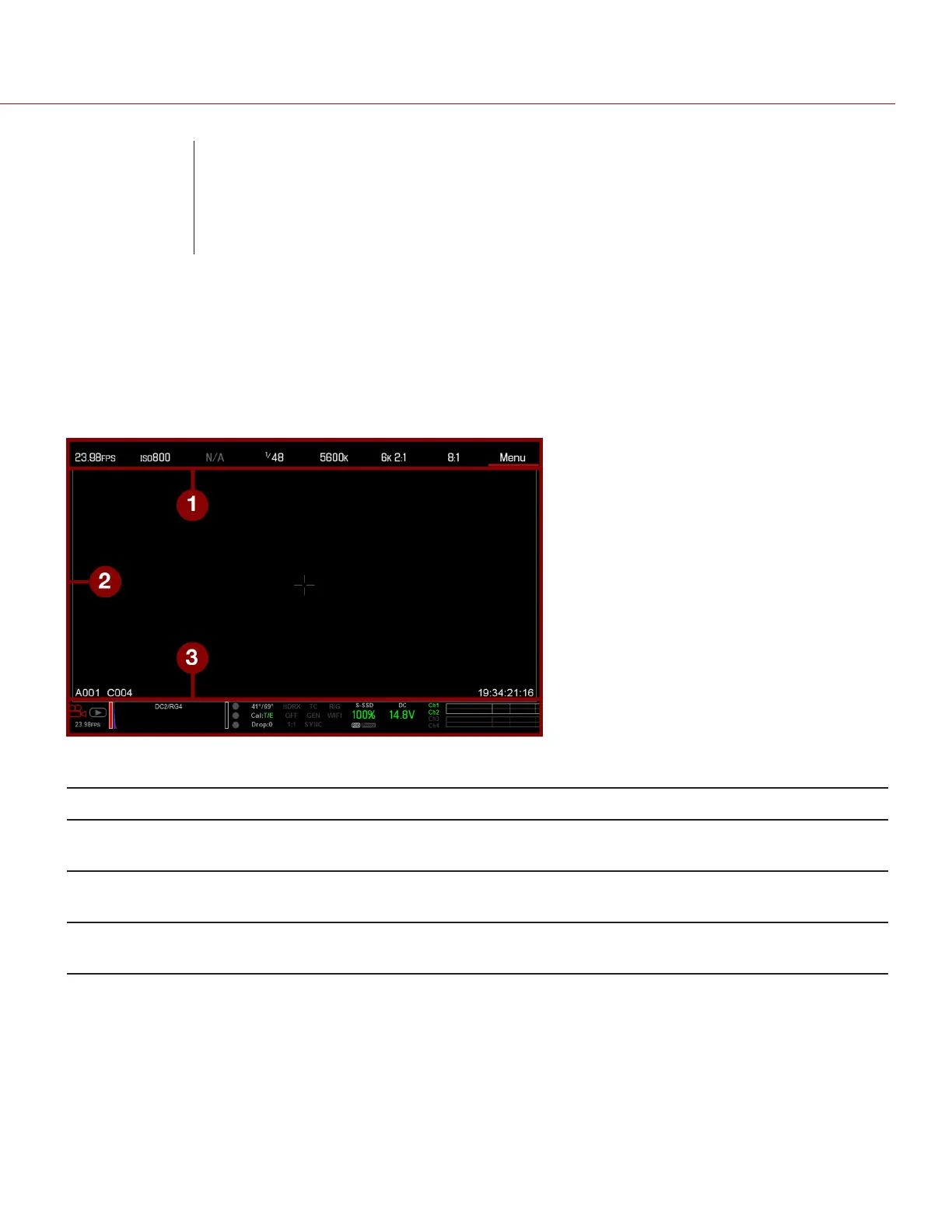
This section describes the structure and layout of the graphical user interface (GUI) that overlays the video monitor
signal. Advanced GUI menu controls enable convenient access to menus, overlays, and other critical camera
information. Functionality varies based on monitor output type and firmware version. The GUI menu is separated into
three (3) main sections:
Figure: GUI Control Menu
# ITEM DESCRIPTION
1 Upper Status Row
(Basic Menu)
Easy access to primary camera capture parameters. Go to "Upper Status Row (Basic
Menu) " on the next page.
2 Live Action Area Live camera recording view, overlays, guides, and more. Go to "Live Action Area " on
page58.
3 Lower Status Row Critical camera parameters, record/playback modes, media and power status, and audio
meter. Go to "Lower Status Row" on page60.



 To Next Page