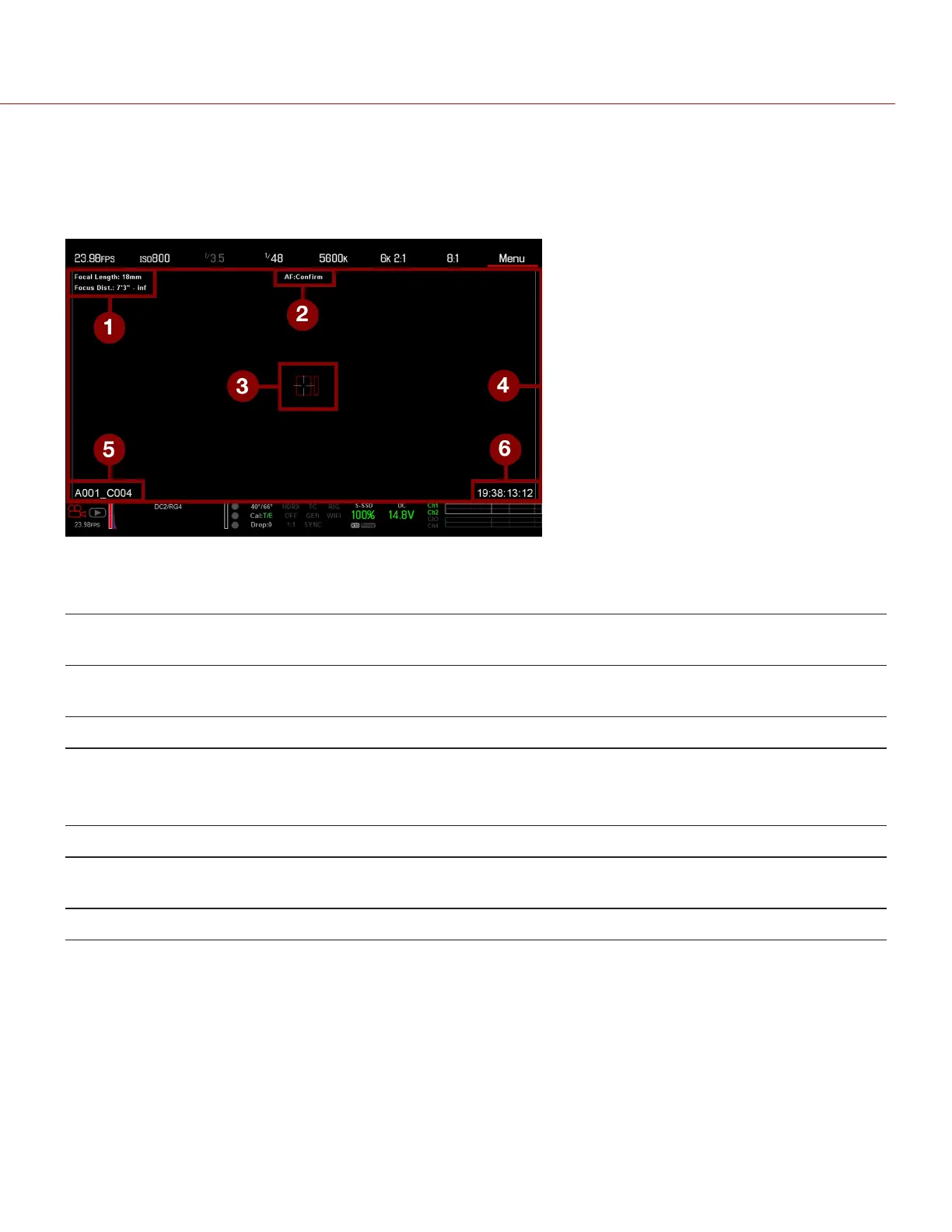
LIVE ACTION AREA
The Live Action Area contains the recorded image area plus Surround View look around area, plus overlays for Frame
Guides, Safe Action/Safe Title, Clip Name, and Timecode values. The color of each overlay can be customized to
maximize the contrast between the guide(s) and scene being captured.
Figure: Live Action Area
The Live Action Area includes the following GUI elements:
# ITEM DESCRIPTION FOR MORE
INFORMATION, GO TO...
1 Lens Information Lens information when using supported Canon lenses "Lens Information" on the
next page
2 AF Status Currently selected auto focus mode "Focus Menu" on page146
3 Center Crosshair and Spot
Focus Guide
Crosshair: Center of selected guide
Reference guides: Safe Action/Safe Title, Picture
Center, Grid Overlay
"General Tab" on page87
4 Frame Guides Record or sensor projection area "Guides" on page87
5 Clip Filename Filename of the clip being recorded, or filename of the
next clip to be recorded
DSMC Media Operation
Guide
6 Timecode Value Current timecode value "Timecode" on page164
C OPYRI GHT © 2017 R ED.C O M , I NC 955- 01 38 _V6.3, REV-D | 58
WEAPON/EPIC-W OPERATION GUIDE



 To Next Page