SWIPE-UP MENU
The Swipe-Up Menu is available in the Lower Status Row on RED Touch displays and provides Swipe-Up Shortcuts
for Motion mode, Stills mode, and Playback.
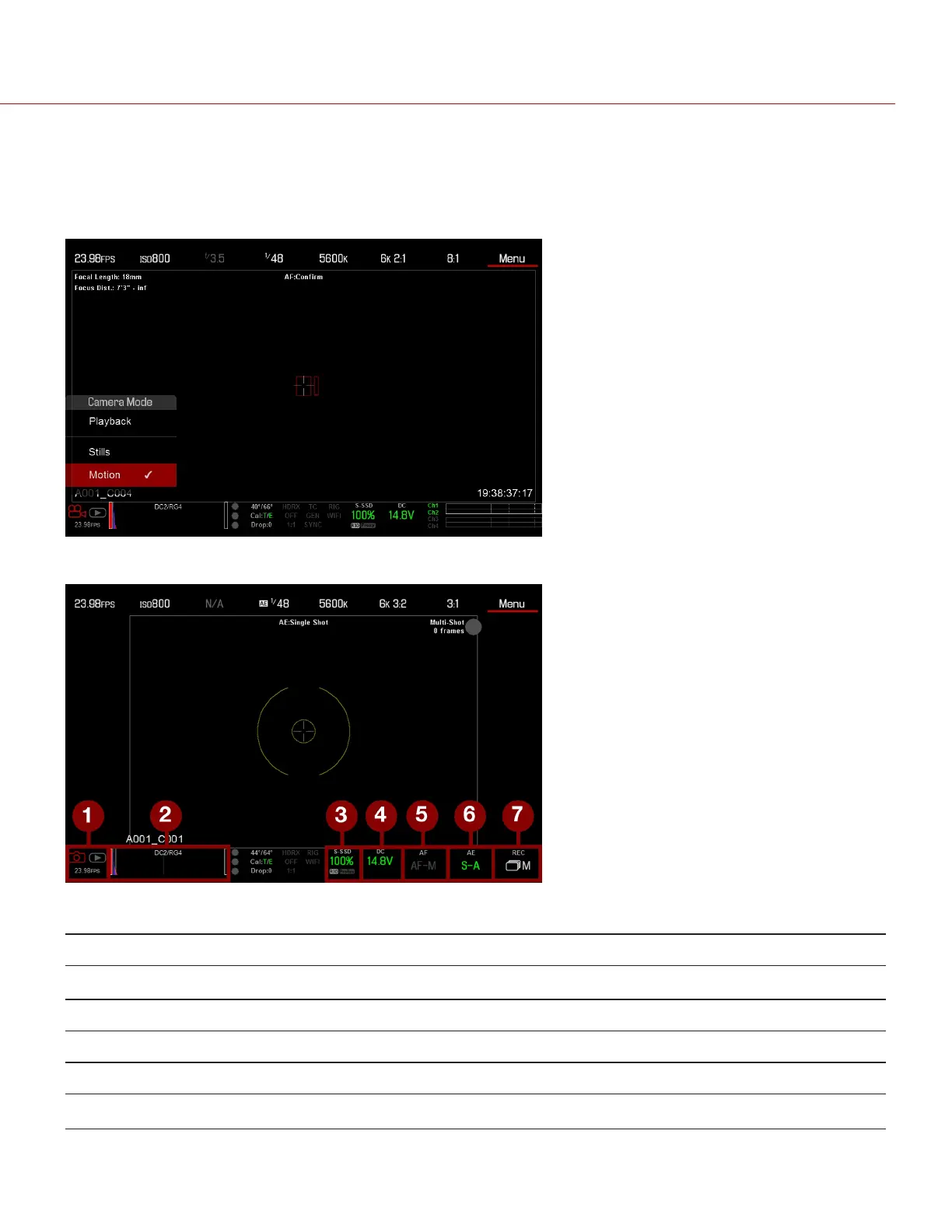
For example, select the Camera Mode icon in the Lower Status Bar, swipe up, and select a Camera Mode.
Figure: Swipe Up to Select a Camera Mode
Figure: Stills Mode
# SWIPE-UP SHORTCUT DESCRIPTION
1 Camera Mode
1
Select Playback, Motion, or Stills
2 Tools Set Horizon, RAW, Magnify, Zebras, and False Color
3 Media View as Percentage or Time Remaining, eject media, view clip thumbnails
4 Power View as Percentage or Time Remaining
5 Auto Focus
2
Set Zone, Size, and Mode
C OPYRI GHT © 2017 R ED.C O M , I NC 955- 01 38 _V6.3, REV-D | 68
WEAPON/EPIC-W OPERATION GUIDE



 To Next Page