b) Programming via the Programming Card
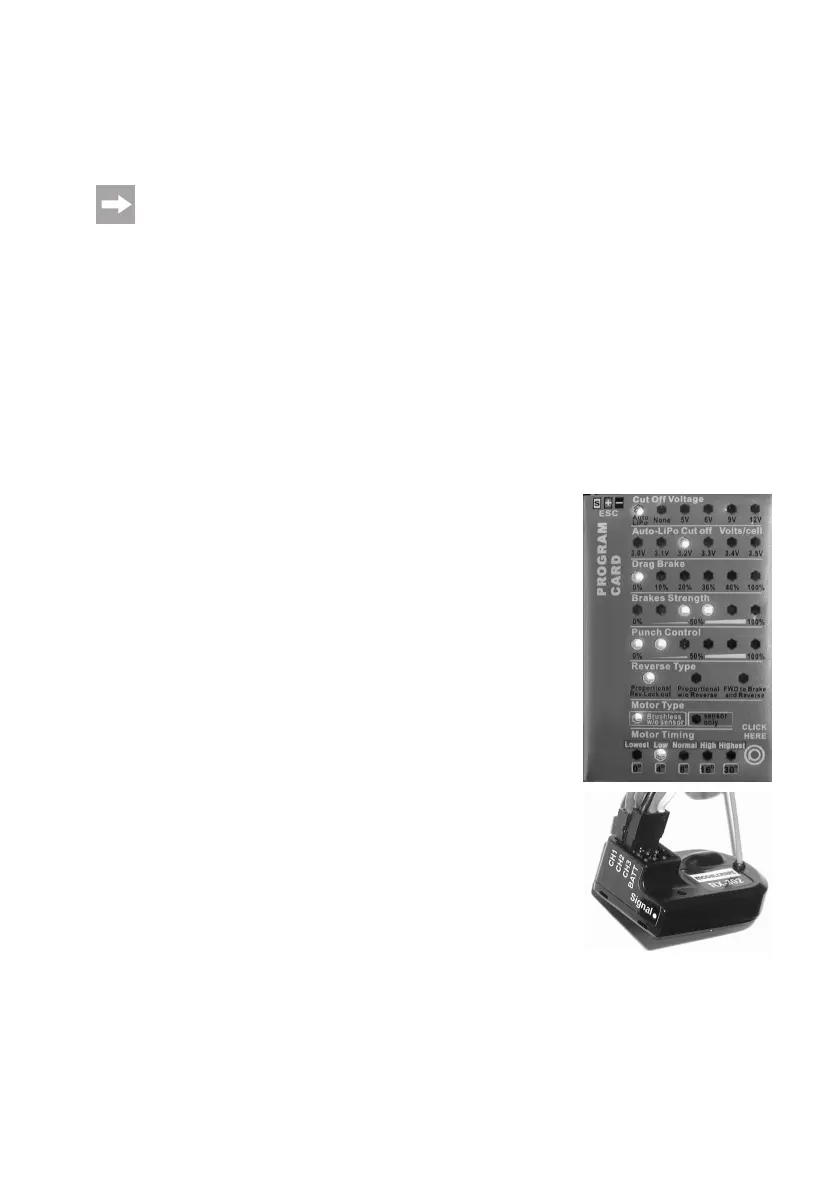
Use the enclosed programing card to change various settings of the speed controller easily. For this, two fully charged
2-cellLiPodrivingbatteriesthatmusttakeoverthepowersupplyofthespeedcontrollerandprogrammingcardare
required just as for operation of the vehicle.
If there is a miniature USB socket at the bottom of the programming card, it serves only for updates by the
manufacturer. Do not connect anything here.
Proceed as follows:
• Turnoffthespeedcontroller(switchto„OFF“;seegureinchapter9.f).
• Turnoutthefourscrewsofthereceiverboxlidagainandtakeitoff.
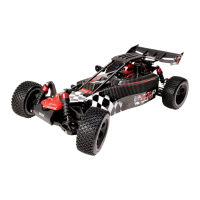
• Pulltheplugofthe3-poleconnectioncableofthespeedcontrollerfromtheconnectionofchannel2(„CH2“)ofthe
receiver (remember the orientation of the plug or the colours of the cable).
• Pushthe3-pinplugofthespeedcontrollerintothecorresponding3-pinconnectionattheupperedgeofthepro-
gramming card. Observe correct alignment; see coloured mark next to the connection (white = „S“, red = „+“,
black = „-“).
• Nowconnectthetwofullycharged2-cellLiPodrivingbatteriestothespeedcontrollerviatheenclosedY-recharge-
able battery adapter.
• Switchonthespeedcontroller(switchposition„ON“).
• TheLEDsontheprogramingcardnowshowthecurrentsettingofthecorres-
pondingfunctions(seedescriptiononthenextpage);theupperLEDat„CutOff
Voltage“ashes.
• Ifasettingistobechanged,pushthebuttonatthelowerrightontheprograming
cardseveraltimesuntiltheLED(s)ofthefunctionthatyouwanttochangeash
(e.g. „Brakes Strength“).
Now keep the button at the lower right of the programing card pushed (do not
release).TheLED(s)ofthefunctionjustselectedswitchtothenextsetvalue
(e.g. 0%........100%).
Release the button again when the desired set value is reached.
TheLED(s)oftheselectedfunctionashagainandyoucanswitchtothenext
functionbybrieypushingthebutton,etc.
• Ifyouhavemadeallsettings,switchoffthespeedcontroller.Allchangesmade
are saved in the speed controller automatically.
• Disconnecttherechargeablebatteriesfromthespeedcontrollerandcompletely
remove the plug connection.
• Connectthe3-poleplugofthespeedcontrollertotheintendedconnection„CH2“
at the receiver again (observe correct orientation; the black GND/mass line is
located towards the edge of the receiver).
• Re-attachthelidofthereceiverboxandscrewittight.
• Yourvehiclecannowbeoperatedwiththenewlyprogrammedspeedcontroller.


 To Next Page