2.7
ENG_UD68946_6
Carte (XNX - Renault)
MAP (6/7)
Guidance
Guidance is activated once the route
has been calculated. The multimedia
system guides you all the way along
your route, informing you at each inter-
section of the direction to follow over
several stages.
Step 1: Preparation
The multimedia system will inform you,
using the navigation voice, that you will
soon have to carry out a manoeuvre.
Step 2: Alert
The multimedia system announces the
manoeuvre that you need to carry out.
e.g. “In 400 metres, take the next exit”.
The screen displays a detailed repre-
sentation or 3D image of the manoeu-
vre.
Step 3: Manoeuvre
The multimedia system indicates which
manoeuvre should be carried out.
e.g. “Take the next right”.
Once the manoeuvre has been com-
pleted, the map will appear in full
screen.
Note: if you do not follow the driving
recommendations or if you quit the
calculated route, a new route is auto-
matically calculated by the multimedia
system.
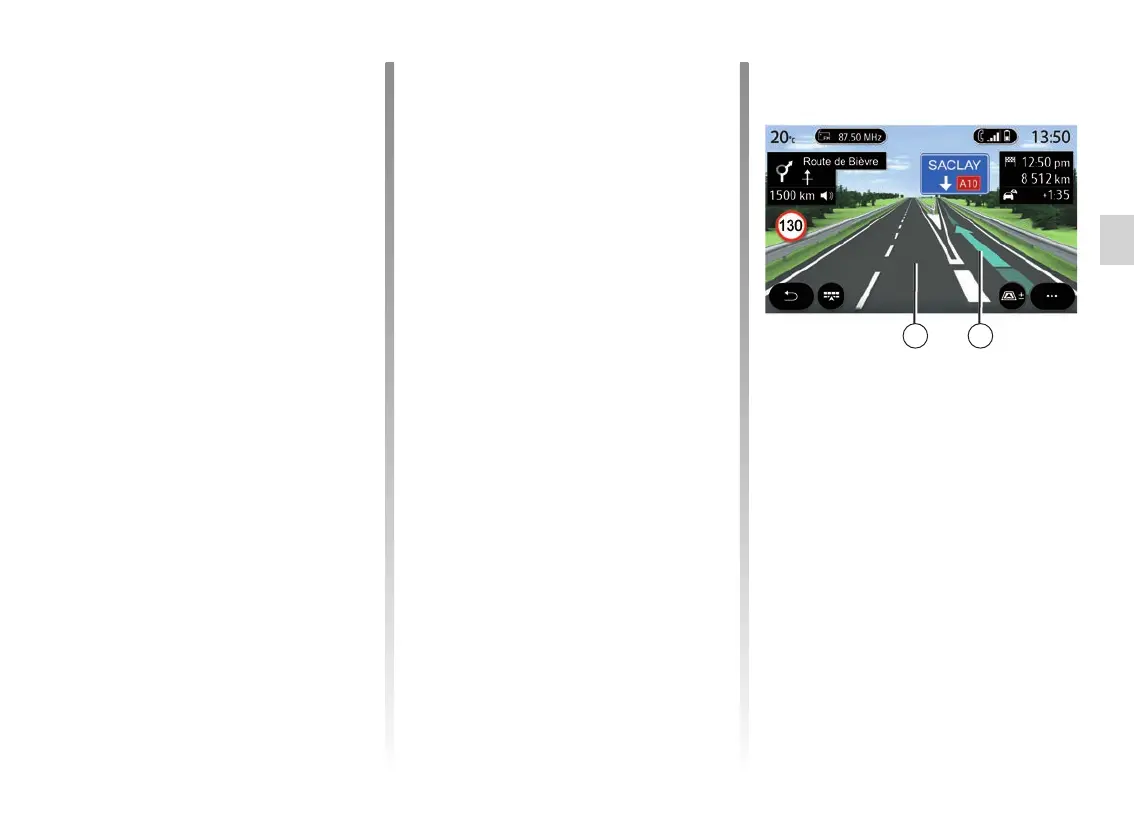
Lane
The display automatically switches to
a more detailed view in order to guide
you to the correct lane for the next ma-
noeuvre:
– lane(s) 3 without direction arrow(s):
the lane should not be taken accord-
ing to the route calculated;
– lane(s) 4 with direction arrow(s): the
lane should be taken according to
the route calculated.
Note: other lanes may appear during
the manoeuvre.
3 4



 To Next Page