2.19
ENG_UD68534_6
Entrer une destination (XNX - Renault)
ENTERING A DESTINATION (11/18)
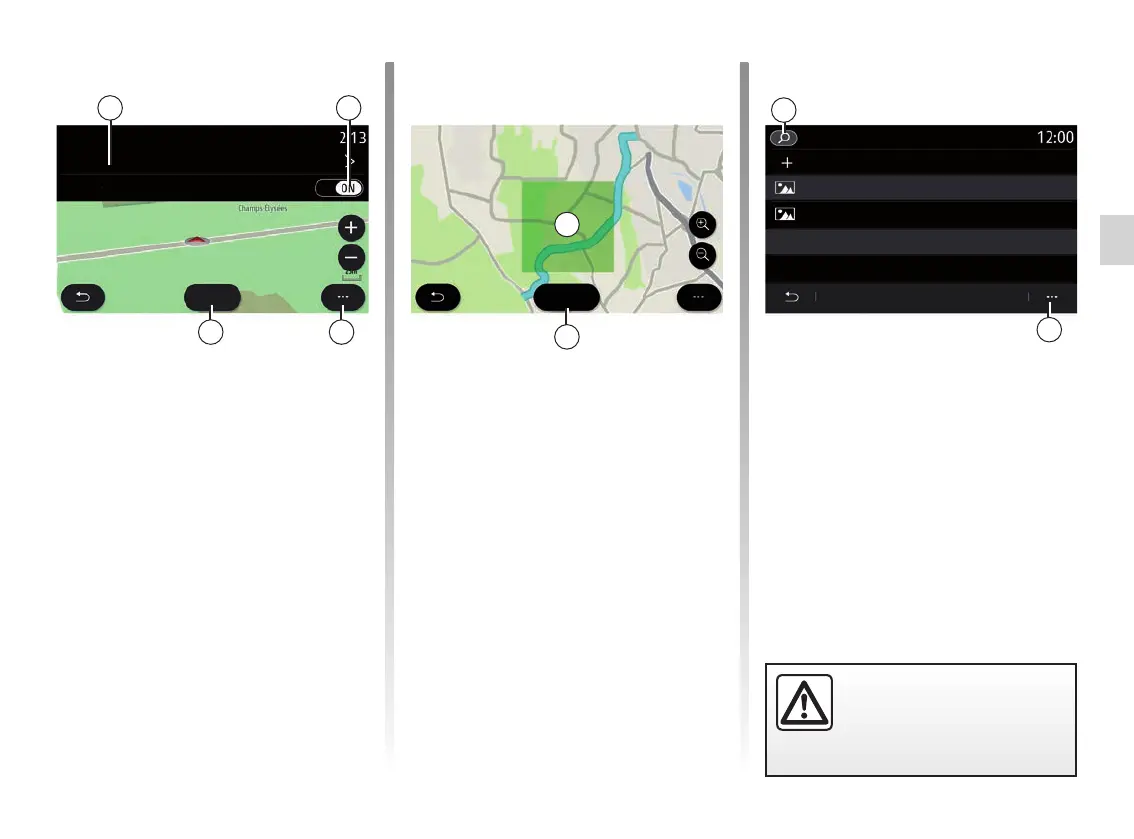
Press the “Draw” button 31 to desig-
nate an area to avoid.
Briefly press the map to display the
“Avoidance areas” 32.
Pinch/spread to enlarge or reduce the
area selected.
Press the “Save” button 33 to add the
selected area to the list of areas to
avoid.
To modify a “Avoidance areas”, select it
from the list of areas to be avoided and
press the “Edit” button on the map.
33
35
34
Bordeaux, France
Paris, France
Add new avoidance area
Save
Avoidance areas
Avoidance areas
From the pop-up menu 35 of the
“Avoidanceareasˮ menu, press:
– “Delete “ (select one or more areas
to be avoided);
– “Delete all”.
By pressing the magnifying glass 34
you can search for stored areas to
avoid.
“Avoidance areas”
Use this function to avoid a set or de-
fined geographical area.
From the “Avoidance areas” menu,
press “Add new avoidance area” or
select previously stored areas. Press
“Name” 28 to change it using the
keypad.
Choose to avoid a certain sections of
motorway using the 29 button.
From the 30 pop-up menu, press
“Select city” to manually enter the coun-
try and town.
29
30
28
For safety reasons, carry
out these operations when
the vehicle is stationary.
32
Avoidance areas
Name
Draw
Motorways
Unknown
31



 To Next Page