7.2 Heated Chamber
The heated building chamber (80 °C max) allows to process the latest technical laments for highly durable
parts and functional models.
Warping and shrinking eects of conventional laments can be reduced eectively.
You can control the heated chamber via Repetier Server, its stored as „Extruder 3“. Please read chapter „5.4
Device panel - control“ ( p.29) about how to set temperatures in Repetier Server.
Please contact your reseller for further information.
7.3 Z-Home Position
Compared to all other 3D printers from GermanRepRap the homing procedure of the x500 is dierent.
Z-home is dened as the lowest point of the Z-axis the printbed can reach.
From here a value is measured called the „Z-MAX length“. This value determins how high the printbed can
go. Your X500 is already calibrated, but in case any changes are made to the hot-end, e.g. changing the
nozzle, there might be a need for small adjustments.
1.
4.
3.
2.
z.B.
5.
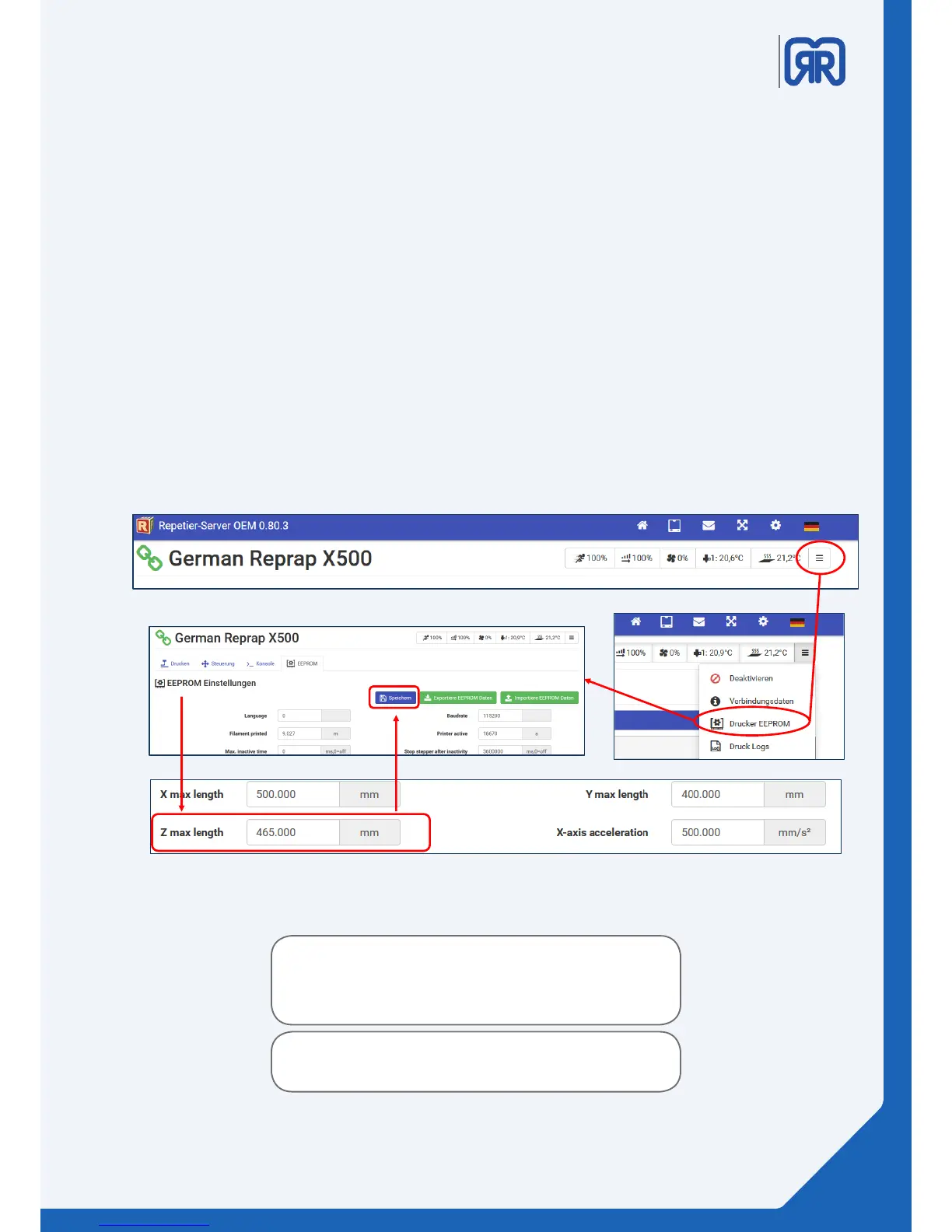
The Z-MAX LENGTH can be adjusted via the Repetier-Server, please follow the instructions above to enter
the EEROM of your x500. Here you can edit the Z-MAX LENGTH ( nr.4).
Warning:
Using the wrong values can damage the printer. The
printbed might collide with the toolhead or even the
carriage itself.
If you are not sure about the process of adjsuting the
printbed height, please contact your reseller
37/45



 To Next Page