8. Tipps & Tricks
8.1 How to determine the X500s MAC address
The MAC address of your X500 can be identied via the device´s LCD display.
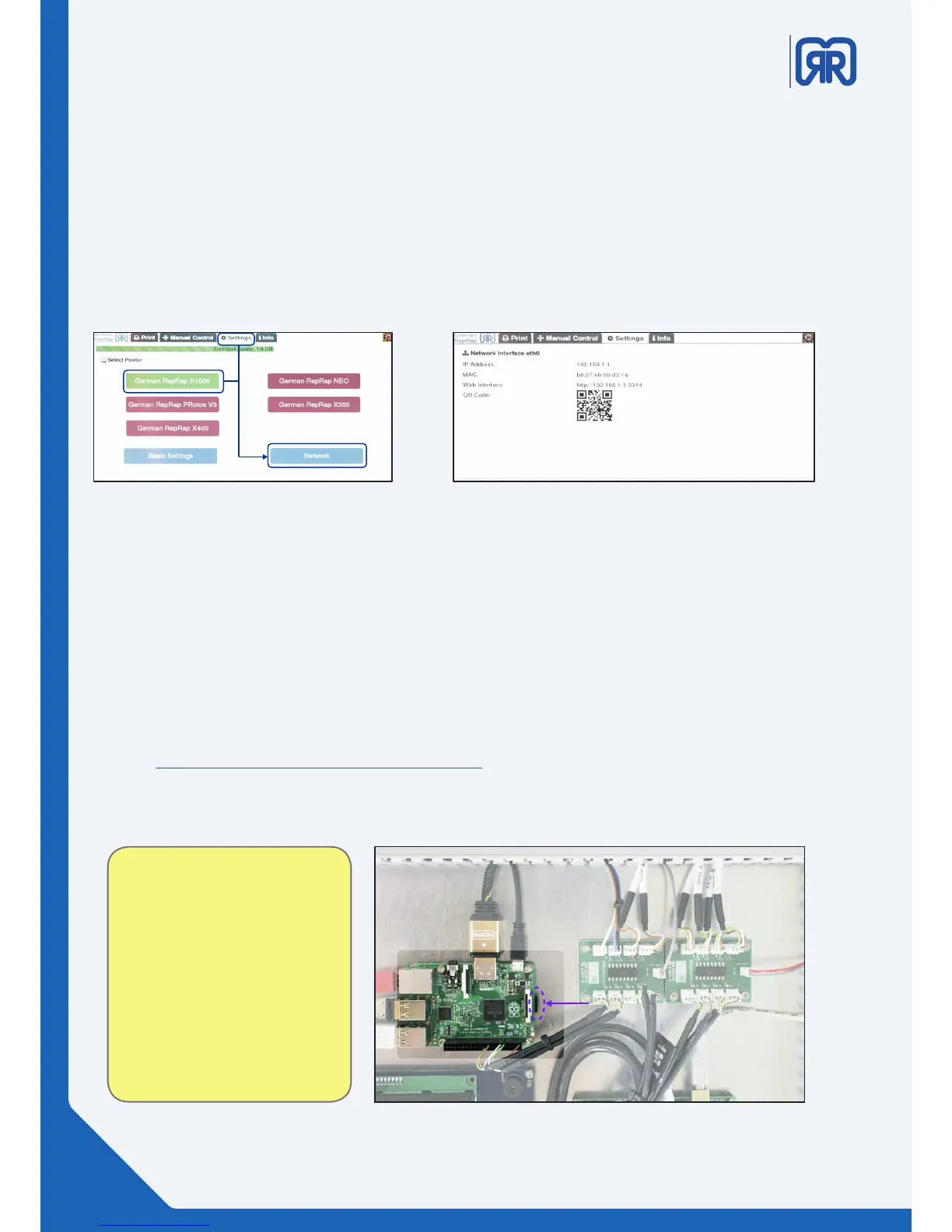
To do this choose your 3D printer from the tab “settings”. Then click on “Network”. The IP address as well
as the MAC address are displayed here.
You are also shown an URL that enables access to the X500´s web interface. The also displayed QR code
can be used to access the web interface via mobile device.
Identifying MAC address X500
Network settings X500
8.2 How to update Repetier-Server
To perform a Repetier-Server update please always use the SD card provided. In case of a fault of the
SD card please use one with the exact same specications. The new card must have at least the same
storage space as the original one. The format must be FAT 16 or FAT 32.
The storage card (Micro-SD) and the corresponding adapter are located in the X500´s switch cabinet
which can be found on the back side of the printer (see picture below). To remove the card, press on it
gently like shown in the picture.
Under Windows you can use the WIN 32 Disk Imager to load the image onto the SD card.
https://sourceforge.net/projects/win32diskimager/
After the installation just chose the image to write and which SD card to write to, the program will take
care of the rest.aus. Den Rest erledigt das Programm selbstständig.
Attention!
Never perform a Repetier-Server
upgrade without consulting the
support. Only use updates which
were approved by us!
SD-Karte entfernen
38/45



 To Next Page