Resources within the software
You will learn so much about your printer by making your first part! Once you feel comfortable with the
basics and are ready for more options, advanced settings can be found by clicking Show Advanced in the
bottom left corner of the FFF Settings window. This reveals the all of the detailed settings that Simplify3D™
Software is implementing behind the scenes, as well as providing customization options for many settings
you may want to adjust.
Support
Tutorials
Video tutorials
Print qualitiy und Troubleshooting
5. Repetier Server
Repertier-Server is an application for operating the X500 3D printer and initiating 3D prints. You can access
your printer from everywhere so it is possible to upload and manage G-Codes from remote. Here it is also
possible to check the print progress of your objects and to send individual commands to the 3D printer. In
addition to this it provides an easy way to upload rmware updates.
5.1 Web interface
The web interface provides full control of the X500, no matter if you work via a computer, a tablet or even a
smartphone.
To access the web interface, enter the following adress into your web browser:
• IPadress.of.your.3Dprinter:3344
• E.g: 192.168.100.1:3344
If you want more information about any par-
ticular setting, hover the mouse cursor over
that element to display a tooltip describing the
functionality.
Simplify3D oers a lot of learning support:
Improved adhesion of the printing bed
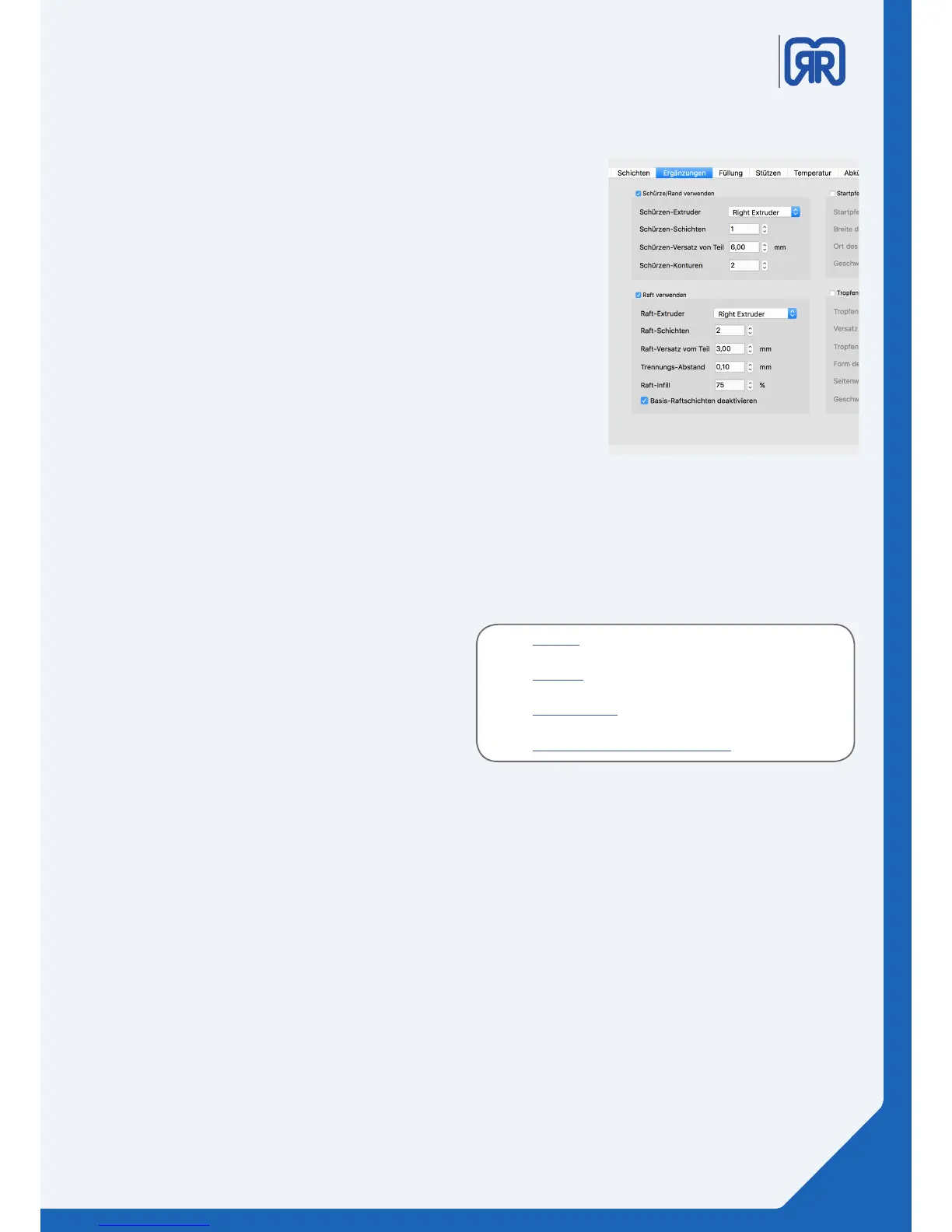
To ensure a stable printing process we highly recommend activating
the “Raft” function in Simplify 3D. You can nd this process congu-
ration option under the menu entry “Additions/Ergänzungen”
During the printing process the “Raft” will be constructed under the
actual object to enlarge its bearing surface. This will compensate
for possible unevenness of the printing bed and ensure the best
possible adhesion for the printing object.
When the printing process is completed the “Raft” must be removed
manually. To make this as trouble free as possible it is important to
set the “Separation Value” between 0.1 and 0.2mm. You will not be
able to remove the “Raft” with a higher value setting.
Please consult the picture on the right-hand side for the complete
settings.
Raft, Simplify3D
23/45



 To Next Page