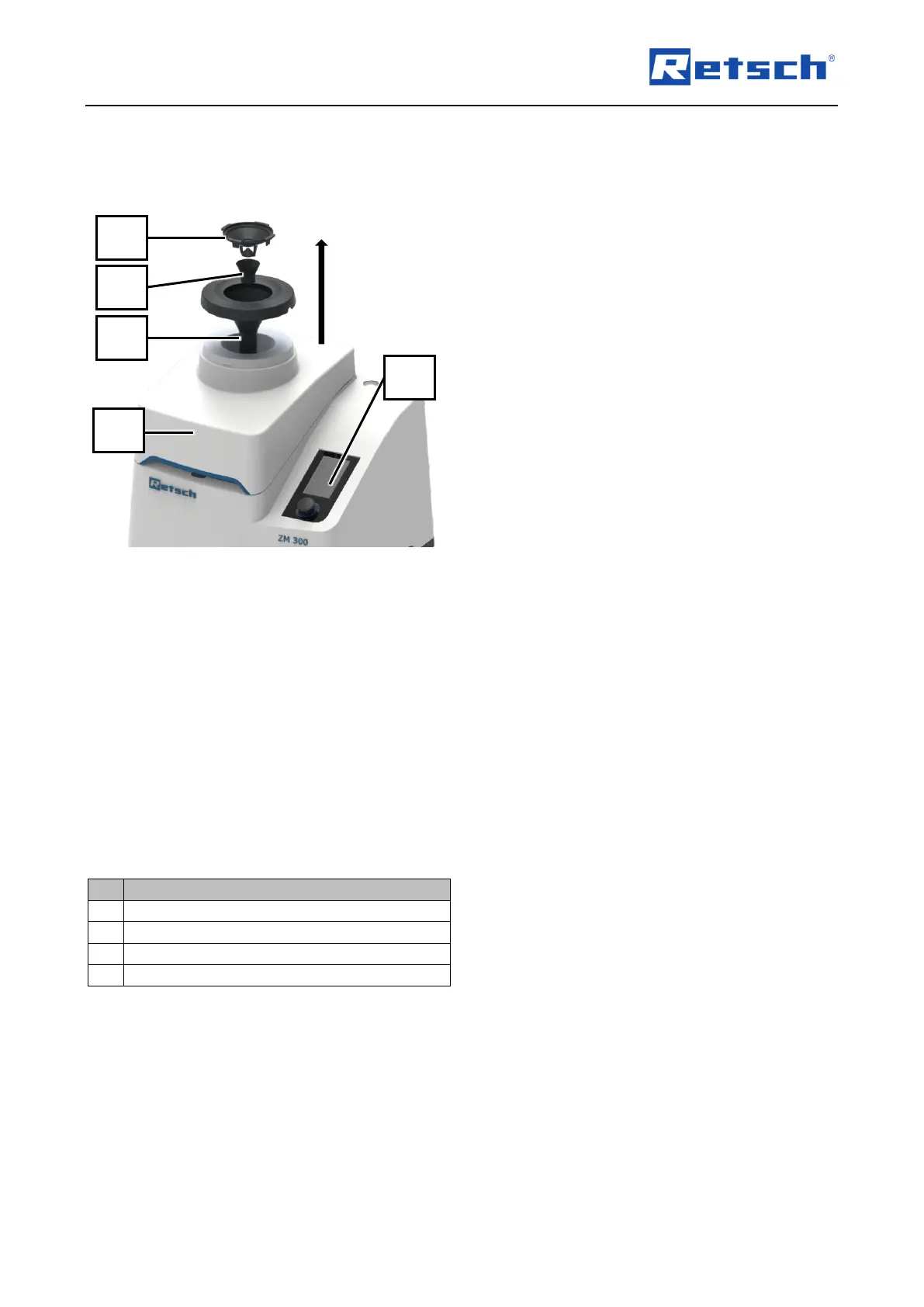
1. Switch off the device with the main switch
(16) at the rear of the device.
➔ Touch display (6) goes out.
➔ Device is switched off.
2. Disengage and remove the feed hopper (1)
by turning it clockwise.
3. Pull the impact protection (0) out of the
feed hopper (1).
4. Push out the funnel for noise protection
(1.1).
5. Clean the feed hopper (1), impact
protection (0) and funnel for noise
protection (1.1) with a vacuum cleaner or
brush.
6. If necessary, hold the feed hopper (1),
impact protection (0) and funnel for noise
protection (1.1) under running water.
7. Allow the feed hopper (1), impact
protection (0) and funnel for noise
protection (1.1) to dry.
8. Insert the feed hopper (1) into device hood
(2).
9. Place the impact pro tection (0) in the
opening of the noise protection funnel (1.1)
and snap it in place by turning it counter-
clockwise.
10. Place the noise protection funnel (1.1) on
the device hood (2).
➔ The mentioned components are cleaned.
➔ Optional: The stainless steel funnel can be
cleaned in the same way



 To Next Page