3.2 LCD Panel
3.2.1 LCD Panel Introduction
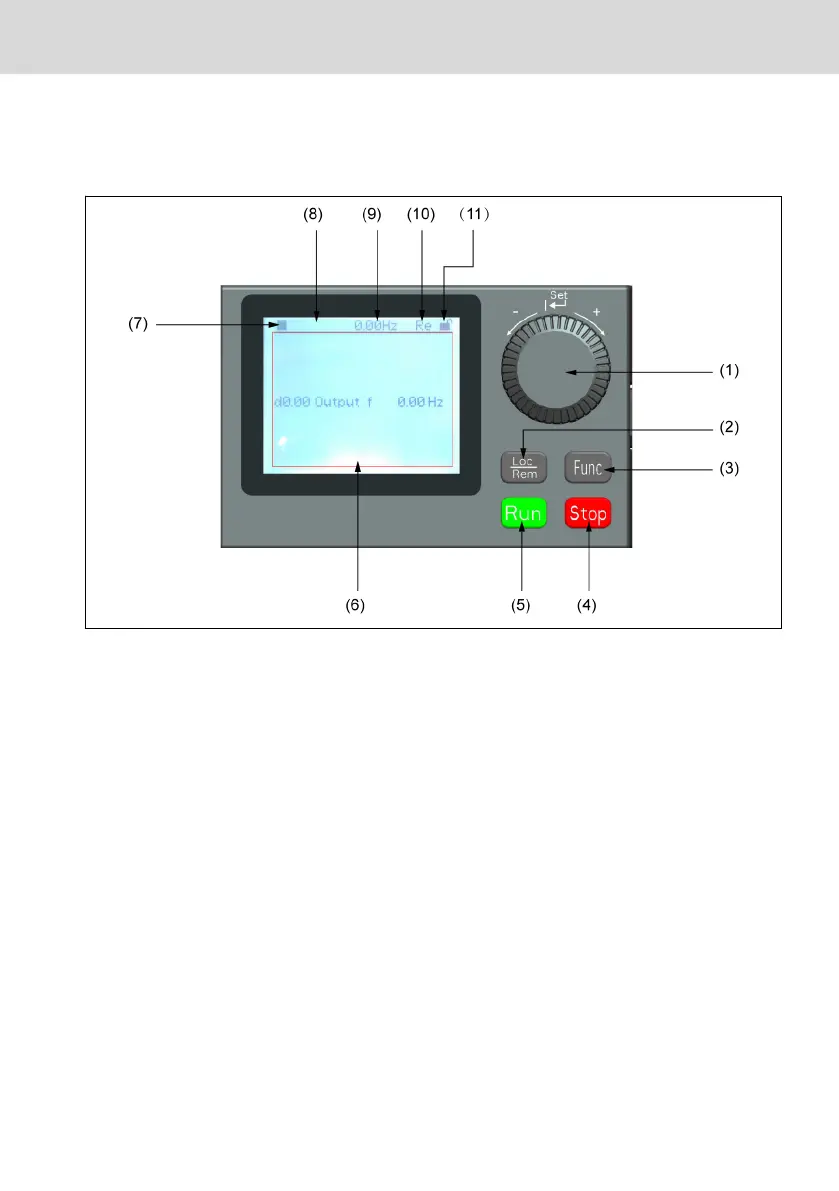
Fig. 3-5: LCD panel appearance
(1) Navigation button
1. Scroll between parameter and group code
2. Set the parameter value
(2) Loc / Rem button: Switch between "Remote" & "Local".
(3) Func button: Enter the parameter group screen and go back to previous
screens.
(4) Stop button: Stop the frequency converter.
(5) Run button: Start the frequency converter.
(6) Text area: Used for displaying:
1. Parameter monitoring screen
2. Parameter group / Parameter code
3. Parameter name
4. Parameter value and unit
5. Other screens: Error / Warning display screen, welcome screen, customer
information message screen
(7) Run / Stop status: It displays information regarding run / stop and forward /
reverse state of the frequency converter. Details are shown in the table below.
Rexroth Frequency Converter VFC
3610 / VFC 5610
33/91
Start-up
R912005518_Edition 16 Bosch Rexroth AG


 To Next Page