4040+e_22.docx / 06.10.17
ROBERT RIELE GmbH & Co KG Page 20 6 - CALCULATION PROCEDURES
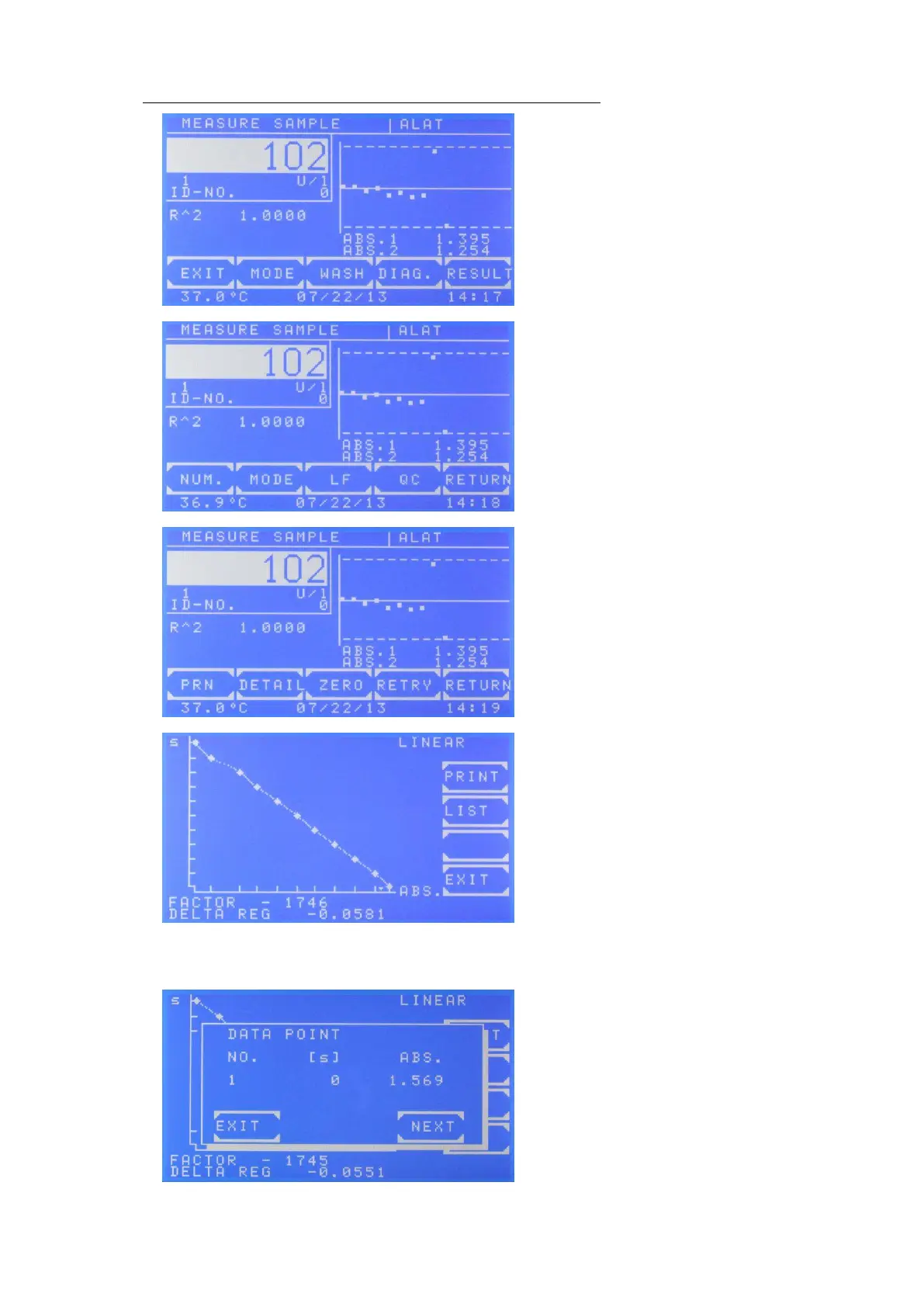
Presentation of the results on the display after a successful measurement:
View after the successful measurement
By [DiAG] the progress of the kinetic is shown.
View after confirming by [MODE].
View after pressing [MODE] [MODE]
By [PRN] the internal printer is switched off.
By [DETAIL] all immediate test results are
shown or printed.
By [ZERO] the zero measurement is repeated.
The measurement is repeated by [RETRY].
View after pressing [DIAG.]
The progress of the kinetic is shown after a few
seconds.
The axis of time is marked by [s], the axis of
extinction is marked by [ABS]
The currently used FACTOR and the calculated
DELTA REG are shown in the bottom lines.
If R^2 is activated, the term LINEAR or NON-
LINEAR is shown in the upper right corner. By
[PRINT] a graphical printout is generated. By
[LIST] all data points are shown sequentially.
Sequential View of data points after confirming
[DIAG] and [LIST]
By [NEXT] for each data point the numeration
the time [s] and the extinction is shown.



 To Next Page