65
20152192
Operation, indications, diagnostic
9.3.2 Before starting with a new program module or
when the program module is replaced
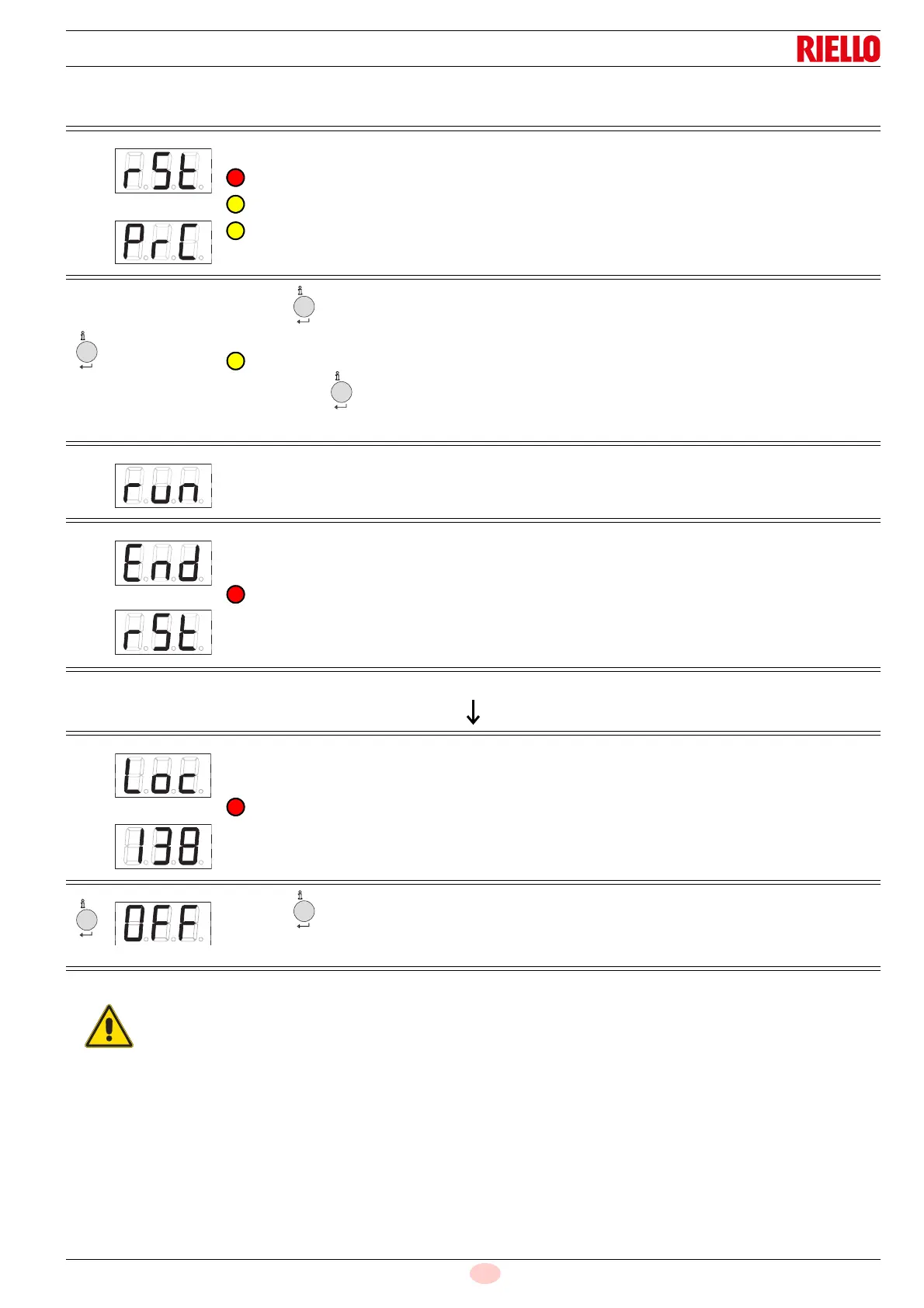
Tab. Z
The display shows rSt and PrC alternately.
The display shows the replacement of the program module.
The indicator light blinks alternately one red and two yellow.
Press for >3 to start the download of the program module data.
The indicator light blinks yellow.
The process that lasts 3 seconds is accompanied by short yellow blinking.
Note:
If you press for <3 seconds, the download does not start. To restart the reset process, you need
to reset the LME7... switching the mains ON/OFF.
The display shows 'run' during the download (reset process) of the program sequence.
The display shows rSt and End alternately.
The display shows the end of the data exchange.
After 2 minutes, the unit passes to Loc 138
At the end of the reset process, the unit is automatically in a lockout position (LOC 138) and need to
be released in order to work!
Press for >1 second to release the unit.
Display: OFF
nfo
At the first start-up or after replacing the pro-
gram module, after the completion of the re-
store process the sequence of the functions
and the parameter settings should be
checked.


 To Next Page