RIGOL
3-2 © Copyright RIGOL Technologies, Inc. 2007.
User’s Guide for DS1000 Series
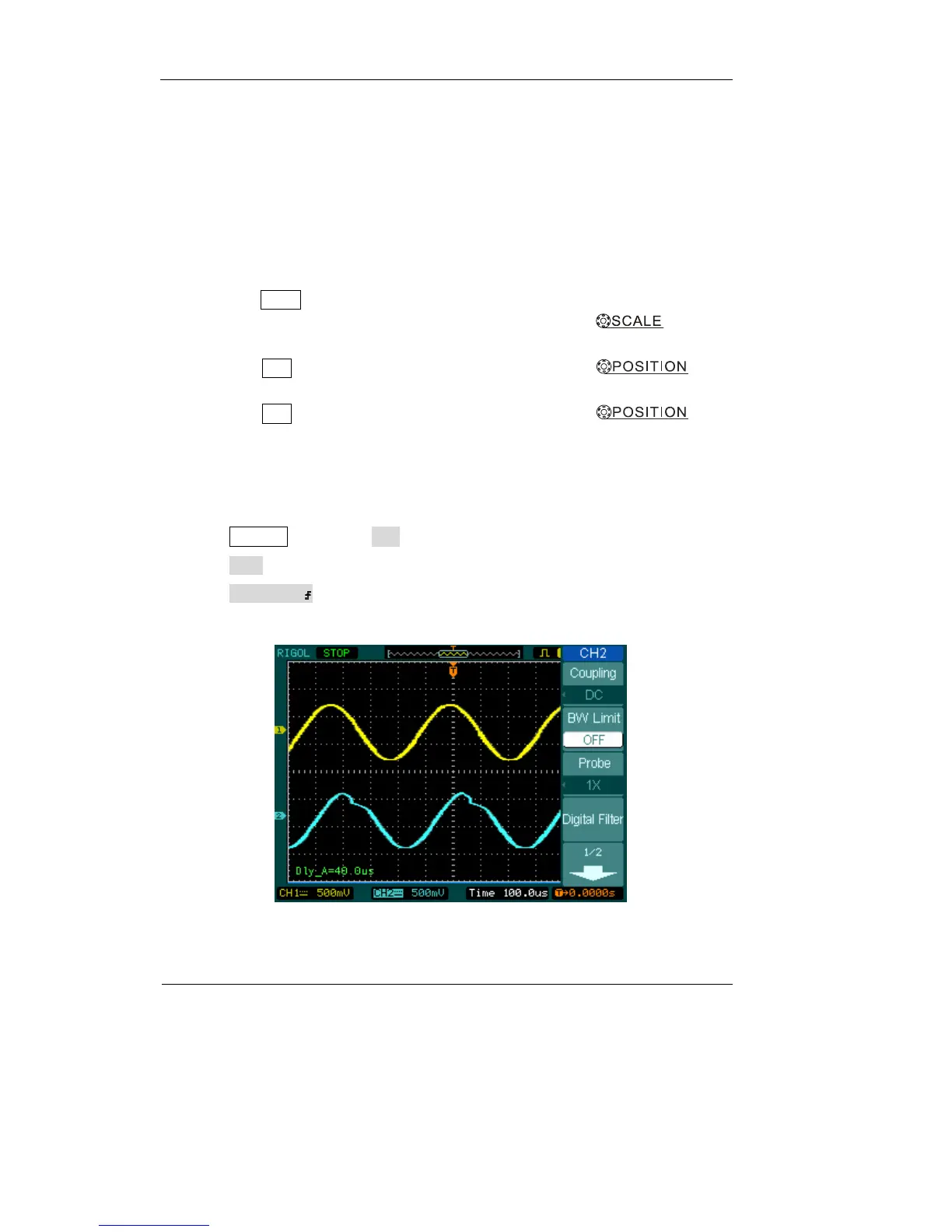
Example 2: View a Signal Delay Caused by a Circuit
This example is to test the input and output signals of a circuit and observe the signal
delay. First, set the probe and the channel attenuation to 10X and connect CH1 probe
to the input, CH2 to the output of the circuit.
Do these steps as follow:
1. Display the signals (CH1 and CH2):
1) Press the AUTO button
2) Adjust the vertical and the horizontal scale by turning the knobs to
appropriate ranges for display.
3) Press the CH1 button to select CH1, and turn the vertical
knob
to adjust the vertical position of CH1’s waveform.
4) Press the CH2 button to select CH2, and turn the vertical
knob
to adjust the vertical position of CH2’s waveform.
2.Measure the delay time when a signal going through the circuit
Auto-measuring the delay:
Press Measure→Source→CH1 to set measurement source
Press Time to select measurement Type
Press Delay 1→2 to display the result on the screen.
You can see the change of the waveform in the following figure:
Figure 3-1: Delay of the signals












 To Next Page