68
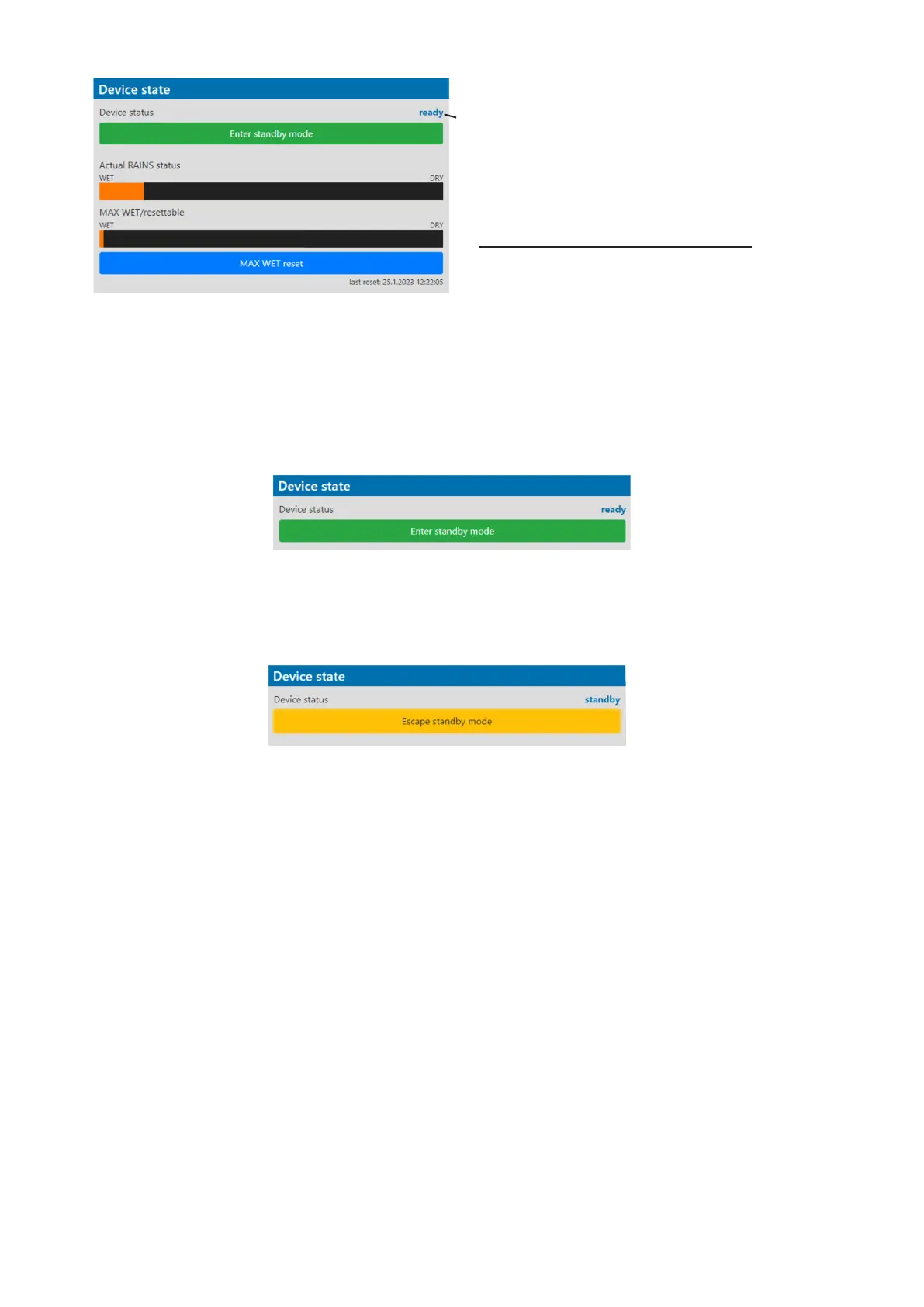
Desiccants saturated with water
Desiccants fully saturated with water
Silica gel desiccants in the xture arm should be replaced.
After replacing them, reset MAX WET resettable bar chart.
It is not necessary to replace silica gels desiccants in plastic boxes in the xture head and base. These desiccants
should be checked (and replaced if it is needed) at removing head or base covers, e.g. at gobo replacement
or some service intervention.
The option Enter standby mode allows you to switch the xture to Standby mode.
Note: Standby mode helps conserve power when a xture is not in use, without fully powering it o.
In the Standby mode, all xture motors and fans are deactivated and light output is closed.
For more information about Standby mode please see the chapter Standby mode.
The option Escape standby mode allows you to switch the xture to standard operating mode.
Device status ready means, that all xture resets are
OK and the xture is ready for operation. It does not
assess state of desiccants or result of pressure test!













 To Next Page