98
Display and Audio
Display and Audio
Equaliser function
The sound on your radio can be adjusted to suit your personal taste for
the material that you are listening to. The R100 has a range of equaliser
modes. Alternatively you may set the treble and bass levels to your own
preferences which can be accessed from the My EQ menu item.
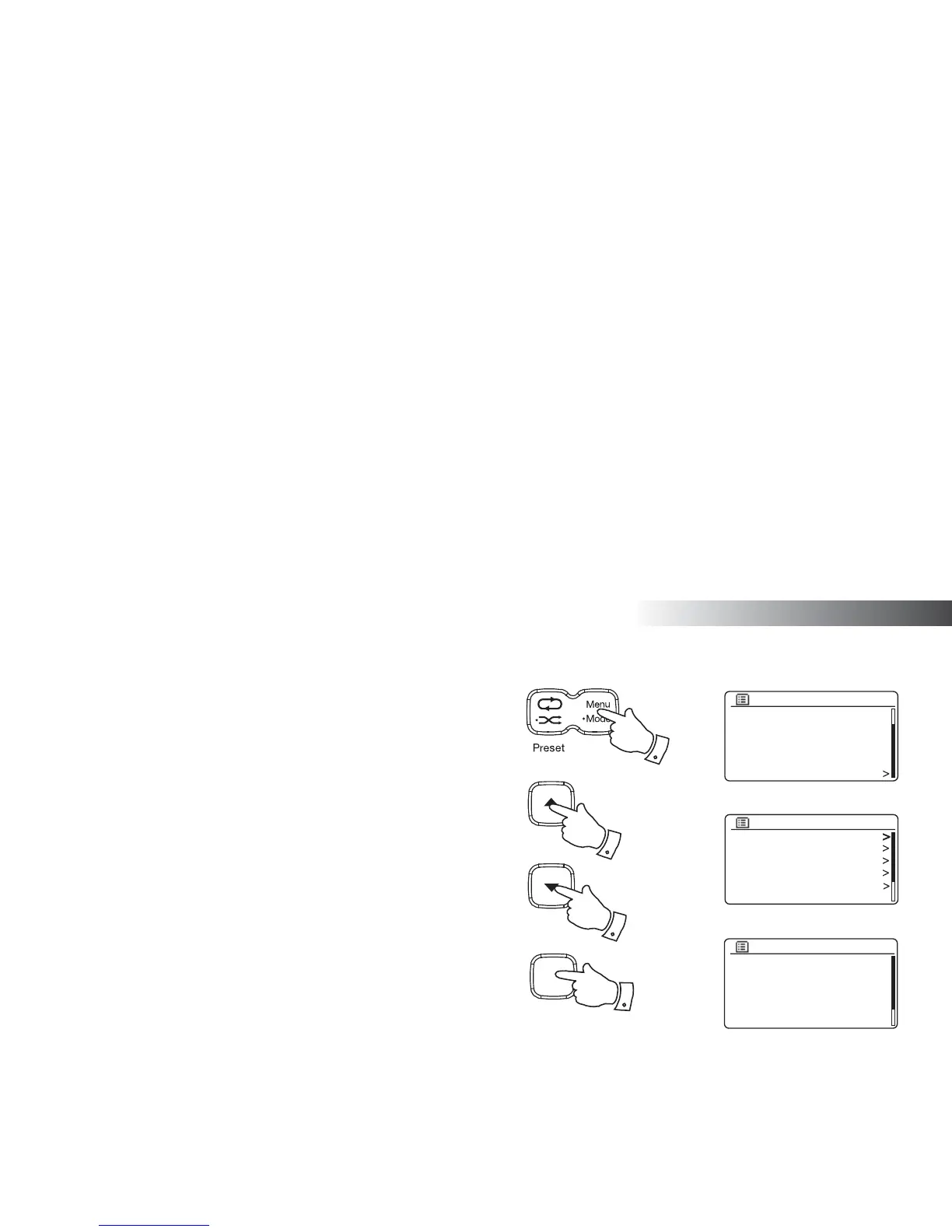
1. Press the On/Standby button to switch on your radio.
2. Access the menu for the current mode by pressing the Menu button.
3. Press the Tuning Up or Down buttons until 'System settings' is
highlighted on the display. Press the Select button to enter the System
Settings menu.
4. Press the Tuning Up or Down buttons until 'Equaliser' is highlighted
on the display. Press the Select button.
5. Press the Tuning Up or Down buttons to cycle through and highlight
the various modes. Press the Select button to confi rm your selection.
a - 'Normal'
b - 'Jazz'
c - 'Rock'
d - 'Movie'
e - 'Classic'
f - 'Pop'
g - 'News'
h - 'My EQ'
The currently selected mode is marked with an asterisk.
6. Press the Menu or the Back button to exit the equaliser setting.
Normal
Jazz
Rock
Movie
Classic
Pop
Equaliser
*
FM
Bluetooth
AUX in
Sleep
Alarms
System settings
Main menu
Equaliser
Network
Time/Date
Brightness
Language
Factory reset
System settings
2
3-5
3-5
Select
i /
3-5



 To Next Page