55
Locating and playing media fi les using UPnP
Once the UPnP server has been confi gured to share media fi les with your
radio, you may select the fi les that you wish to play as follows:-
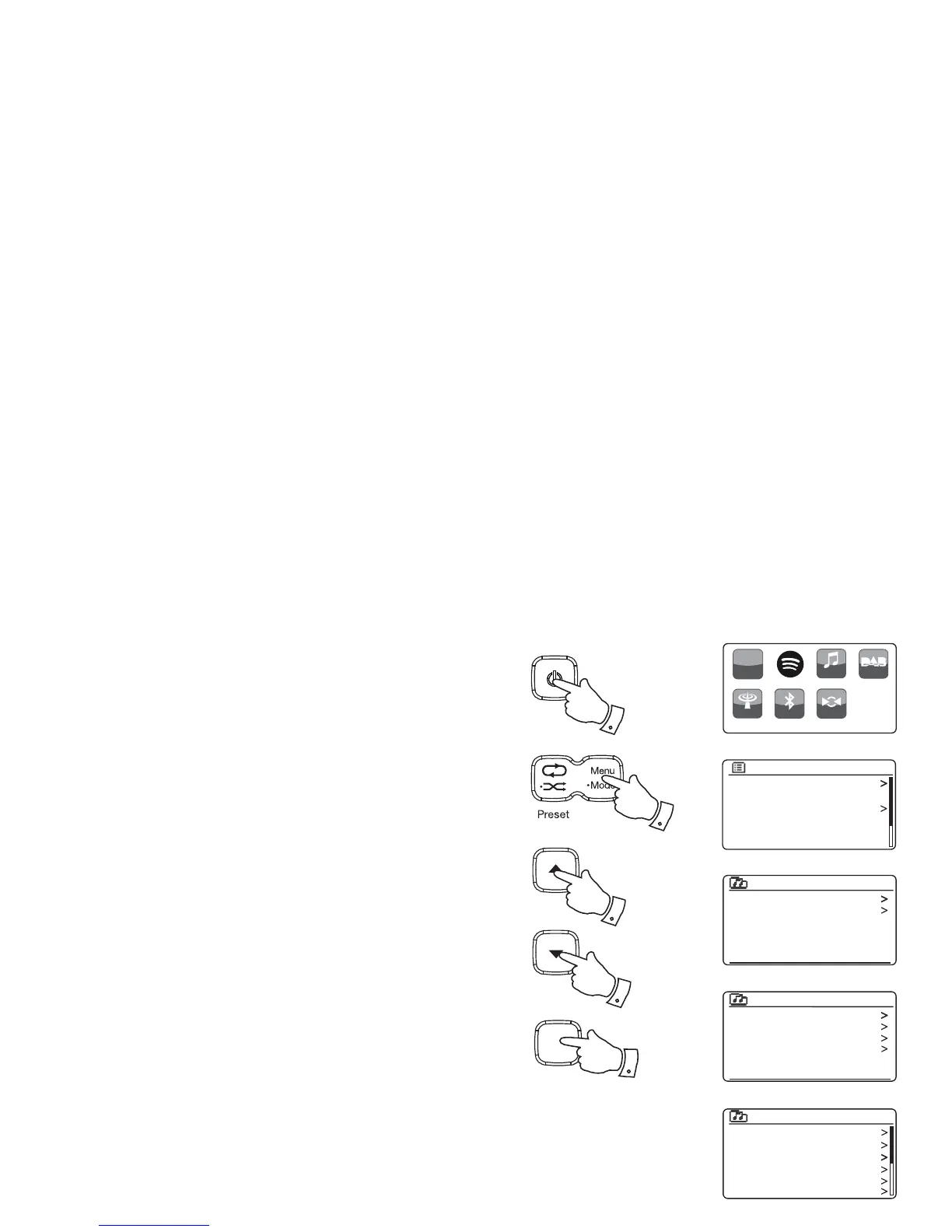
1. Press the On/Standby button to switch on the unit. Press and hold
the Mode button and then select the Music Player mode (see page
6). The main Music Player menu will then be displayed.
2. Press the Tuning Up or Down buttons until 'Shared media' is highlighted
on the display and then press the Select button to cause the radio to
scan for UPnP servers. Note that it may take a few seconds for the
radio to complete its scan. The display will return to the Music Player
menu if no UPnP servers are found.
3. After a successful scan, press the Tuning Up or Down buttons to
highlight your UPnP server and then press the Select button. If the
display shows multiple media types, select 'Music'. (Some UPnP
servers can serve pictures and video content to suitable devices.)
4. The radio will now list the media categories which are made available
by the UPnP server - for example, 'Album', 'Artist' and 'Genre'. Press
the Tuning Up or Down buttons to highlight which category you wish
to browse, then press the Select button to confi rm your choice.
If you wish to use the search function press the Tuning Up or Down
buttons until 'Search' is selected on the display. You may select
characters to build a keyword for searching for content to play.
When you fi rst set up sharing with a UPnP server, not all of your fi les will
be available immediately. The UPnP server must look inside each fi le to
identify the artist and album information from 'tags' embedded in them.
The server may also need time to access the Internet to obtain additional
information such as 'album art' which it can display when you examine
your music library on your PC. For a library of many fi les this can take
some time.
JENNY: Jenny’s music
HOME_PC: Mum’s music
Shared media
Music
Video
Pictures
Playlists
JENNY: Jenny’s music
All music
Genre
All Artists
Contributing Artists
Album Artists
Composers
Music
Shared media
USB playback
My playlist
Repeat play: Off
Shuffle play: Off
Clear My playlist
Music player
Music player
h
ttp://
Bluetooth
Internet
Radio
My Music DAB Radio
FM Radio AUX
1
1
1-4
1-4
Select
i /
1-4



 To Next Page