Network Video Recorder User Manual
56
up left, left, left down, down, right down, right, up right and stop rotating; drag the slider to
adjust the rotate speed, “1” is slowest, “8” is fastest, and “5” is moderate; zoom, focus and
iris are adjustable; select the serial number of preset point, then click “Save”/”Clear” button
to save/delete the position of preset point with a maximum of 256.
Click button to hide the PTZ control window, click the right mouse button to
revert back; click button to exit the current interface.
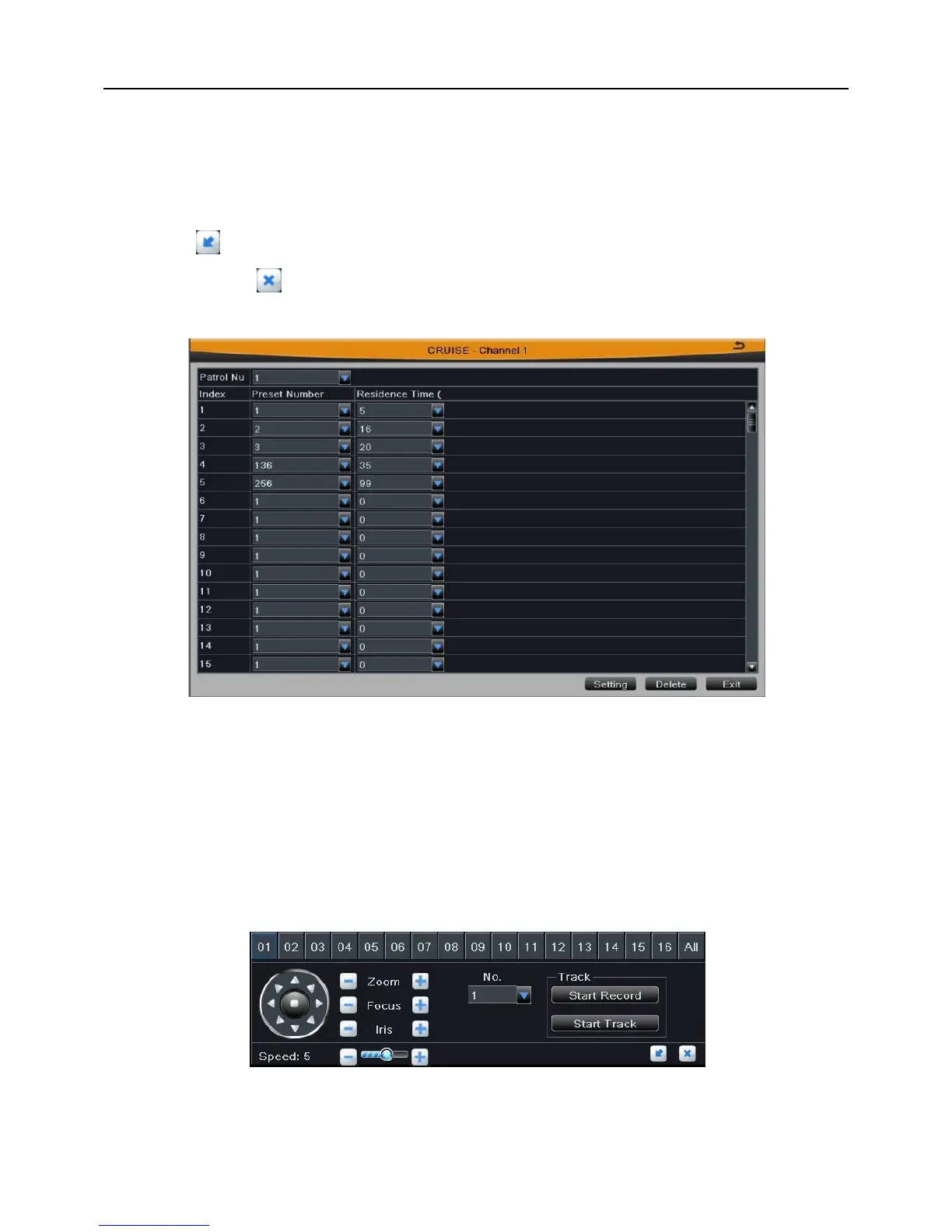
Step3: Click “Setting” button of patrol, as shown in Fig 4-19.
Fig 4-19
[Patrol Number]: Select patrol number for the current settings. The device provides 8
patrols numbering from 1 to 8.
[Preset Number]: A patrol can add 256 preset points.
[Residence Time]: The residence time at the preset point, range from 0 to 99s.
Click Setting button to save the setting; click Exit button to exit current interface.
Step4: Click “Setting” button of pattern, as shown in Fig 4-20.
Fig 4-20
User can control the PTZ operations of any channel or all channels: PTZ rotates up,
up left, left, left down, down, right down, right, up right and stop rotating; drag the slider to



 To Next Page