Page | 44
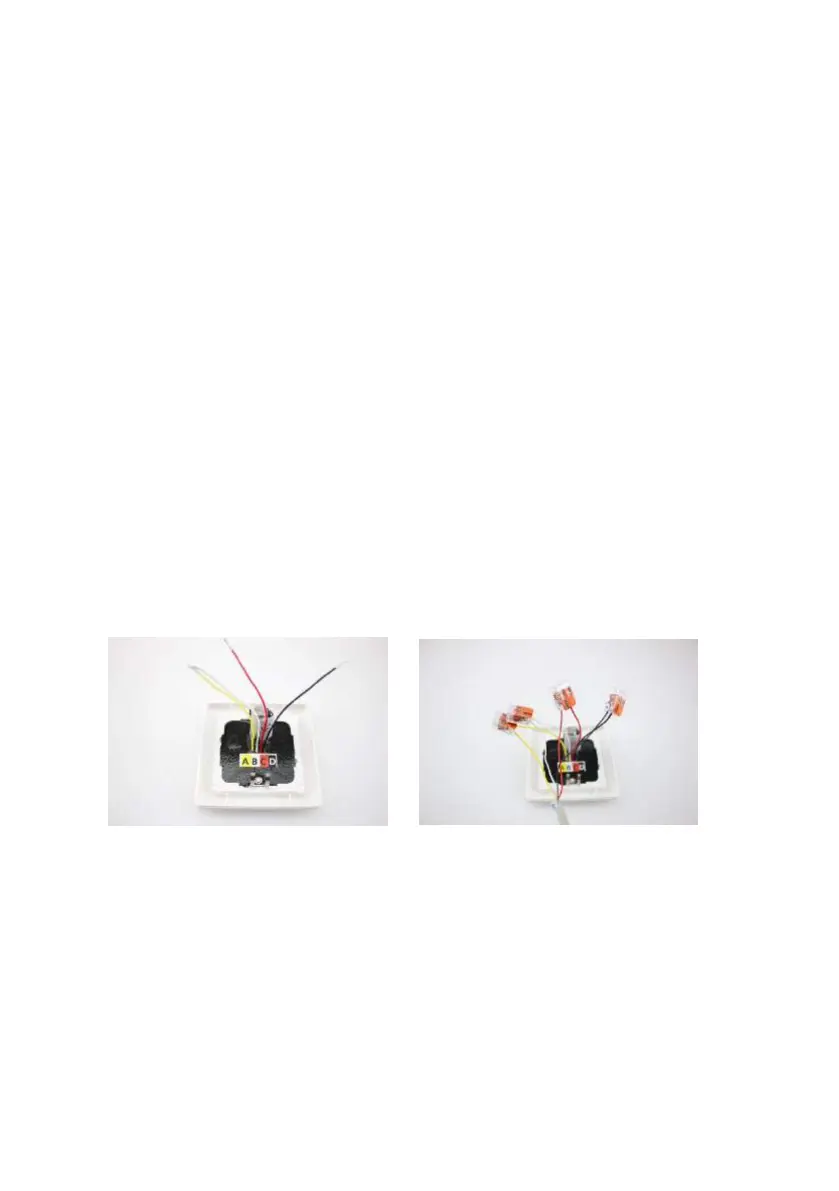
Please note: This operating switch (module) fits in all conventional cover frames in the
55 series. Flush as well as surface mounting are possible. It is operated using the
provided customer or service key. Please only provide the customer key to the end
customer!
This module can be operated with the customer key (short, one ring) or service key
(long, two rings).
All switch functions and indicators work in parallel to the RSC control board; status
indicators can be found in the section ‘STATUS INDICATORS and OPERATING BUTTONS’.
Two functional levels are enabled on the switch depending on the operating key:
1) Customer operation with monitoring indicators (‘STOP’ button active)
2) Service function with programming (‘STOP’ button functions as ‘PROG’ button)
Installation steps:
Caution! The supply cable must not be removed or disconnected during operation in any
case.
1. Switch off the power to the RSC controller/transformer. Move the switch on the
transformer housing to ‘O’ or disconnecting the transformer mains plug.
2. Connect the switch cables with your supply cable; the cable must correspond to
the following characteristics: telephone line J-Y(ST)Y 2x2 x 0.6 mm², or cable with
identical construction.


 To Next Page