Ultritouch+Ultrix User Guide (v1.0) Creating a Soft Panel for Ultritouch • 29
Defining the Home Window Elements of a Soft Panel
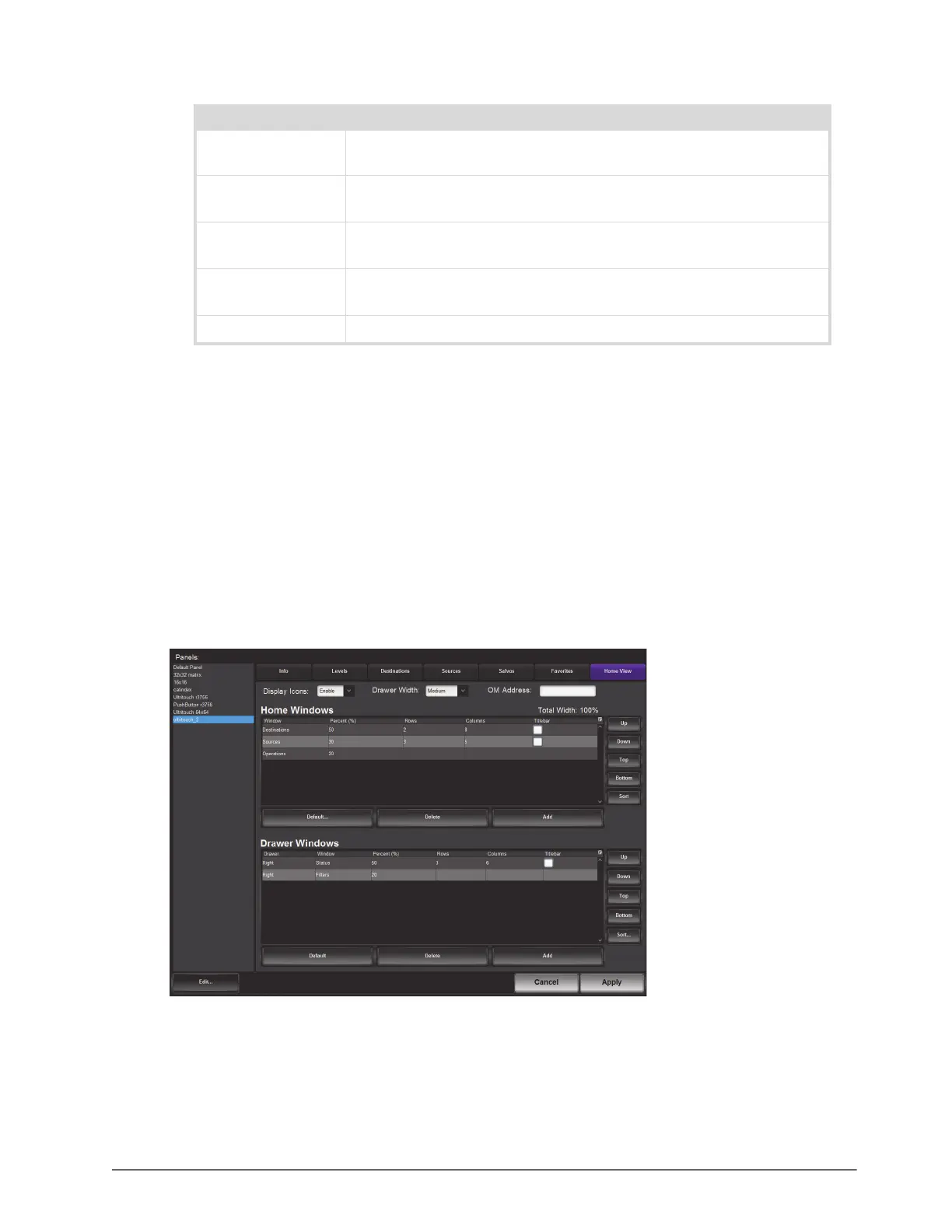
The options for defining the Home Windows of a soft panel are arranged in a table format of the Home View tab.
You can chose to use the default settings, or customize the width and number of rows/columns in each window
independently.
The order of the rows in the Home Windows table determine the order of the windows that display on the soft
panel. For example, if the first row is assigned to Sources, the first window next to the main toolbar of the soft
panel will display the Sources buttons.
To define the Home Window elements of a soft panel
1. Navigate to the Panels interface.
2. Double-click the soft panel name from the Panels list in the left toolbar of the Panels tab.
3. Click
Home View.
4. Locate the Home Windows table of the tab.
Output monitor Adds a window that displays a a thumbnail of video. Refer to the section
“Using the Output Monitor Window” on page 37 for details.
Presets Displays the source/destination/level switch combinations that are cued for
crosspoint control.
Salvos Adds a window that displays buttons representing the available salv.os (as
defined in the procedure “Salvos for the Soft Panel” on page 24)
Sources Displays source selection buttons as defined in the procedure “Sources for
the Soft Panel” on page 23.
Status Displays the level selection window and current multilevel status.
Table 5.1 Home Page — Types of Windows
Window Type Description



 To Next Page