Ultritouch+Ultrix User Guide (v1.0) Using Categories • 39
Using Categories
This chapter outlines how to use an Ultritouch soft panel that includes Category Index and Group Category
elements to perform crosspoint switches on an Ultrix router.
Using Category/Index Mode
Category/Index mode allows alpha-numeric extensions to labels to “build up” the final label selection. Destination
and source names are split into substrings - the first substring is referred to as the category and the subsequent
substrings as the indexes. Once the Cat/Index categories are defined, the user can perform switches on the
Ultritouch based on the categories.
Before You Begin
Before you can load a soft panel with Category Index elements, you must first:
1. Assign categories within the Ultrix database.
2. Assign indexes within the Ultrix database.
3. Configure an Ultritouch soft panel to include a Category Index window.
For More Information on...
• on assigning categories and indexes, refer to the Ultrix User Guide.
Soft Panel Overview
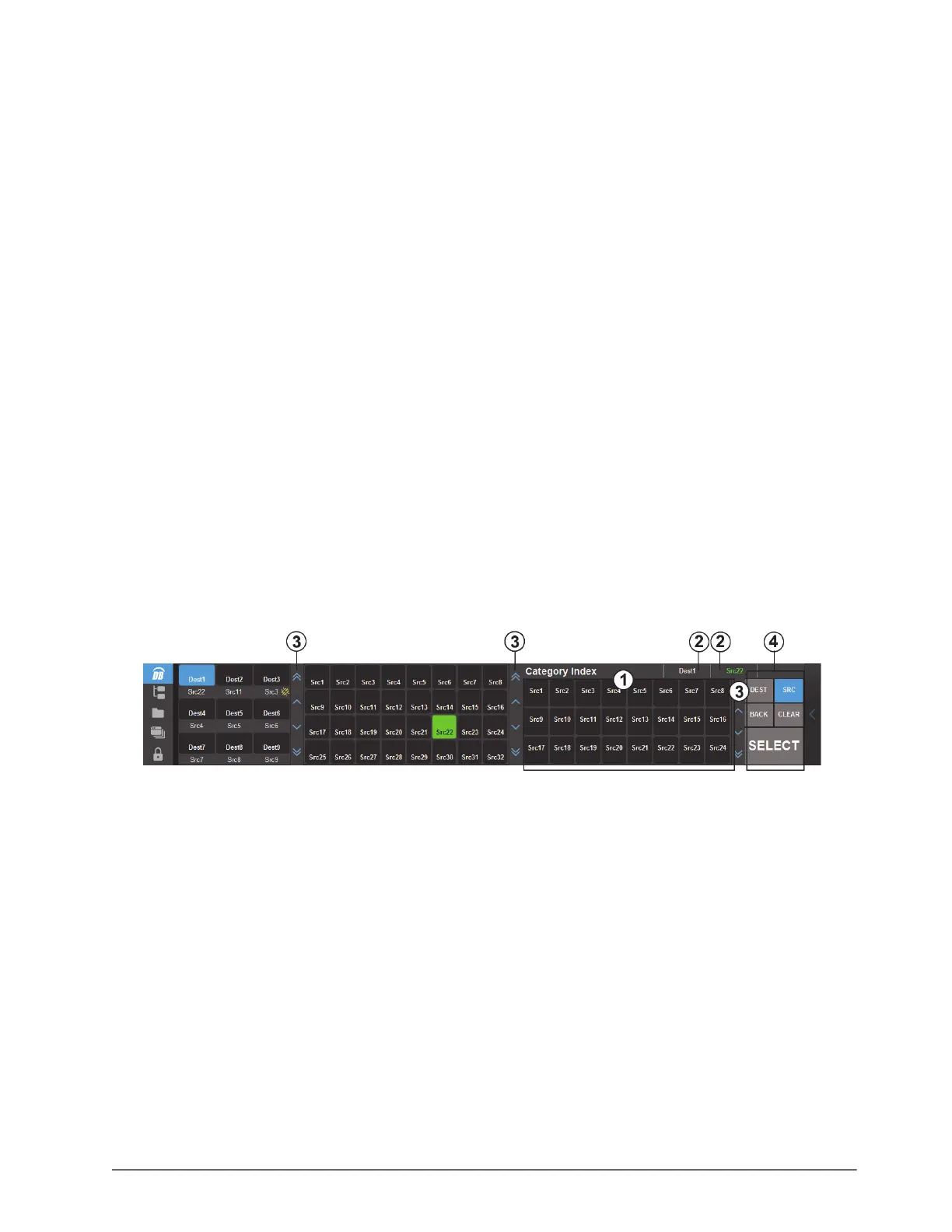
Figure 7.1 provides an example of an Ultritouch soft panel with a Category Index window and buttons.
Figure 7.1 Example of a Default Category/Index Soft Panel Layout
1. Category Index Window
This window provides access to the Destination and Source buttons for selected categories and indexes defined
in the Ultrix database. The buttons that display in this window change depending on whether the DEST or SRC
button was tapped. In Figure 7.1, the user tapped
SRC, and the Category Index window displays buttons
assigned to the Source category.
A Category Index window is added to an Ultritouch PB soft panel during configuration as outlined in the section
“Defining the Home Page of the Soft Panel” on page 28.
2. Status
This area reports the current selection (Dest and Src).
3. Button Paging
Tap these buttons to scroll up/down the window.
4. Operations Window
The Operations window includes the following buttons for Category/Index mode:



 To Next Page