Ultritouch+Ultrix User Guide (v1.0) Using Soft Panels • 37
Recalling a Salvo
Once you have created and saved your salvos, and created a soft panel with a Salvos window, you can recall each
salvo from the Ultritouch.
To recall a salvo from Ultritouch
1. Load a soft panel to the Ultritouch as outlined in “To load a soft panel on Ultritouch” on page 34.
2. Tap the button for the salvo you wish to recall.
Using Favorites
Before proceeding ensure that:
• one or more Favorite button is defined as outlined in the section “Adding a Favorite Button” on page 24.
• a Favorite window is accessible as defined on by the Home View configuration tab
To use favorites
1. Load a soft panel to the Ultritouch as outlined in “To load a soft panel on Ultritouch” on page 34.
2. Tap the desired button from the Favorite window on the soft panel.
3. If the selected favorite is a source, crosspoint, or salvo, the soft panel
TAKE configuration setting is honored;
•if the
TAKE operation is set to confirm via soft panel configuration, the TAKE button (on operations
window) must be tapped to send the switch request to the router.
•if the
TAKE operations is set to direct, the switch request is sent immediately upon selecting the required
favorite.
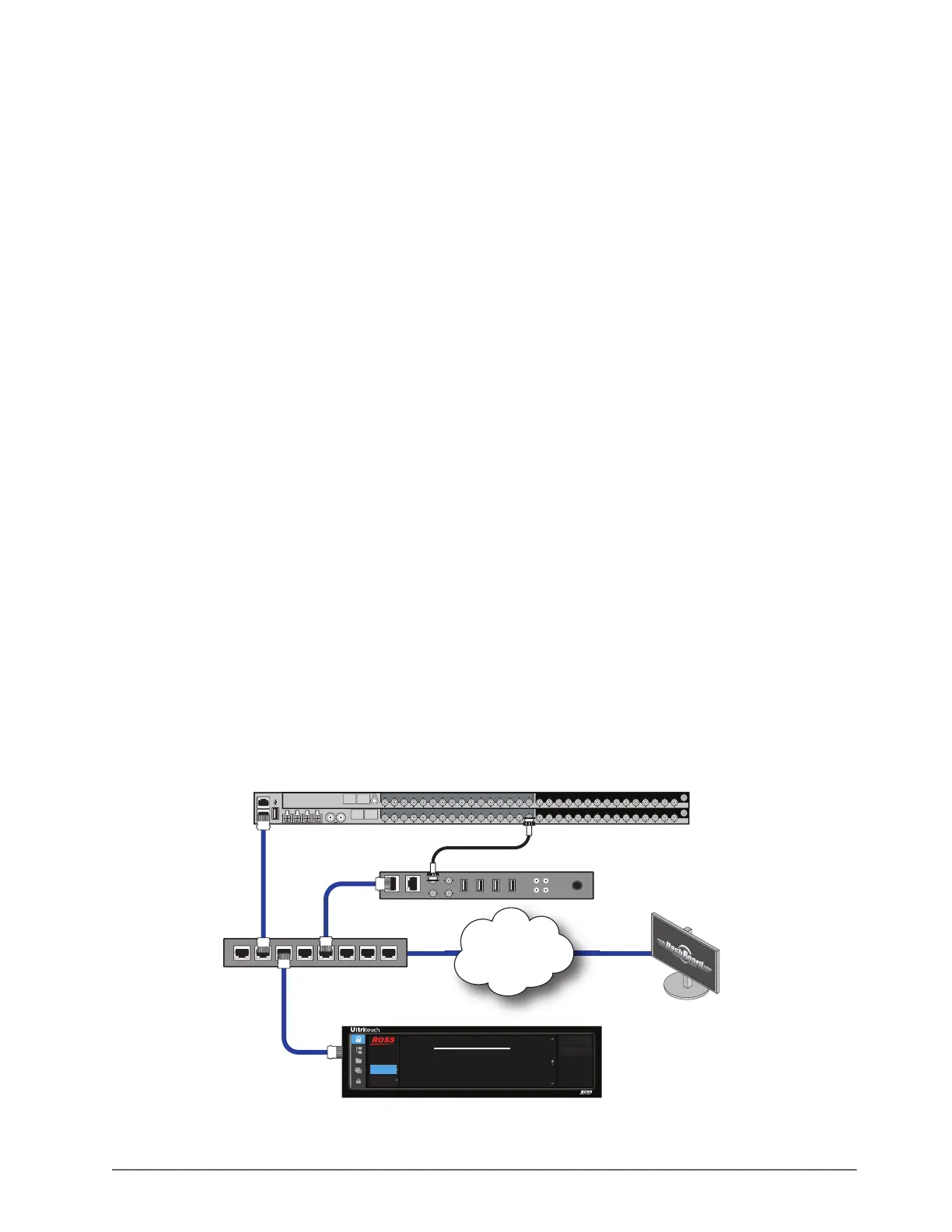
Using the Output Monitor Window
This feature requires that the Ultrix router run software 3v31 or higher.
The Output Monitor window requires:
• you to be familiar with the Ultrix feature called Destination Follow for standard destinations (outputs).
• a third-party video Codec box downstream to the router. Contact Ross Technical Support for a list of supported
boxes.
Figure 6.6 Example of Physical Connections for an Output Monitor Window
Ultritouch
Remote Control Panel
Ultritouch
Device
Device Name: Ultritouch_01
Device ID: ABCDEFG12345
Type: Ultritouch
Serial: 1234567890123
General Info
Manage Open Views
1
of
4
Upload
Reboot Device
ULTRIX-FR1
32x32 3G/HD/SD SDI Router
ENET 1
14
A B
REF
1 2 3 4 5 6 7 8910 11 12 13 14 15 16 1 2 3 4 5 6 7 8 9 10 11 12 13 14 15
16
AUX A AUX B
OUT IN
1 2 3 4 5 6 7 8910 11 12 13 14 15 16 1 2 3 4 5 6 7 8 9 10 11 12 13
14
15
16
OUT IN
Ultrix-HDNBC-IO
REF
!
SDI-IP Codec Device
NET 2NET 1
PSU
r
Internet / LAN / VPN
Network Switch
SDI IN
ENET 2
PC running DashBoard
14
AUX A AUX B
PORT 7PORT 2 PORT 3 PORT 4 PORT 5 PORT 6 PORT 7 PORT 8PORT 1



 To Next Page