Installation manual
18
RKHBH/X008AA
Indoor unit for air to water heat pump system
4PW50203-1A
Procedure
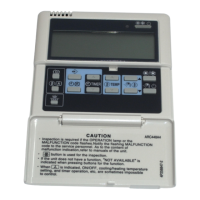
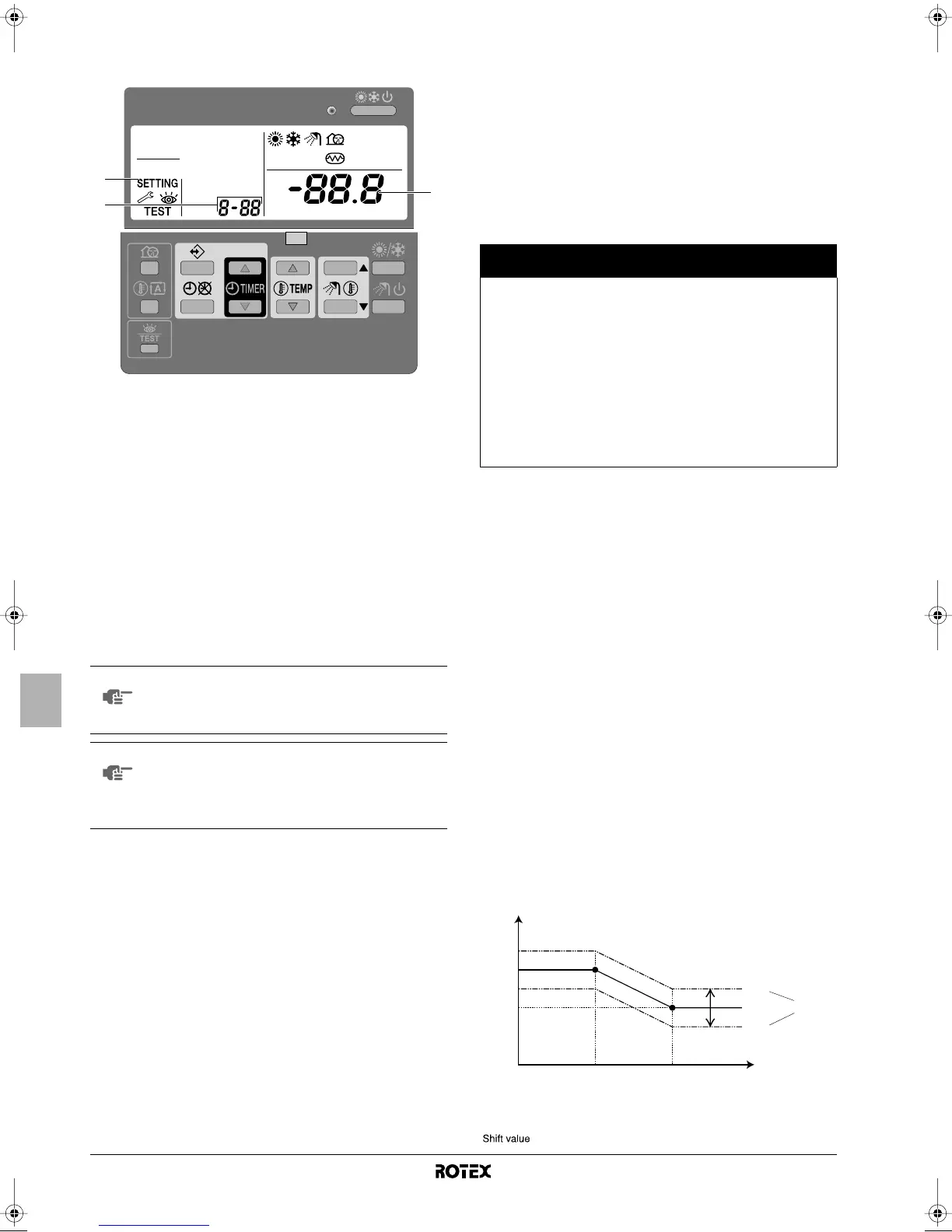
To change one or more field settings, proceed as follows.
1 Press the z button for a minimum of 5 seconds to enter FIELD
SET MODE.
The $ icon (3) will be displayed. The current selected field
setting code is indicated ; (2), with the set value displayed to
the right - (1).
2 Press the bgi button to select the appropriate field
setting first code.
3 Press the bgj button to select the appropriate field
setting second code.
4 Press the pfi button and pfj button to change
the set value of the select field setting.
5 Save the new value by pressing the pr button.
6 Repeat step 2 through 4 to change other field settings as
required.
7 When finished, press the z button to exit FIELD SET MODE
.
Detailed description
[0] User permission level
If required, certain user interface buttons can be made unavailable for
the user.
Three permission levels are defined (see the table below). Switching
between level 1 and level 2/3 is done by simultaneously pressing
buttons pfi and pfj immediately followed by
simultaneously pressing buttons s and ba, and keeping all 4
buttons pressed for at least 5 seconds (in normal mode). Note that no
indication on the user interface is given. When level 2/3 is selected,
the actual permission level – either level 2 or level 3 – is determined
by the field setting [0-00].
[1] Weather dependent set point (heating operation only)
The weather dependent set point field settings define the parameters
for the weather dependent operation of the unit. When weather
dependent operation is active the water temperature is determined
automatically depending on the outdoor temperature: colder outdoor
temperatures will result in warmer water and vice versa. During
weather dependent operation, the user has the possibility to shift up
or down the target water temperature by a maximum of 5°C. See the
operation manual for more details on weather dependent operation.
■ [1-00] Low ambient temperature (Lo_A): low outdoor
temperature.
■ [1-01] High ambient temperature (Hi_A): high outdoor
temperature.
■ [1-02] Set point at low ambient temperature (Lo_Ti): the
target outgoing water temperature when the outdoor
temperature equals or drops below the low ambient
temperature (Lo_A).
Note that the Lo_Ti value should be higher than Hi_Ti, as for
colder outdoor temperatures (i.e. Lo_A) warmer water is
required.
■ [1-03] Set point at high ambient temperature (Hi_Ti): the
target outgoing water temperature when the outdoor
temperature equals or rises above the high ambient
temperature (Hi_A).
Note that the Hi_Ti value should be lower than Lo_Ti, as for
warmer outdoor temperatures (i.e. Hi_A) less warm water
suffices.
NOTE
Changes made to a specific field setting are only
stored when the pr button is pressed. Navigating to a
new field setting code or pressing the z button will
discard the change made.
NOTE
■ Before shipping, the set values have been set as
shown under "Field settings table" on page 23.
■ When exiting FIELD SET MODE, "88" may be
displayed on the user interface LCD while the unit
initialises itself.
2
3
1
Button
Permission level
1 2 3
Quiet mode button
s
operable — —
Weather dependent
set point button
ba
operable — —
Schedule timer
enable/disable button
pr
operable operable —
Programming button
<
operable — —
Time adjust buttons
pf
i
pf
j
operable — —
Inspection/test
operation button
z
operable — —
T
t
Target water temperature
T
A
Ambient (outdoor) temperature
= Shift value
Lo_Ti
Lo_A Hi_A T
A
T
t
+ 05
00
– 05
Hi_Ti
Shift value
1D_IM_4PW50203-1A.book Page 18 Thursday, January 29, 2009 10:51 AM



 To Next Page
 Loading...